





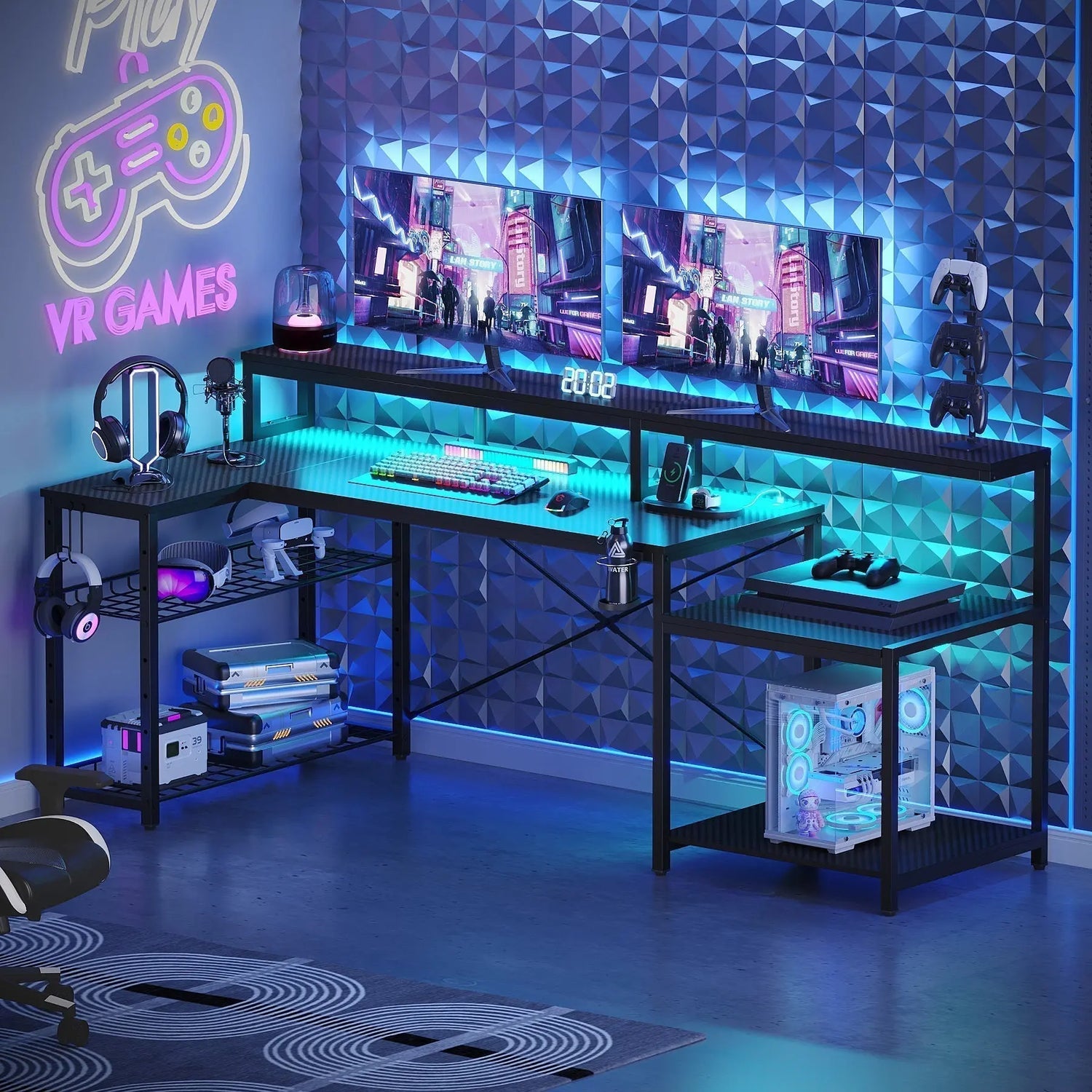
Gaming environments have evolved far beyond simple computer setups, with lighting playing a crucial role in creating immersive experiences. A gaming desk with LED lights transforms your space into a dynamic command center that responds to your gameplay and mood. Strategic illumination enhances focus, reduces eye strain during extended sessions, and creates an atmosphere that pulls you deeper into virtual worlds.
Why LED Lighting Enhances Gaming Performance and Comfort
The right lighting setup does more than make your gaming space look impressive. Research shows that proper illumination reduces eye fatigue during long gaming sessions by minimizing the contrast between your bright screen and surrounding darkness. When you incorporate LED strips into your desk, you create ambient backlighting that softens harsh transitions and keeps your eyes comfortable even during marathon gaming sessions.

Energy Efficiency and Longevity Benefits
LED technology offers distinct advantages over traditional lighting options for any gaming desk with LED lights. These energy-efficient lights consume minimal power while delivering vibrant colors that can be adjusted to match your game's aesthetic or your personal preferences. The low heat output means your gaming area stays cool even during intense sessions, and the impressive lifespan of LED components means you won't need frequent replacements.
The Psychology Behind Gaming Atmospheres
Colors influence mood and performance in ways many gamers overlook. The table below shows how different LED colors impact your gaming experience:
| Color | Psychological Effect | Best For |
| Blue | Promotes alertness and concentration | Competitive gaming, fast-paced action |
| Red | Stimulates excitement and energy | Action games, intense gameplay |
| Green | Creates calm focus | Strategy games, puzzle solving |
| Purple | Combines creativity with concentration | RPGs, creative gameplay |
| Orange/Warm | Inviting and social atmosphere | Cooperative gaming, streaming |
Immersive Gaming Through Synchronized Lighting
Your brain responds to environmental cues even when you're focused on screen action. Synchronized lighting that reacts to in-game events deepens immersion by extending the visual experience beyond monitor boundaries. When explosions cast orange glows across your desk or health warnings pulse red light through your space, your gaming environment becomes an extension of the virtual world.
Best Gaming Desk with LED Lights Features
Selecting the best gaming desk with LED lights requires evaluating several key characteristics that separate exceptional setups from mediocre ones. RGB capability stands as the foundation, allowing you to access millions of color combinations. Look for desks offering multiple lighting zones that can be controlled independently, giving you creative freedom to design complex lighting patterns that suit different games or moods.
Essential LED Configurations to Consider
Strip placement significantly impacts your lighting experience and overall gaming atmosphere. Underglow strips mounted beneath the desk surface create a floating effect that adds depth to your gaming space. Edge lighting along desk perimeters defines your gaming zone while providing practical illumination. Rear-mounted strips create impressive backlit effects against walls, projecting ambient light that fills your entire room.
The number of LED zones determines your customization potential for any gaming desk with LED lights. Single-zone systems change all lights simultaneously, offering simplicity and unified color schemes. Multi-zone configurations divide strips into sections that can display different colors or patterns, enabling sophisticated effects like color waves or rainbow gradients that flow across your desk.
| LED Configuration | Advantages | Ideal User |
| Single-Zone | Simple control, unified colors, budget-friendly | Casual gamers, minimalists |
| Multi-Zone (2-4) | Basic customization, color transitions | Intermediate users |
| Multi-Zone (5+) | Advanced effects, wave patterns, full customization | Enthusiasts, streamers |
Brightness control is essential for adapting to different gaming conditions. You'll want the ability to dim lights for late-night sessions or boost intensity for daytime gaming. The control method matters too. Some desks include physical buttons or knobs, while others connect to smartphone apps or desktop software. Remote controls offer convenience, letting you adjust settings without interrupting gameplay.
Cable Management and Power Solutions
Even the most impressive LED setup loses appeal when tangled cables create visual clutter. Quality gaming desks incorporate cable management systems that hide wiring beneath surfaces or route cords through integrated channels. Some models include cable trays mounted under the desk, keeping power supplies and excess cord length out of sight.
Power requirements vary between LED systems and affect your setup options. USB-powered strips offer convenience, drawing power directly from your computer or wall adapters. This approach simplifies installation and reduces cord clutter. Other systems require dedicated power supplies, which may provide more robust performance and brighter output. Consider your available outlets and whether you'll need power strips or surge protectors to accommodate your complete setup.
Black Gaming Desk with LED Lights Options
A black gaming desk with LED lights delivers dramatic contrast that makes colors pop with exceptional vibrancy. The dark surface creates a canvas where LED effects stand out boldly, whether you're running subtle underglow or explosive multicolor patterns. This classic color choice complements virtually any room decor while maintaining a serious, focused aesthetic that many gamers prefer.
Sleek Designs for Modern Gaming Setups
Contemporary black gaming desks combine angular lines with smooth curves, creating commanding presences in gaming rooms. Carbon fiber textures add visual interest without overwhelming clean aesthetics. Some designs incorporate matte finishes that reduce glare and fingerprints, while glossy surfaces provide mirror-like reflections that amplify LED effects.
Black surfaces excel at hiding minor scratches, smudges, and daily wear that show prominently on lighter desks. This practical advantage keeps your gaming station looking sharp even after years of intense use. The neutral background won't compete with your monitor's display, helping maintain visual focus where it matters most.
Design Configurations for Different Spaces
Consider desk shapes that maximize your available space when choosing a black gaming desk with LED lights. L-shaped configurations utilize corners efficiently, providing ample surface area for multiple monitors, gaming peripherals, and accessories. Straight desks offer flexibility for room layouts, fitting against walls or floating in open spaces. Extended surfaces accommodate racing wheels, flight sticks, or other specialty controllers without crowding your primary gaming area.
White Gaming Desk with LED Lights Choices
Choosing a white gaming desk with LED lights creates bright, open gaming environments that feel spacious and modern. Light surfaces reflect LED illumination beautifully, creating soft ambient glows that fill entire rooms. This approach works exceptionally well in smaller spaces where dark furniture might feel cramped or oppressive.
Minimalist Aesthetics Meet Functionality
Modern white gaming desks embrace simplicity without sacrificing features that serious gamers need. Integrated LED systems maintain clean lines by hiding strips within desk structures or along concealed edges. Touch-sensitive controls blend seamlessly into surfaces, eliminating protruding buttons or switches that disrupt smooth aesthetics.
White desks pair perfectly with minimalist decor philosophies increasingly popular among gamers. The clean appearance makes cable management especially important, as any visible clutter stands out against light backgrounds. However, this visibility encourages better organization habits that ultimately benefit your entire gaming experience.
Material Considerations for Durability
Material selection impacts both appearance and durability when investing in a white gaming desk with LED lights. High-quality laminates resist staining and yellowing that can plague white furniture over time. Engineered wood surfaces with protective coatings withstand daily use while maintaining pristine appearances. Some premium options feature scratch-resistant treatments that preserve that showroom look despite intense gaming sessions.
Comparing Top LED Gaming Desk Models
Evaluation criteria should include build quality, LED brightness and color accuracy, control system sophistication, and included accessories when shopping for the best gaming desk with LED lights. Examine construction materials and weight capacity to ensure your desk handles multiple monitors and heavy gaming equipment safely. Check reviews specifically mentioning LED performance, as some systems deliver disappointing brightness or limited color ranges.
| Feature Category | Entry-Level | Mid-Range | Premium |
| LED Zones | 1-2 | 3-5 | 6+ |
| Control Method | Manual buttons | Remote control | App + voice control |
| Brightness (Lumens) | 200-400 | 400-800 | 800+ |
| Color Accuracy | Basic RGB | Enhanced RGB | True RGB with calibration |
| Cable Management | Basic channels | Integrated trays | Hidden routing system |
| Weight Capacity | 100-150 lbs | 150-250 lbs | 250+ lbs |
| Warranty | 1 year | 2-3 years | 3-5 years |
Control options vary widely between models and significantly impact user experience. Basic systems offer simple color selection and brightness adjustment. Advanced options include preset effects, music synchronization, and software integration with popular games for reactive lighting that responds to gameplay events. Determine which features matter most for your gaming style and budget accordingly.
Pay attention to warranty coverage and customer support availability. LED systems involve electronic components that occasionally malfunction, so responsive support makes troubleshooting easier. Extended warranties provide peace of mind for significant investments in premium gaming furniture.

Setting Up Your LED Gaming Environment
Installation typically requires minimal tools and technical knowledge for most gaming desks with LED lights. Most LED strips feature adhesive backing that sticks directly to desk surfaces. Clean the mounting area thoroughly before application to ensure strong adhesion. Peel protective backing gradually while pressing strips firmly into position, working slowly to avoid air bubbles or wrinkles.
Placement Tips for Maximum Impact
Strategic placement maximizes visual impact while supporting practical gaming needs. The following table outlines optimal LED placement strategies:
| Placement Location | Visual Effect | Practical Benefit |
| Underglow (beneath desk) | Floating appearance, depth | Illuminates floor for finding items |
| Front edge | Keyboard/mouse zone lighting | Reduces hand shadows, improves visibility |
| Rear-facing (wall) | Ambient room glow | Reduces eye strain, expands visual space |
| Side edges | Zone definition | Marks gaming territory, aesthetic appeal |
| Monitor backlighting | Bias lighting effect | Reduces screen contrast fatigue |
Position control units within easy reach but away from mouse and keyboard zones where accidental bumps might change settings mid-game. Cable routing should follow natural paths along desk edges or legs, secured with clips or ties that prevent sagging or tangling. Test your complete setup before final installation to confirm all zones function properly and colors display accurately.
Wall-facing rear lights should sit high enough to project colors across surfaces without creating harsh spots or shadows. Experiment with distances to find sweet spots where light diffuses beautifully. Consider room colors when planning schemes, as LED hues interact with wall tones to create combined effects that might differ from your intentions.
Maintenance and Customization Tips
LED systems require minimal maintenance beyond occasional cleaning to maintain optimal performance. Dust accumulation can diminish brightness and color accuracy over time. Wipe strips gently with dry microfiber cloths, avoiding harsh chemicals that might damage LED coatings or adhesive backing. Address any loose sections promptly by reapplying adhesive or using additional mounting clips.
Expanding Your Lighting Ecosystem
Software updates occasionally improve LED system performance or add new features to your gaming desk with LED lights. Check manufacturer websites periodically for firmware upgrades that enhance your desk's capabilities. Join online communities where gamers share custom lighting profiles and programming tips. Many enthusiasts create game-specific lighting schemes that dramatically enhance immersion for popular titles.
Expand your lighting ecosystem gradually as budget allows for a cohesive gaming environment. Coordinate desk LEDs with RGB components in your gaming PC, peripheral lighting on keyboards and mice, or ambient room lighting for comprehensive visual experiences. Synchronization software can unite multiple devices, creating unified themes that transform entire gaming spaces.
Conclusion
LED-equipped gaming desks represent significant upgrades over traditional setups, delivering benefits that extend beyond aesthetics into practical performance improvements. Whether you choose a black gaming desk with LED lights for dramatic contrast or a white gaming desk with LED lights for modern minimalism, integrated lighting transforms ordinary gaming sessions into extraordinary experiences. The investment pays dividends through reduced eye strain, enhanced immersion, and a personalized gaming sanctuary that reflects your unique style.
FAQs
Q1: Do LED Lights on Gaming Desks Increase Electricity Costs Significantly?
LED lighting systems consume minimal power, typically between 5-20 watts depending on brightness settings and strip length. Running LEDs continuously for a month adds only pennies to electricity bills, making them extremely cost-effective compared to traditional lighting options.
Q2: Can I Add LED Lights to My Existing Gaming Desk?
Absolutely. Adhesive LED strip kits designed for furniture installation work with virtually any desk material. Choose USB-powered strips for easy integration, measuring your desk perimeter before purchasing to ensure adequate strip length for complete coverage.
Q3: How Long Do Gaming Desk LED Lights Typically Last?
Quality LED strips last 30,000-50,000 hours under normal use. Gaming several hours daily means your LEDs should function reliably for 10-15 years before requiring replacement, making them essentially permanent installations for most users.
Q4: Are Gaming Desk LED Lights Safe for Extended Gaming Sessions?
LEDs produce negligible heat and emit no harmful UV radiation, making them completely safe for unlimited use. Proper ambient lighting actually protects eye health by reducing screen contrast that causes fatigue during long gaming sessions.
Q5: Can Gaming Desk LED Lights Sync With My Games?
Many advanced systems offer game integration through software that detects in-game events and adjusts lighting accordingly. Popular titles support lighting APIs that enable reactive effects matching gameplay, though compatibility varies by desk model and game developer support.
