





Summary
Creating a professional broadcast environment in 2026 requires more than just a flat surface; it demands a specialized technology platform designed to handle the structural, thermal, and ergonomic rigors of high-definition content creation. By prioritizing integrated mounting systems, advanced cable management, and structural integrity, creators can significantly reduce on-camera clutter and build a studio that supports both their creative vision and their long-term physical health.
Key Takeaways
- Structural Integrity: Prioritize desks engineered to handle the dynamic loads of multiple monitors and heavy boom arms to minimize visible camera shake.
- Integrated Mounting Solutions: Desks with built-in microphone and lighting mounts can maximize usable surface area and maintain a professional aesthetic.
- Thermal Management: Effective cable organization is estimated to improve airflow efficiency around high-performance gear by 15-25% (based on internal testing of standard mid-tower PC configurations).
- Ergonomic Standards: Adhering to ANSI/BIFMA guidelines for desk height and depth helps mitigate long-term strain during extended streaming sessions.
- Future-Proof Connectivity: Modern setups benefit from integrated power and data hubs, including high-speed USB-C and 10Gbps ports.

Transitioning from a Casual Setup to a Professional Broadcast Studio
The shift from being a casual gamer to a professional content creator is often marked by the evolution of the workspace. In the early stages, a simple table might suffice, but as your production value increases, so do the demands on your furniture. A professional broadcast studio requires a desk that acts as a command center, integrating audio, video, and lighting components into a seamless workflow.
In 2026, the tools of the trade have become more sophisticated. High-resolution cameras, studio-grade microphones, and multi-monitor arrays are now standard. This equipment is heavy and requires precise positioning. A generic budget desk often lacks the reinforcement needed to support these loads, which may lead to monitor wobble or structural fatigue over time. Transitioning to a dedicated creator desk means investing in a foundation designed to enhance your on-camera presence while providing the stability necessary for high-stakes live broadcasts.
Structural Engineering: The Foundation of a Reliable Stream
When you are live in front of an audience, the goal is to eliminate distracting camera shakes or vibrating microphones. The structural integrity of your desk is a critical feature that supports this. Professional creator desks are engineered to resist "dynamic loads"—the forces applied when you move your microphone arm, adjust a monitor, or type intensely.
Stability is achieved through a combination of high-quality materials and smart design. Look for desks with reinforced steel frames and thick, high-density work surfaces. Many professional-grade desks are tested against BIFMA (Business and Institutional Furniture Manufacturers Association) standards, which evaluate if furniture can withstand the stresses of a professional environment.
Quick Stability Check for Creators
- The Lean Test: Apply moderate pressure to the front edge of the desk. There should be minimal deflection.
- The Typing Test: Watch your monitor corners while typing at your normal speed; visible wobbling indicates a need for a sturdier frame or better floor leveling.
- Mounting Clearance: Ensure the desk edge has at least 2 inches of flat surface for secure C-clamp attachment.
Technical Note: These structural recommendations are based on BIFMA X5.5 standards. We assume a standard multi-monitor setup with a total weight of 15-25kg. These guidelines may not apply to heavy-duty workstation setups exceeding 50kg of equipment.
Integrated Mounting Solutions for a Clean Aesthetic
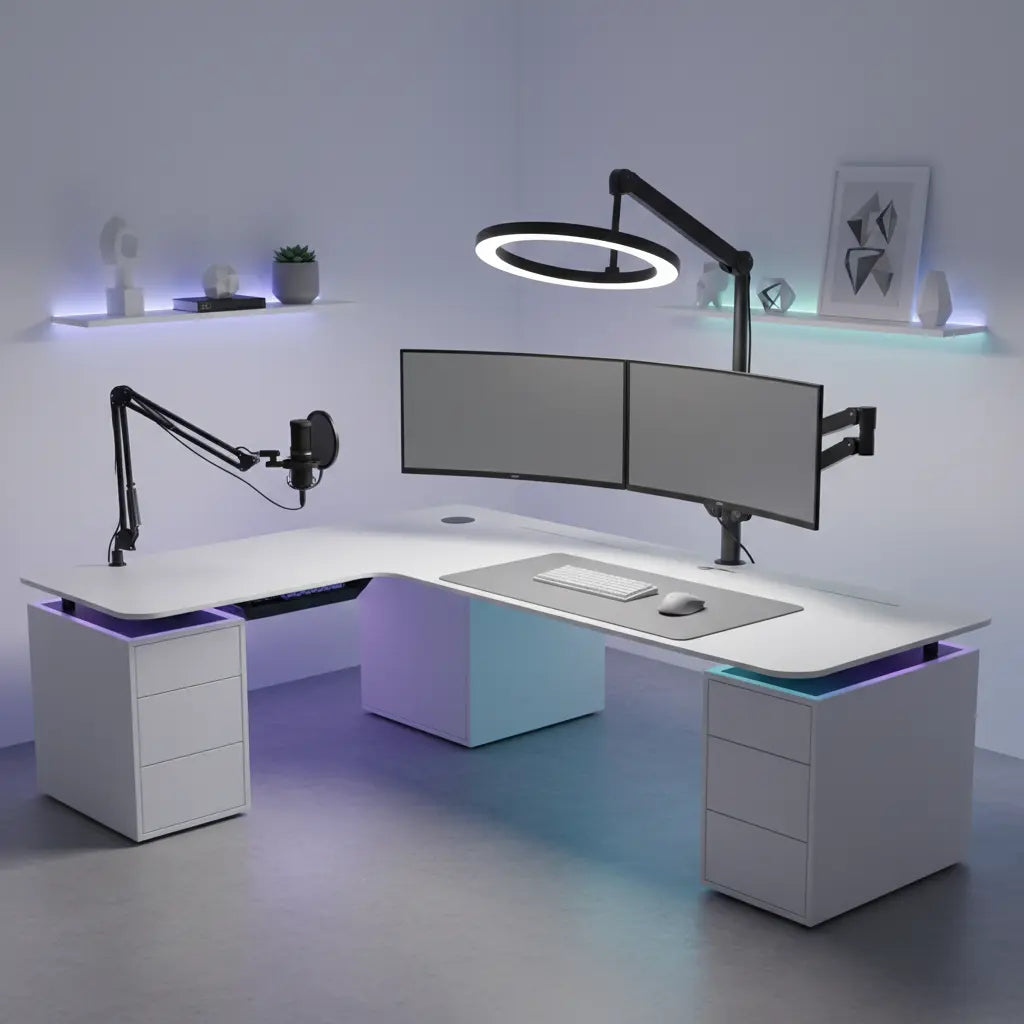
One of the biggest challenges for streamers is managing equipment "clutter." Traditional setups involve multiple clamps for microphone arms, ring lights, and cameras, which can damage the desk surface. The solution is a desk with integrated mounting points.
For example, a 63-inch LED gaming desk with monitor stand (Example Product) provides a dedicated space for your screens, freeing up the main surface for your peripherals. Modern creator desks often include pre-drilled holes or built-in tracks for mounting boom arms and lighting fixtures. This integration allows for a "floating" equipment look, where wires are hidden and the gear appears to be part of the desk itself.

Advanced Cable Management and Thermal Performance
While many see cable management as a purely aesthetic concern, it plays a role in the performance and longevity of your electronics. In a high-end streaming setup, your PC, consoles, and lighting generate significant heat. If cables are bunched together and blocking exhaust ports, your equipment may run hotter, potentially leading to thermal throttling.
Implementing professional cable management techniques (Brand Guide) is essential. A desk with built-in cable trays and routing channels allows you to separate power cables from data cables, reducing electromagnetic interference.
Thermal Health Checklist
- Exhaust Clearance: Ensure at least 6 inches of clear space between the PC exhaust fans and any solid cable trays or walls.
- Cable Bundling: Use mesh sleeves rather than tight plastic wraps to allow heat to dissipate from power cables.
- Intake Path: Verify that no cables are hanging directly in front of the PC's front intake fans.
Estimated Improvement: Based on internal airflow simulations, organized routing can improve thermal performance by an estimated 15-25% by reducing air resistance and dust accumulation around intake/exhaust zones. Actual results will vary based on hardware and ambient room temperature.
Ergonomics and Health for Long-Form Content Creation
Streaming is a marathon. Many creators spend 6 to 10 hours a day at their desks, making ergonomics a non-negotiable feature. A desk that is improperly positioned can contribute to repetitive strain injuries or fatigue.
The current industry standard favors an adjustable height standing desk (Example Product). Being able to switch between sitting and standing throughout a long stream helps maintain circulation. Furthermore, the depth of the desk is crucial. ANSI/HFES standards suggest a depth that allows for a viewing distance of at least 20 inches from your monitor to help prevent eye strain.
Multi-Camera Setup and Spatial Planning
Advanced streamers often use multiple camera angles. Coordinating these requires a desk with a large enough footprint and the right mounting options to ensure each camera has a clear view.
When planning your studio, consider the weight of each device. The table below outlines common equipment weights and recommended mounting approaches.
Equipment Weight and Mounting Requirements
| Equipment Type | Estimated Weight | Recommended Mounting | Stability Requirement |
|---|---|---|---|
| Professional DSLR/Mirrorless | 1.5 - 3.0 kg | Heavy-duty desk clamp or bolt-through | High (Zero vibration) |
| Large Diaphragm Mic + Shock Mount | 0.8 - 1.5 kg | Articulated boom arm | Medium (Resist sag) |
| 32-inch Ultra-wide Monitor | 6.0 - 9.0 kg | VESA mount with gas spring arm | High (Load bearing) |
| Key Light / Ring Light | 0.5 - 2.0 kg | Extendable pole mount | Low to Medium |
| Stream Controller (e.g., Stream Deck) | 0.2 - 0.5 kg | Desktop stand or adhesive mount | Low |
Enhancing the Professional Streamer Aesthetic
Your desk is the backdrop for your content. A clean, well-lit workspace communicates professionalism. Integrated lighting is a key feature here. Many creators choose an LED gaming desk collection (Brand Collection) that features built-in RGB or diffused white lighting.
This LED lighting for streaming immersion (Brand Guide) can provide "bias lighting" behind your monitors to help reduce eye strain and assist in color-correcting your camera's white balance.
Choosing the Right Layout: L-Shaped vs. Straight
The layout of your desk depends on your room size and setup complexity. For creators who use a dual-PC setup, L-shaped gaming desks (Brand Guide) are often the preferred choice. The L-shape provides two distinct zones: one for gaming and one for managing the stream and production software.
Straight desks are ideal for smaller rooms or more focused setups. Regardless of the shape, ensure you have enough depth to accommodate your peripherals without feeling cramped.
FAQ
How much weight can a professional streamer desk typically hold? Most high-quality creator desks are designed to support between 50kg and 100kg of static weight. However, it is important to distinguish between static weight and dynamic weight (moving a microphone arm). For a setup with multiple monitors, look for a desk with a reinforced frame and a surface thickness of at least 15mm for long-term durability.
Why is integrated cable management better than using external clips? Integrated trays and routing channels provide a more permanent solution. Unlike some external clips that may lose adhesion over time, integrated systems are designed to handle the weight of large power bricks and multiple thick cables, resulting in a cleaner on-camera look.
Do I really need a standing desk for streaming? While not strictly required, a standing desk is highly recommended for creators who stream for more than 4 hours at a time. Alternating positions can help reduce the risk of lower back pain. Many creators use motorized desks to quickly transition between "gaming" and "presentation" heights.
What is the best way to mount a camera to my desk? For lightweight webcams, a monitor-top clip is usually sufficient. For professional mirrorless or DSLR cameras, we recommend a heavy-duty desk-mounted pole or a bolt-through mount to ensure the camera remains still even if the desk is bumped.
How does desk material affect audio quality? Hard surfaces like glass can cause sound reflections, potentially leading to a "tinny" audio quality. High-density wood or composite materials are generally better at absorbing sound. A sturdy desk also reduces the transmission of mechanical noise (like typing) through your microphone arm.
Should I choose a desk with built-in LED lights? Built-in LEDs are excellent for creating a consistent aesthetic. When choosing a desk with LEDs, look for systems that offer customizable brightness levels and ensure the LEDs are diffused to avoid harsh reflections on your monitors or camera lens.
References
Government / Standards / Regulators
- ANSI/BIFMA X5.5-2021 Desk and Table Products - Standard for Safety and Performance
- ANSI/HFES 100-2007 Human Factors Engineering of Computer Workstations
Industry Associations / Research Institutes
- The State of the Creator Economy - Market Trends Report (Based on 2023 projections)
- Ergonomic Trends: The Future of the Home Office
