





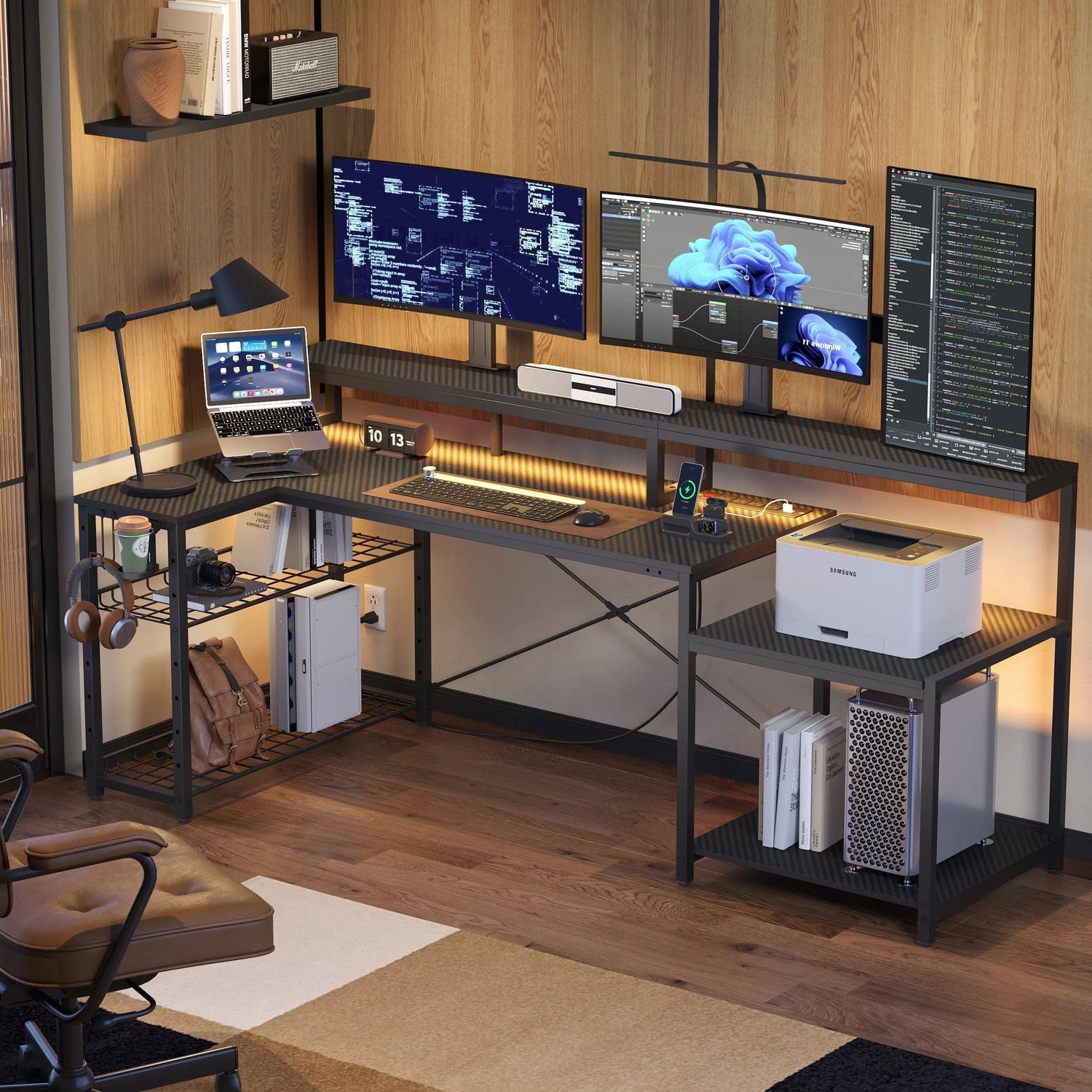
Corners are common dead zones in home offices. They are where the dust accumulates, the storage bins, or a void. An L-shaped desk turns dead zones into useful work areas. The corner desk design neatly fills a corner while delivering ample workspace. Your home office now has the central command station you have always wanted.
The Hidden Potential in Every Room Corner
A corner, however, is something you must identify in your space by first recognizing what you're missing. Walk into most home offices, and you'll find that the corner is simply doing nothing. They're simply too awkward for most furniture, too small for a filing cabinet, and too large to totally ignore.
Such lost square footage is costly. A standard corner consumes between 9 and 16 square feet of flooring space. This is an adequate amount to create a complete workstation. Nevertheless, many individuals place their desks against a flat wall, thus leaving corners unused.
The psychology of space should also not be ignored. Corners make you feel sheltered. Corners help to create boundaries to help you concentrate. Your back is to the wall, but your eyes are on the room. It is a natural position to take to concentrate.
How a Corner L-Shaped Desk Transforms Your Workspace
Now that you know the corner problem, the solution isn't difficult to see. The corner L-shaped desk completely eliminates the wasted space issue. Two surfaces meet at a right angle of 90 degrees. One leg goes along each wall. The intersection meets precisely at the corner.
With this setup, there are two distinct areas to perform your work. One side is dedicated to computer work. The other is designed to hold paperwork, sketching, or a second monitor. You just have to turn your chair around to switch between the activities.
The footprint remains small. Unlike conventional rectangular desks that project deep into the room, L-shaped desks are against the walls. They occupy less floor space and make optimum use of space.
Dual Surface Benefits
A two-surface design has far more to do with space than a single-surface design. It alters the working methodology. Your key activity lies right before you. Additional information or secondary tasks rest on the other surface.
This makes for less clutter. Your papers do not stack up on your keyboard. Your coffee cup has an area of its own where you keep it separate from your electronics.
Better Room Flow
The corner position also improves room flow. Traffic patterns remain open. You're positioned away from doorways and walking paths. Interruptions decrease when your workspace feels intentionally separated.
Your sightlines change in a corner setup. You can monitor the room entrance without constantly turning around. This peripheral awareness helps you feel more in control of your environment.

Choosing the Right Small L-Shaped Desk for Tight Spaces
Not all corners offer the same dimensions, so size matters. Not every corner offers generous dimensions. Apartments and converted bedrooms present challenges. A small L-shaped desk addresses tight quarters without sacrificing functionality.
Measuring Your Space
Measure your corner first. Note the distance along each wall where the desk will sit. Account for doors that swing open, heating vents, and electrical outlets. Add three inches of clearance on all sides for comfortable chair movement.
Compact models typically measure 40 to 50 inches per leg. That's enough for a laptop, notebook, and desk lamp on each surface. Some designs feature asymmetrical legs, with one side shorter than the other. This works well when one wall has less available space.
Going Vertical
Consider vertical space when floor area is limited. Hutches and shelving units mount above the desk surface. They provide storage without expanding the footprint.
Wall-mounted shelves complement smaller desks beautifully. They keep frequently used items within reach without cluttering your work surface. This vertical approach works particularly well in compact home offices.
Smart Storage Solutions: The L-Shaped Desk With Storage Benefits
Storage transforms a desk from simple furniture into a complete workstation. An L-shaped desk with storage eliminates the need for separate filing cabinets. Built-in drawers, shelves, and cabinets keep supplies within arm's reach.
Drawers and Cabinets
Drawer configurations vary widely. Some desks feature a pedestal with three or four drawers on one side. Others integrate shallow pencil drawers under the work surface. File drawers accommodate hanging folders for important documents.
Open shelving works for frequently accessed items. Books, binders, and supplies stay visible and easy to grab. Closed cabinets hide less attractive necessities like printer paper and cables.
Corner Storage
The corner junction itself can provide storage. Some designs incorporate a corner shelf at desktop height. Others add a cabinet beneath the corner section. This otherwise dead space becomes surprisingly useful.
Cable management systems matter more than they seem. Grommets, channels, and clips route wires out of sight. Your workspace looks cleaner. You're less likely to accidentally disconnect something important.
Creating an Attractive Home Office L-Shaped Desk Setup
A functional workspace should also inspire you visually. A home office L-shaped desk becomes a focal point, whether you want it to or not. Its size and position draw the eye. Make it visually appealing.
Materials Matter
Start with the desktop itself. Wood finishes bring warmth. Darker stains suggest traditional professionalism. Lighter tones feel modern and airy. Laminate surfaces offer easy cleaning and contemporary looks.
Coordinate with existing furniture. Your desk doesn't need to match everything perfectly, but it should complement the room's overall style. A sleek metal frame suits minimalist spaces. Ornate woodwork fits classical decor.
Decoration Tips
Personal touches prevent the space from feeling sterile. A small plant adds life without taking up much room. Family photos or artwork create emotional connections. Just avoid overdecorating. Too many objects become distracting clutter.
Keep one surface relatively clear for active work. The other can hold permanent items like a printer, lamp, or charging station. This division maintains functionality while showcasing your style.
Light Layers
Corners typically receive less natural light than window-adjacent areas. Compensate with layered artificial lighting.
A desk lamp provides task lighting for close work. Position it opposite your dominant hand to avoid shadows. Adjustable arms let you direct light exactly where needed.
Ambient lighting fills the room. Overhead fixtures or floor lamps prevent your workspace from feeling like a cave. The contrast between the bright desk light and the dim surroundings causes eye strain.
Consider the color temperature of bulbs. Cooler white light (4000K to 5000K) promotes alertness during work hours. Warmer tones (2700K to 3000K) feel more comfortable for evening tasks.

Ergonomic Setup for Your Corner L-Shaped Desk
Comfort directly impacts how long you can work productively. Surface height determines comfort over long work sessions. Standard desk height sits around 29 to 30 inches. That works for people of average height. Others may need adjustments.
Height Adjustments
Your elbows should bend at 90 degrees when typing. Wrists stay neutral, not angled up or down. If the desk sits too high, add a keyboard tray. Too low requires a different solution, like a height-adjustable model.
Chair selection matters as much as desk choice. Your feet should rest flat on the floor. Thighs remain parallel to the ground. Lumbar support maintains the natural curve of your lower back.
Screen Placement
Monitor placement prevents neck strain. The top of your screen should align roughly with eye level. Position it about arm's length away. If using dual monitors on your L-shaped setup, angle them slightly inward to reduce head turning.
Movement Breaks
Take regular breaks. Even perfect ergonomics can't compensate for hours of stillness. Stand up every 30 to 60 minutes. Stretch. Walk around. Your body needs movement.
Installation and Setup for Your L-Shaped Corner Desk
Proper installation ensures your corner workspace lasts for years. Assembly intimidates some buyers. Most L-shaped desks arrive flat-packed with detailed instructions. Set aside two to three hours for construction. A power drill speeds up the process considerably.
Assembly Process
Recruit help if possible. Large panels become unwieldy alone. A second person steadies pieces while you tighten bolts. The extra hands prevent frustrating mistakes.
Position the desk before fully tightening all connections. Slide it into the corner. Check that it sits flush against both walls. Make fine adjustments before final assembly. Moving a fully assembled desk risks loosening joints.
Leveling Tips
The surfaces should be levelled if your floor is not level. Most desks come with adjustable legs. An unlevel surface means annoying wobbling while you type. Do it right the first time.
Test it out before you decide to victory. Sit back down in your chair. Reach out for both surfaces. Make sure all is well and comfortable.
Make Your Corner Work Harder
Corners are areas in homes with unused potential. They are sufficiently spacious to hold furniture. However, they always remain unused. The L-shaped desk turns this unused corner into your productive space.
The two-surface design allows ample space for a variety of tasks and does not overcrowd your floor plan. Storage facilities ensure organized supplies. With sufficient lighting and the right ergonomics, the corner office becomes a place of preference. Convert your forgotten corner to a functional working space. Your productivity will surprise you.
Frequently Asked Questions
Q1: How Much Space Do I Need for a Corner L-Shaped Desk?
The minimum size dimensions usually involve a distance of 4 feet across each wall. Add another 3 feet behind the desk for chair mobility. Take the measurement of your corner space and consider your baseboards, which might extend an inch or two beyond your wall space.
Q2: Can I Place an L Shaped Desk in the Middle of a Room?
Yes, but not to maximize the corner. It can be freestanding if the room is large, with no corner available. Make sure there's enough space around it. It occupies more space compared to corner mounting.
Q3: What Is the Ideal Desk Height for Ergonomic Comfort?
Average height: 28–30 Inches. Elbows should bend at 90-degree angles when typing. Some come with the feature of being adjustable according to height. Positioning needs to be tried before setting up in a permanent position.
Q4: How Do I Manage Cables With a Corner Setup?
Employ the use of cable management grommets incorporated onto the surface of the desk. The usage of adhesive clips helps manage wires through the legs of the desks. Power strips that provide surge protection allow for the centralization of all connections.
Q5: Which Surface Should I Use as My Primary Work Area?
Pick the side with better lighting or easier access to electrical outlets. Right-handed people typically use the right leg for the primary workspace. Left-handed people can reverse this setup. Try both options to see which feels more natural.
