





Summary
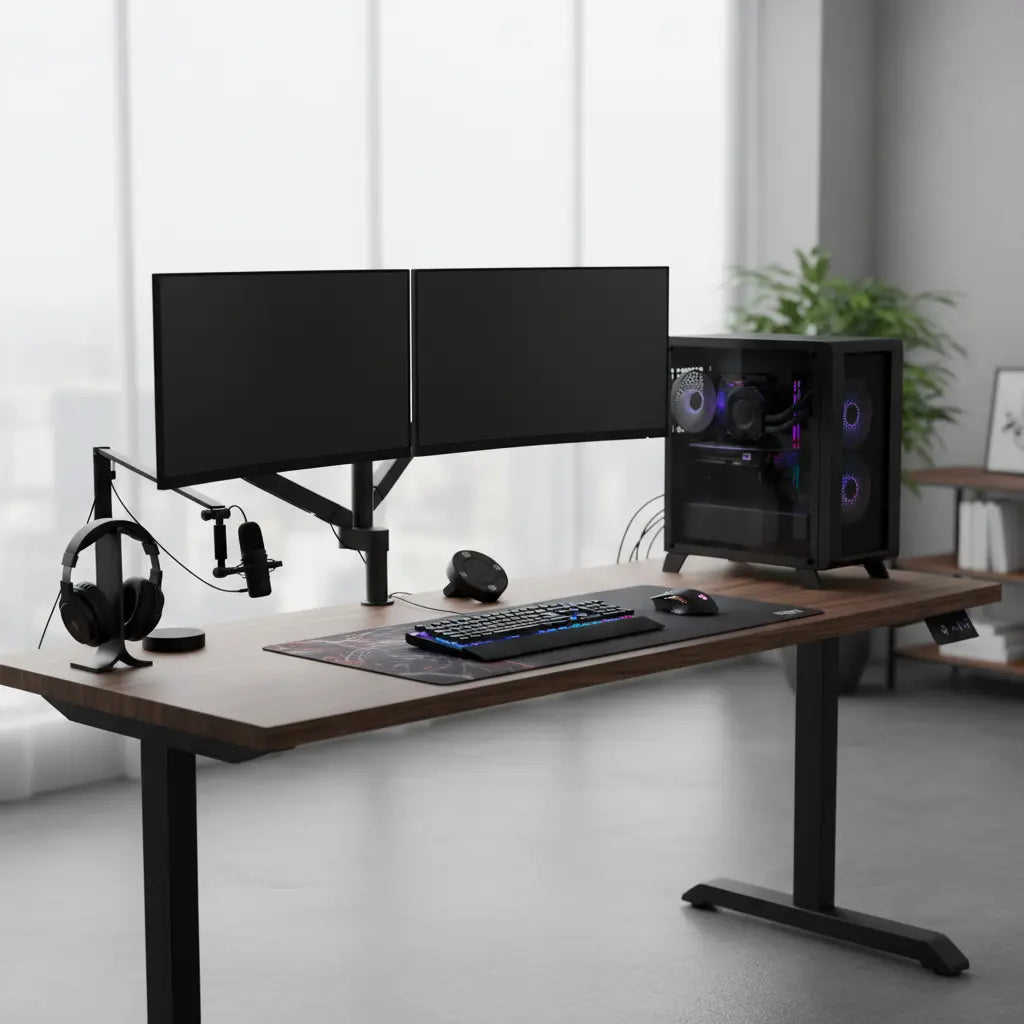
Most Bestier gaming desks are engineered with a static weight capacity of approximately 125 pounds (56 kg), which is sufficient for a standard dual-monitor setup and a high-end PC tower. However, safely supporting a 2026-era workstation requires understanding the difference between static and dynamic loads, as well as the specific point pressure exerted by modern monitor arms.
Key takeaways
- Standard Capacity: Most Bestier gaming models, such as the 52-inch L-shaped gaming desk specifications, support up to 124 lbs, while larger L-shaped configurations can distribute higher loads across multiple support legs.
- Setup Weight Math: A 2026 high-end gaming PC (40+ lbs) plus dual 32-inch monitors (48+ lbs) can quickly consume 70-80% of a desk's rated capacity before adding peripherals.
- Point Pressure Risks: Monitor arms concentrate weight into a small surface area; using a reinforcement plate is highly recommended for P2 particle board surfaces to prevent material compression.
- Stability Factors: Proper assembly for maximum weight capacity and ensuring all cam-locks are fully tightened are critical for maintaining structural integrity under heavy loads.
Understanding Bestier Desk Weight Capacity: Static vs. Dynamic Loads
When evaluating whether a desk can hold your gear, it is essential to distinguish between static and dynamic weight. The rated capacity of a Bestier desk—typically around 124 lbs for standard models—refers to a static load. This is weight that remains stationary and is evenly distributed across the surface.
In contrast, dynamic loads occur when you lean on the desk while standing up, rest your arms heavily during an intense gaming session, or move equipment around. These actions can momentarily double the force applied to the desk's joints. To ensure long-term durability, we recommend keeping your permanent gear weight to roughly 80% of the rated capacity, leaving a 20% "safety buffer" for these everyday dynamic stresses.
Logic Summary: The 80% rule is a heuristic used by furniture engineers to account for material fatigue over time. While a desk may hold its maximum rated weight initially, consistent operation at the limit increases the risk of "creep"—the slow deformation of wood fibers under constant stress.
How Much Weight Does a 2026 Gaming Setup Actually Weigh?
To determine if your desk is up to the task, you must calculate the cumulative weight of your hardware. As of 2026, flagship components have become heavier due to advanced cooling requirements and larger screen sizes.
| Component Type | Estimated Weight (lbs) | Notes |
|---|---|---|
| High-End PC Tower (e.g., RTX 5090 build) | 35 – 45 lbs | Includes heavy heatsinks and glass panels. |
| 32-Inch Gaming Monitor (with stand) | 22 – 26 lbs | Stand weight accounts for ~5-8 lbs. |
| Dual Monitor Arm (Heavy Duty) | 12 – 18 lbs | Steel construction adds significant weight. |
| Ultrawide Monitor (49-inch) | 30 – 40 lbs | Often requires specialized high-torque arms. |
| Peripherals (Keyboard, Mouse, Mic, Speakers) | 5 – 10 lbs | Cumulative weight of desk accessories. |
| Total Estimated Setup | 74 – 139 lbs | Varies significantly by configuration. |

Material Science: P2 Particle Board and Steel Frames
The structural integrity of a Bestier desk relies on a combination of P2-grade particle board and a powder-coated steel frame. While some models feature a "carbon fiber" texture, it is important to note that this is an aesthetic finish for grip and style, not a structural reinforcement. The actual load-bearing capacity comes from the density of the wood substrate and the gauge of the steel legs.
Bestier utilizes P2 particle board that meets strict engineered wood safety standards and material strength requirements. These standards ensure that the material is not only safe regarding formaldehyde emissions (CARB Phase 2 and TSCA Title VI) but also possesses the internal bond strength necessary to hold fasteners securely. For users concerned about long-term stability, improving desk stability and weight distribution can be achieved by ensuring the desk is perfectly level, which prevents uneven stress on the frame.
The Hidden Impact of Monitor Arms and Point Pressure
One of the most common causes of desk failure is not the total weight, but point pressure. A monitor arm clamped to the back of a desk concentrates the weight of two or three monitors into a surface area of just a few square inches.
On engineered wood surfaces, this high-pressure concentration can lead to "crushing" of the wood fibers over time. If you plan to use a dual-monitor arm, we strongly suggest using a steel reinforcement plate (a simple metal sandwich that spreads the clamp's force over a larger area). This is especially important for the 61-inch gaming desk with storage features, where the surface area is vast, but the rear edge remains the primary load point for mounting.

Maximizing Stability: Bestier L-Shaped Desk Weight Limits
L-shaped desks inherently offer better stability than straight desks because they have a minimum of five or six legs, creating a wider "footprint." This geometry allows for better weight distribution, making them the preferred choice for triple-monitor setups or those who keep their PC tower on the desk surface.
When browsing the L-shaped desk collection options, look for models with cross-bracing or reinforced corner joints. To maximize the capacity of an L-shaped desk:
- Place the heaviest item (the PC) near a leg: This transfers weight directly to the floor rather than through the center of the desktop.
- Distribute monitors across the corner: The corner joint is often one of the strongest points of the frame.
- Check the floor level: An uneven floor can cause one leg to carry 50% more weight than intended, leading to frame warping.
FAQ
Can a Bestier desk hold a dual monitor arm? Yes, most Bestier gaming desks can support a dual monitor arm, provided the total weight of the monitors and the arm does not exceed the desk's rated capacity (typically 124 lbs). However, because monitor arms concentrate weight into a small clamp area, we highly recommend using a reinforcement plate to prevent the clamp from indenting the P2 particle board surface.
What is the weight limit for a Bestier L-shaped desk? While specific limits vary by model, most Bestier L-shaped desks have a total capacity ranging from 110 lbs to 150 lbs depending on the number of support legs and the frame design. The weight is best supported when distributed across both "wings" of the L-shape rather than concentrated in the center of one section.
Is the carbon fiber texture on Bestier desks stronger than standard wood? The carbon fiber finish is a high-quality PVC or melamine laminate designed for scratch resistance and a modern aesthetic; it does not add structural strength to the desk. The desk's actual strength is derived from the P2-grade engineered wood core and the underlying steel support frame.
How do I prevent my desk from sagging in the middle? To prevent sagging, avoid placing heavy items like PC towers or printers in the exact center of a long, unsupported span of the desktop. Instead, position heavy equipment directly over the steel legs or near the reinforced edges of the frame to ensure the load is transferred efficiently to the ground.
Does assembly affect how much weight a desk can hold? Absolutely. A desk's weight capacity is only as strong as its weakest joint. If cam-locks are loose or screws are stripped during assembly, the desk will lose structural rigidity and may wobble or fail under a load that it would otherwise handle easily. Following a step-by-step assembly guide is crucial for safety.
Can I put my PC tower on top of the desk? Yes, you can place your PC tower on the desk, but you should factor its weight (often 30-45 lbs for modern builds) into the total load. For the best stability, place the tower directly over one of the desk's legs rather than in the middle of the desktop to minimize surface deflection.
References
Government / Standards / Regulators
- EPA TSCA Title VI Compliance for Engineered Wood
- California Air Resources Board (CARB) Phase 2 Standards
Industry Associations / Research Institutes
- BIFMA (Business and Institutional Furniture Manufacturers Association) Safety Standards
- Furniture Industry Research Association (FIRA) Load Testing Guidelines
Academic / Whitepapers / Labs
- Structural Performance of Particleboard under Constant Load (ResearchGate)
- Mechanical Properties of Wood-Based Composite Materials (ScienceDirect)
