
Summary
Disclosure: This guide is provided by Bestier. We design and sell L-shaped desks, and some links in this article lead to our product pages. Our recommendations are based on internal stress testing and feedback from the sim racing community.
Building a sim racing desk setup on an L-shaped desk offers a strategic advantage for enthusiasts who need to balance professional productivity with high-performance virtual racing. By utilizing the dual-surface nature of the "L" configuration, racers can dedicate one wing to a permanent or semi-permanent wheel mount while keeping the primary workspace clear for traditional PC tasks. Success in this setup hinges on selecting a desk with a reinforced steel frame capable of absorbing the lateral torque from force feedback motors and ensuring the desktop material is robust enough to withstand the concentrated pressure of mounting clamps.
Key Takeaways
- Structural Integrity: Prioritize desks with triangular corner reinforcements and steel support bars to minimize "desk shake" during high-torque maneuvers.
- Material Safety: Ensure your desk follows engineered wood safety standards for durable desk construction to guarantee a stable surface that resists warping under heavy peripherals.
- Ergonomic Alignment: Position the racing wheel at a height where your elbows maintain a 90-to-110-degree angle, typically requiring a desktop height of 28 to 30 inches.
- Pedal Stability: Use a dedicated pedal plate or a non-slip floor mat to prevent the pedal set from sliding forward during heavy braking.
- Modular Cable Management: Implement a "hub-and-spoke" cable system to allow for quick transitions between work and racing modes.
Why L-Shaped Desks are Ideal for Sim Racing
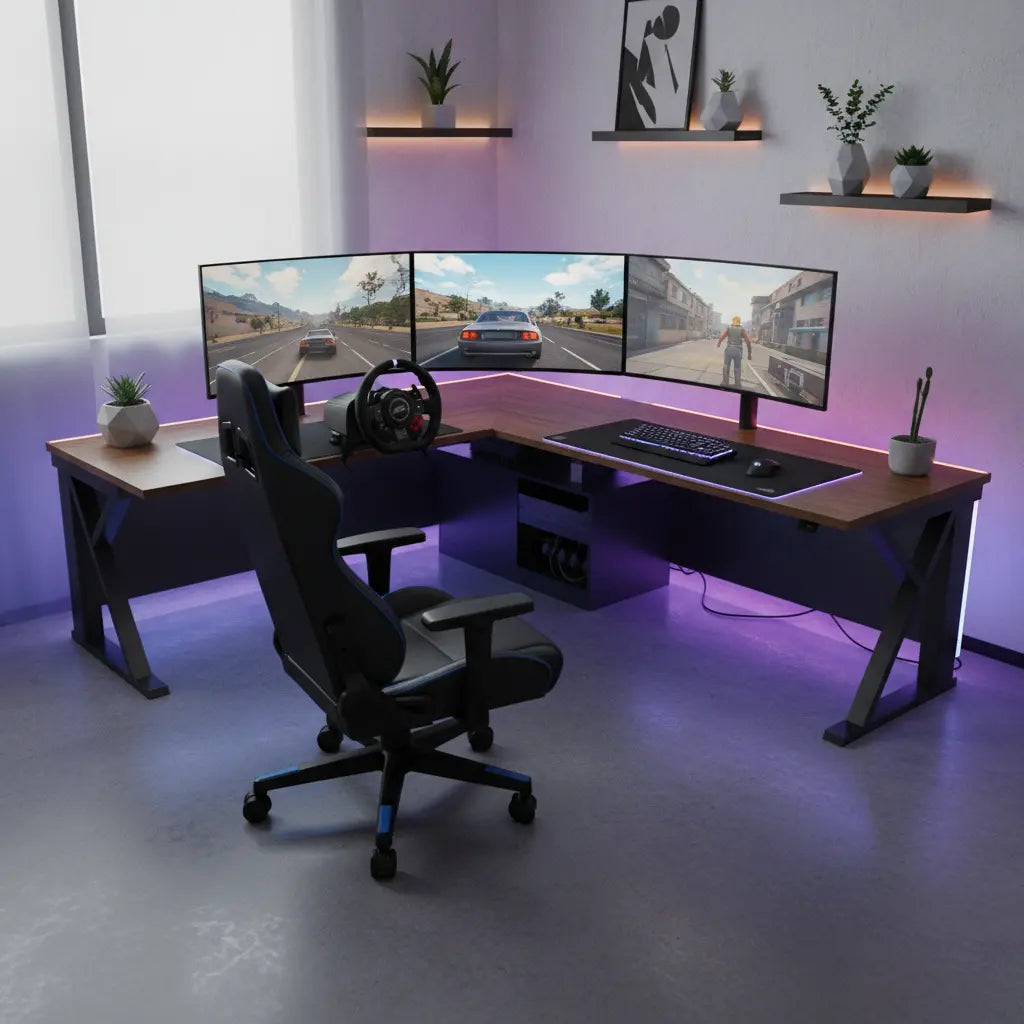
The transition from a casual gamer to a sim racing enthusiast often brings a hardware challenge: where to put the wheel, shifter, and pedals without sacrificing a functional workspace. An L-shaped desk provides two distinct zones within a single footprint. This "dual-zone" philosophy allows you to mount your racing wheel on the side wing, creating a dedicated cockpit that doesn't interfere with your keyboard and mouse placement on the main desk surface.
When optimizing L-shaped gaming desk layouts for maximum efficiency, we recommend placing the monitor on a swivel mount at the corner of the "L." This enables you to rotate the screen toward the racing wing for track time and back to the center for daily tasks. This flexibility is particularly valuable in small apartments where a full-sized racing rig is not viable.
Expert Tip: Measuring Your Space Before purchasing, ensure you have at least a 50x50 inch corner area. Measure the "racing wing" depth; most wheelbases require 10-15 inches of clearance to accommodate the motor housing and cable exits without hitting the wall.
Essential Stability Requirements for Racing Wheels
Stability is the most critical factor in a desk-based racing setup. Modern racing wheels generate significant force feedback (FFB). Based on manufacturer specifications (e.g., Logitech, Fanatec), a gear-driven wheel like the G29 produces approximately 2.1 to 2.2 Newton-meters (Nm) of torque, while mid-range Direct Drive (DD) bases can reach 5 to 10 Nm. If the desk is not stable, this energy is lost to furniture vibration rather than being felt in the driver's hands.
To combat this, look for desks featuring a heavy-duty steel frame. Desks with a "K" or "X" frame design often provide better lateral stability. Additionally, check for essential desk stability tips for secure racing wheel mounting, such as ensuring the desk is flush against a wall.
Verifying Desktop Strength: The desktop should be at least 0.6 inches (15mm) thick. To test your current desk's suitability:
- The Flex Test: Apply firm downward pressure (approx. 15-20 lbs) at the center of the mounting edge.
- Observation: If the board deflects more than 2-3mm, you will likely experience "desk bounce" during racing. Consider a desk with a steel support rail running directly under the mounting edge.

Mounting the Logitech G29 and Other Wheels
Mounting a wheel like the Logitech G29 is generally straightforward due to its built-in dual-clamp system. However, the unique geometry of L-shaped desks can present challenges if the desk has a support bar located too close to the front edge.
How to Measure Clamp Compatibility: Most standard wheel clamps require approximately 1.5 to 2 inches of flat surface on the underside of the desk to "bite" effectively.
- Step 1: Measure the distance from the front edge of the desk to the first obstruction (like a support rail).
- Step 2: If this distance is less than 2 inches, you will need a "spacer"—a small block of wood or a hard rubber pad—to bridge the gap between the rail and the desktop, ensuring the clamp pressure is distributed evenly.
Desk Stability vs. Wheel Torque Compatibility
The following table provides a heuristic for matching desk types with wheel torque. Note: Torque values are based on manufacturer-rated peak output.
| Wheel Type | Peak Torque (Nm) | Recommended Desk Construction | Reinforcement Needed? |
|---|---|---|---|
| Entry-Level (Gear/Belt) | 2.0 - 3.5 Nm | Standard Steel Frame, 15mm MDF | Minimal (Non-slip pads) |
| Mid-Range (Direct Drive) | 5.0 - 8.0 Nm | Reinforced Steel Frame, 18mm+ MDF | Recommended (Corner braces) |
| High-End (Direct Drive) | 10.0+ Nm | Industrial Steel Frame, Solid Wood | Mandatory (Wall anchoring) |
Optimizing Pedal Placement and Ergonomics
While the wheel gets the attention, pedal placement is where many setups fail. At a standard desk, you sit in an upright "office" position, which creates a steep angle for your ankles. This can lead to "pedal creep"—where the pedals slide away during heavy braking.
Pro-Tip for Pedal Stability: Place your pedals against the wall or the backboard of the desk. If there is a gap, use a "dead stop" (a heavy box or wood block). For those on carpet, the "spikes" included with many sets are often insufficient. A high-quality rubber floor mat or a dedicated pedal stand that connects to your chair can bridge the gap between a desk setup and a full cockpit.
Sim Racing Desk Setup Essentials Checklist
- [ ] Surface Clearance: At least 20 inches of width on the "racing wing" for the wheel and shifter.
- [ ] Legroom: No drawers or cabinets directly under the pedal area.
- [ ] Power Access: A power strip with at least 4 outlets (PC, Monitor, Wheel, Accessories).
- [ ] Monitor Height: Center of the screen should be at eye level when seated.
- [ ] Chair Lock: Use "caster cups" or replace wheels with stationary "glides" to prevent rolling backward.
Recommended L-Shaped Desks for Racing
The following products are from the Bestier catalog, designed with reinforced frames suitable for sim racing peripherals.
For smaller rooms, the 48-inch LED L-shaped gaming desk offers a compact footprint with the structural rigidity needed for gear-driven wheels like the G29. The integrated LED lighting can be synced with your PC for immersive ambient light.
For those with more peripherals, the 52-inch L-shaped gaming desk with USB ports provides additional surface area and built-in connectivity for shifters and handbrakes. You can also browse our complete collection of L-shaped desks to find a model that fits your specific room dimensions.
Transitioning from Work to Race: Modular Setup Tips
To make your setup modular, use a USB hub mounted to the underside of the desk. Plug all racing peripherals into this hub so you only have one USB cable to connect to your PC. Additionally, consider using magnetic cable organizers to tuck away power leads when not in use. By treating your racing gear as a modular "plug-and-play" system, you can transition from a meeting to the starting grid in less than two minutes.
FAQ
Can I mount a Direct Drive (DD) wheel to an L-shaped desk? Yes, but it requires a sturdy, steel-framed desk. For mid-range DD bases (5-8 Nm), use a dedicated table clamp to distribute torque. For bases exceeding 10 Nm, we recommend anchoring the desk to a wall to prevent lateral swaying.
How do I stop my office chair from rolling when I brake? The most effective way is to use rubber caster cups or "bell glides." Caster cups sit under your existing wheels, while bell glides replace the wheels entirely.
What is the best desk height for a sim racing setup? The ideal height is typically 28 to 30 inches (71-76 cm). This allows for a comfortable ergonomic position where your arms maintain a natural bend while grasping the wheel.
Will clamping a racing wheel damage my desk? It can if the surface is low-density or if the clamp is overtightened. To prevent damage, place a thin rubber sheet or a spare mousepad between the clamp and the desk surface.
How much space do I need for an L-shaped sim racing setup? A functional setup typically requires a minimum floor space of 5 feet by 5 feet to accommodate the desk, chair, and leg extension for pedals.
Is an L-shaped desk better than a straight desk for sim racing? Yes, because it allows for a "permanent" mounting solution on one wing that doesn't interfere with your primary workspace on the other.
References
Government / Standards / Regulators
Platform Official Docs
Industry & Community
- International Ergonomics Association (IEA) Guidelines
- r/simracing: Desk Mounting Community Guide (Reddit)
- RaceDepartment: Sim Racing Hardware Forums

