





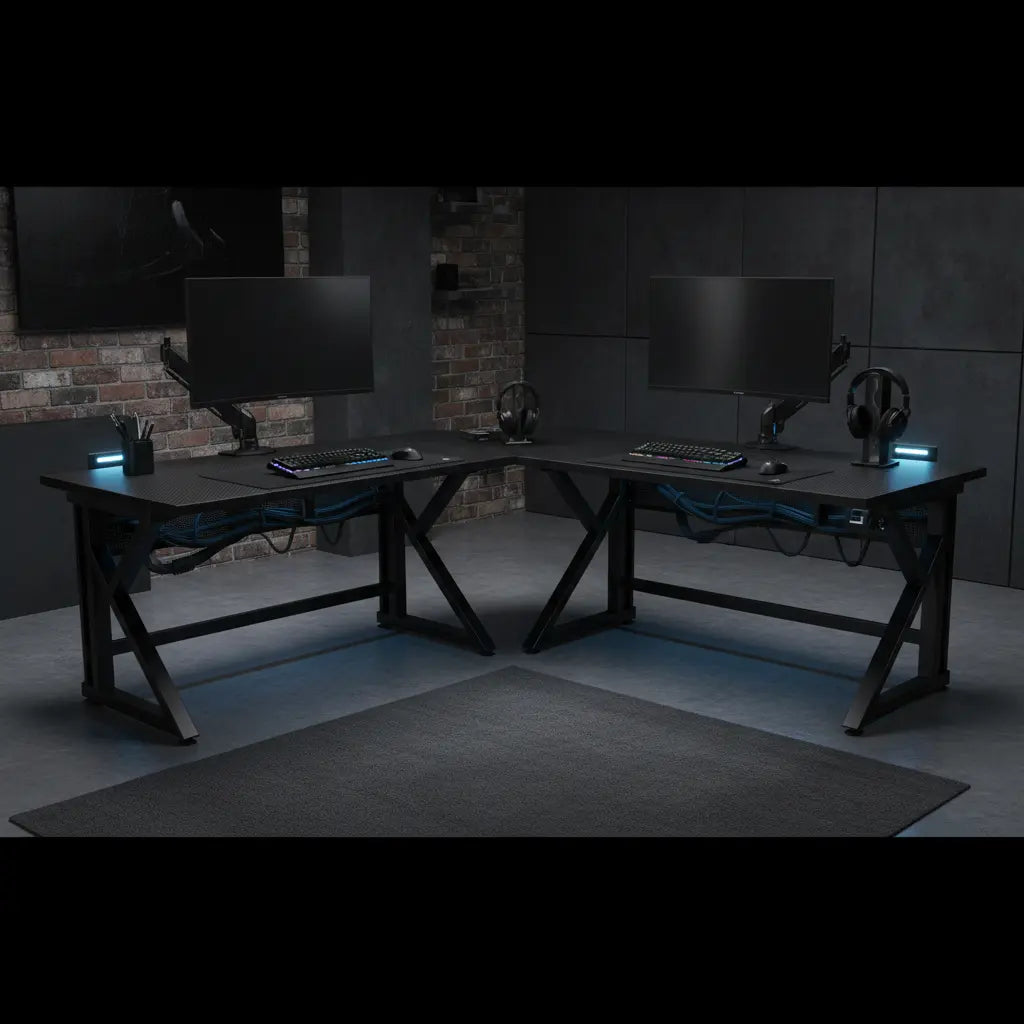
A wobbly desk can quickly turn an otherwise perfect dual-monitor setup into a frustrating experience, especially when heavy monitors on arms transmit every keystroke or mouse movement into visible shake. The good news is that you can avoid this by focusing on a few key structural features rather than relying on marketing claims alone. Desks with thoughtful steel framing, proper cross-bracing, wide leg placement, and leveling options tend to stay far more stable under real-world loads than basic flat-pack models.

Choosing the right desk for heavy dual monitors means evaluating how the frame resists side-to-side sway, not just how much weight the top can hold. This guide breaks down what actually prevents wobble, common myths that mislead buyers, risk factors specific to gaming and productivity setups, and practical steps to reinforce an existing desk or select a new one that stays rock-solid.
Why Desk Wobble Matters More with Dual Monitors and Arms
Heavy monitors mounted on arms create off-center loads that amplify any weakness in the desk structure. Unlike a centered laptop, monitor arms extend the weight forward or to the side, turning minor flex into noticeable shake during intense gaming sessions or focused work. This movement can cause monitor drift, make typing feel imprecise, and in extreme cases risk tipping peripherals or damaging expensive equipment.
Ergonomic guidance commonly recommends placing the monitor at about an arm’s length and aligning the top of the screen near eye level, which often requires arms or stands that add leverage against the desk edge. When the desk itself flexes, the entire viewing experience suffers. Budget furniture is especially vulnerable because many rely on simple screw-together joints that loosen over time or lack lateral support.
In small apartments or rooms with slightly uneven floors, the problem compounds. A desk that feels stable empty can develop annoying wobble once dual 27-inch or larger monitors and arms are installed. Recognizing these risks early helps you prioritize rigidity during purchase instead of dealing with constant adjustments later.

Common Myths About Sturdy Desks
Many buyers assume that a steel frame automatically eliminates wobble or that any L-shaped gaming desk will handle heavy monitors without issue. These assumptions often lead to disappointment.
Myth: All steel-frame desks do not wobble.
Reality: Steel is a strong material, but frame geometry, joint quality, and leg layout matter more than the label. Some steel desks still flex if the design has long unsupported spans or minimal cross-bracing. As many expert-tested roundups note, steel construction is frequently marketed as a stability feature, yet buyers should verify actual load behavior under monitor arms rather than trusting the term alone.
Myth: L-shaped desks are always more stable.
Reality: The corner joint in some L-shaped designs can become a weak point, allowing the longer sections to twist under uneven load. Stability depends on how well the manufacturer braces that junction and spaces the legs.
Myth: Any gaming desk works for heavy dual monitors.
Reality: Gaming branding often emphasizes style, LED lights, and cable management more than structural rigidity. Heavy monitor arms quickly expose flex that lighter setups might hide.
Myth: Tightening the screws once will permanently stop wobble.
Reality: This helps with initial assembly looseness but does not address fundamental design limitations or floor unevenness. Periodic checks are part of maintenance for flat-pack furniture.
These myths explain why some budget desks marketed as sturdy still disappoint users with dual-monitor setups. Focus instead on visible engineering details.
Risk Levels: When Wobble Becomes a Deal-Breaker
Not every setup needs the most overbuilt desk. Your risk level depends on the combination of monitors, mounting method, floor conditions, and daily use intensity.
- Low risk: Fixed desk on a level floor, no monitor arms, centered lighter loads, and minimal movement. Minor flex may be tolerable.
- Medium risk: One monitor on an arm, occasional leaning, or slight floor variation. Better frame geometry becomes important.
- High risk: Dual monitors on arms, uneven floors, budget flat-pack construction, or frequent vigorous input during gaming. Here, rigidity and leveling features should top your priority list.
Illustrative Stability Factors by Risk Level
Use this chart to classify setup risk and identify which desk features or reinforcements matter most for wobble control.
View chart data
| Category | Steel frame quality | Cross-bracing | Leveling feet | Desk thickness / leg spread | Reinforcement plates |
|---|---|---|---|---|---|
| Low risk | 4.0 | 5.0 | 6.0 | 4.0 | 3.0 |
| Medium risk | 7.0 | 8.0 | 8.0 | 7.0 | 6.0 |
| High risk | 9.0 | 9.0 | 10.0 | 10.0 | 9.0 |
Illustrative heuristic based on the provided scenario matrix and constraint-first filter: values express relative importance for reducing wobble under dual monitors and arms. Higher scores indicate stronger relevance to setup stability; they are not lab measurements or official product ratings.
This visualization shows how feature importance scales with risk. In high-risk scenarios, cross-bracing, wide leg spread, and reinforcement become critical.
What to Look for in a Sturdy Desk for Heavy Dual Monitors
Apply this constraint-first filter before comparing aesthetics or price: Can the desk stay rigid under off-center load, monitor arms, and imperfect floors?
Key structural features to prioritize:
- Steel frame with cross-bracing: Look for diagonal or horizontal braces that prevent parallelogram-style sway. Quality varies widely even among steel desks.
- Leg placement and spread: Wider, splayed legs or multiple contact points improve stability over narrow, tall designs.
- Leveling feet or adjustable glides: Essential for uneven floors common in apartments. These compensate for small height differences that cause rocking.
- Desktop thickness and material: At least 18-25mm engineered wood with proper edge banding resists bending, though the frame carries most of the stability load.
- Reinforced mounting zones: Some desks include metal plates or thicker sections under the edge where monitor arms clamp, reducing the chance of crushing particle board.
For L-shaped desks, pay special attention to the corner connection. Models with sturdy metal brackets or continuous framing at the joint perform better. This L-shaped gaming desk guide explores layout considerations that also affect long-term stability.
When shopping budget options, avoid desks that rely solely on surface thickness or vague “heavy-duty” claims. Request or check detailed dimensions of the frame and look for customer photos showing the underside.
How to Stop an Existing L-Shaped Desk from Wobbling
If you already own a shaky flat-pack desk, several reinforcement techniques can dramatically improve stability without a full replacement.
Start with the basics: Place the desk on a level surface and adjust any built-in leveling feet. Use plastic shims or felt pads under legs on uneven floors. Tighten all assembly screws and consider adding thread-locker to prevent future loosening.
For more stubborn wobble, add cross-bracing yourself using metal brackets or tension cables on the back or underside. Installing a monitor arm reinforcement plate distributes clamp pressure and prevents denting the desktop. Our companion article on how to fix a wobbly desk provides step-by-step hardware upgrade suggestions.
Another effective method is adding mass or damping: A heavy monitor stand or strategically placed weights can lower the center of gravity. For monitor arms specifically, follow guidance from resources like preventing desk damage when mounting heavy arms, which recommends thickness thresholds and torque-reduction strategies.
These fixes often transform a marginal desk into one suitable for dual monitors, though they work best when the original frame geometry is reasonably sound.
Desk Size and Layout Considerations for Dual Monitors
Beyond stability, proper sizing prevents cramped setups that indirectly worsen perceived wobble through poor ergonomics. For dual monitors, aim for at least 55 inches of width, with larger L-shaped or corner desks offering better weight distribution.
Our complete desk size guide recommends measuring your space and matching the desk to both equipment and room constraints. L-shaped designs are popular for maximizing corner space while providing separate zones for monitors and peripherals.
When using monitor arms, ensure the desk edge can support the clamp without overhang that increases leverage and shake. Some premium models include integrated monitor stands or reinforced ledges that simplify stable placement.
Recommended Features in Bestier Desks for Stable Setups
Bestier’s gaming and office desks incorporate many of the stability features discussed. Models with steel frames, integrated bracing, and ample leg room tend to perform well under dual-monitor loads.
For example, the Bestier L-Shaped Gaming Desk with Power Outlets, LED Lighting and Monitor Stand offers a spacious layout that distributes weight effectively across its steel-supported structure. Similarly, the 58 Inch LED L-Shaped Gaming Desk with Shelves combines carbon fiber texture with practical storage while maintaining a solid footprint.
Standing desk options like the 58" Wide Electric Standing Desk add height adjustability without sacrificing the rigid base many users need for monitor arms. Browse the full L Shaped Desk collection or All Desks to compare options suited to your risk level.
These desks balance budget accessibility with practical engineering that addresses real wobble concerns.
Health and Comfort Disclaimer
This article discusses comfort and setup advice related to desk stability and ergonomics. It does not constitute medical advice, diagnosis, or treatment. Desk wobble may contribute to perceived fatigue or discomfort, but individual responses vary. If you experience persistent eye strain, neck pain, or other symptoms, or have existing conditions, consult qualified healthcare professionals. Stability improvements can support better posture when combined with proper monitor positioning, but results depend heavily on your overall workspace and habits.
Final Checklist Before Buying or Reinforcing
Use this practical checklist to evaluate any desk for heavy dual-monitor use:
- Does the frame include visible cross-bracing or lateral supports?
- Are the legs spaced widely enough to resist tipping or sway?
- Does the desk offer leveling feet or easy shimming options?
- Is the desktop edge reinforced for monitor arm clamps?
- Will the size accommodate your monitors without excessive overhang?
- For existing desks: Have you tightened all joints and added reinforcement plates where needed?
Answering yes to most of these significantly reduces wobble risk. In high-risk scenarios, prioritize desks that clearly show these features in product images and specifications.
A stable desk forms the foundation of an enjoyable and productive multi-monitor setup. By focusing on structural reality rather than marketing language, you can create a workspace that stays solid through years of gaming sessions and deep work. Explore Bestier’s range of computer desks and gaming furniture to find a configuration that matches both your space and stability needs.
Remember that even the sturdiest desk benefits from occasional maintenance checks. With the right choice and a few smart setup habits, you can eliminate the wobble and focus on what matters most—your game or your work.
