





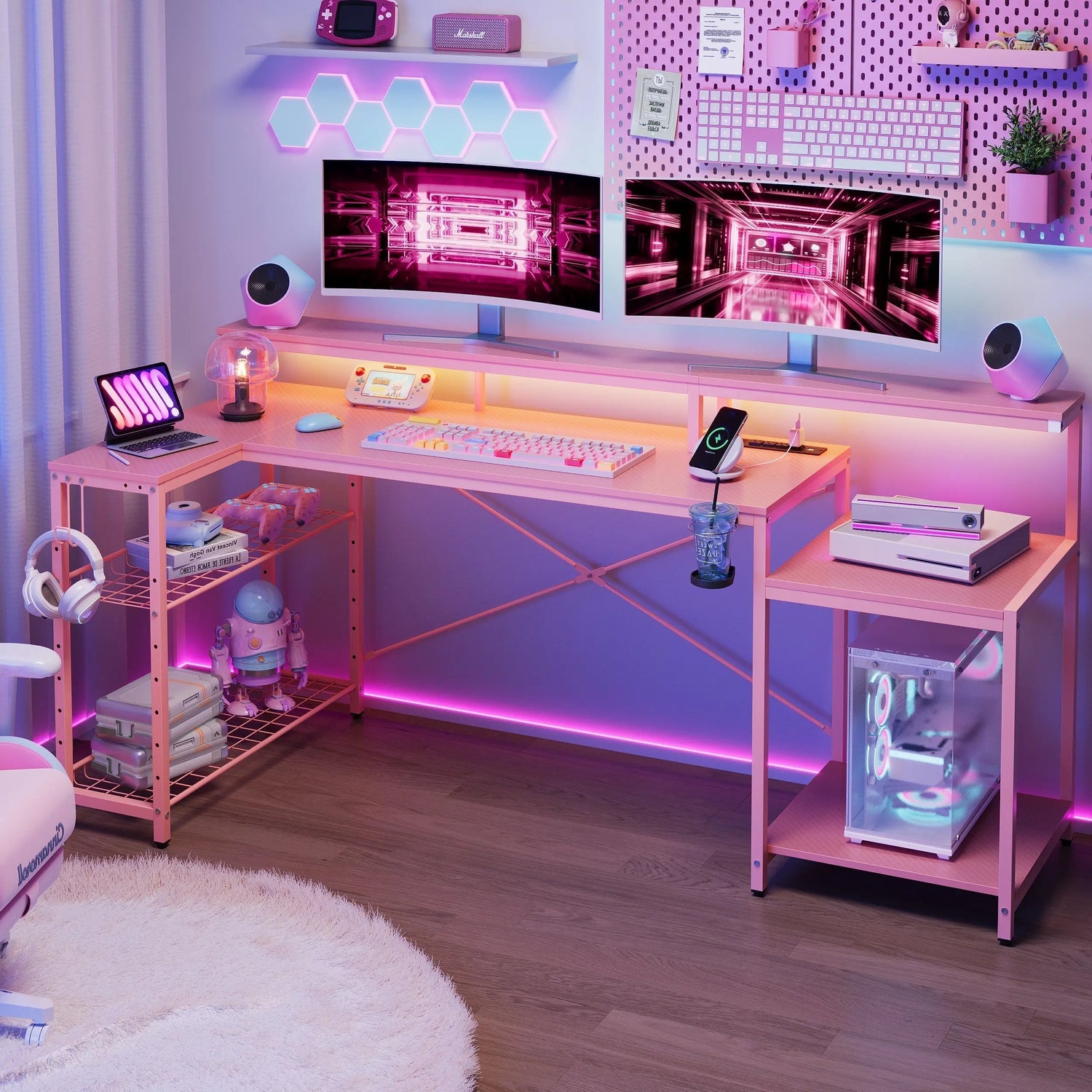
Choosing between RGB and LED lights for your gaming setup depends on what you value most. RGB lights offer customizable colors and dynamic effects that sync with games. Standard LED lights provide consistent, practical illumination at lower costs. Most serious gamers combine both types strategically. Understanding each option's strengths helps you build the perfect lighting system for your needs.
RGB vs LED: What's the Real Difference?
The confusion starts here because RGB actually uses LED technology. The distinction lies in how these lights function.
Single Color vs Multiple Colors
Standard LED lights emit one fixed color. Most gaming setups use white LEDs in different temperatures. Cool white (5000K-6500K) creates alert, focused environments. Warm white (2700K-3000K) feels relaxing for casual gaming sessions.
These lights excel at consistent brightness and energy efficiency. They cost less than RGB options and require simpler installation. A basic LED strip provides reliable illumination without software or complicated controls.
Millions of Color Options
RGB lights combine red, green, and blue diodes to produce millions of color combinations. You control them through apps, remotes, or even voice commands. Many RGB systems sync with games, changing colors based on in-game action.
The appeal is obvious for streaming and creating immersive atmospheres. RGB strips let you match team colors, create mood lighting, or impress viewers during broadcasts. However, they cost more and consume slightly more power than standard LEDs.
Quick Comparison Table
| Factor | Standard LED | RGB LED | Winner for Gaming |
|---|---|---|---|
| Color options | One fixed color | Millions of colors | RGB for variety |
| Eye comfort | Excellent with proper setup | Good but can distract | LED for long sessions |
| Price | $15-$50 | $30-$150 | LED for budget |
| Installation | Very simple | Requires controller/app | LED for ease |
| Customization | None | Extensive | RGB for personalization |
| Streaming appeal | Minimal | High | RGB for content |

Which Light Type Is Better for Gaming Performance?
Performance matters more than aesthetics for competitive gamers. The right lighting choice affects your gameplay directly.
Standard LEDs Keep You Focused
Standard LED lights reduce eye strain through consistent illumination. Your eyes don't constantly adjust to changing brightness or colors. This stability helps you focus during intense matches.
Bias lighting with standard LEDs creates the ideal viewing environment. Mounting neutral white strips behind your monitor reduces the contrast between your bright screen and dark surroundings. This prevents headaches during marathon gaming sessions.
Many professional gamers choose standard LEDs for their setups. The predictable lighting doesn't distract from gameplay. You maintain complete focus on your screen without flashy effects pulling your attention away.
RGB Enhances Immersion
RGB lights enhance immersion for single-player and casual gaming. Colors that match your game's atmosphere pull you deeper into the experience. Horror games feel scarier with red accents. Racing games gain energy from dynamic color shifts.
Some RGB systems sync with in-game events. Your lights flash when you take damage or change color during loading screens. This adds sensory feedback beyond your monitor and speakers.
However, competitive players often find RGB distracting during crucial moments. Flashing lights in your peripheral vision can break concentration. If you play ranked matches or tournaments, consider whether RGB helps or hurts your performance.
Combining Both Works Best
Most gamers don't need to choose just one type. An rgb gaming desk combines both options perfectly. Standard white LEDs provide task lighting for your keyboard and mouse. RGB strips along the desk edges create ambiance without interfering with gameplay.
This combination lets you switch between performance mode and immersion mode. Turn off RGB during competitive sessions. Enable it for casual play or streaming. You get the benefits of both systems without compromise.
RGB vs LED for Different Gaming Setup Sizes
Your available space determines which lighting works better. Different desk sizes need different approaches.
Standard Desk Solutions
Most gaming desks work well with gaming desk with led lights that include both types. Mount standard LED strips behind your monitor for bias lighting. Add RGB strips under the desk or along the back edge for visual effects.
This setup separates functional and decorative lighting. Your standard LEDs stay on constantly for eye comfort. RGB elements turn on when you want extra atmosphere or during streams.
L-Shaped Desk Advantages
An L shaped gaming desk with led lights configurations offer more surface area for creative lighting. Run standard LED strips along both desk sections at the rear. This provides consistent bias lighting regardless of where you position monitors.
Add RGB strips along the outer edges and underneath both sections. The extended perimeter creates impressive lighting effects that define your gaming space. The larger desk area prevents RGB from overwhelming your view.
Compact Setup Strategies
A small gaming desk with led lights needs simpler solutions. Choose one high-quality RGB strip that can display white when needed. Mount it along the desk's back edge serving double duty as bias lighting and decorative accent.
Alternatively, select a best gaming desk with led lights designed specifically for small spaces. These desks integrate lighting into the structure efficiently. You avoid cluttering your limited space with multiple light strips and controllers.

Cost Comparison: RGB vs LED for Gaming
Budget plays a major role in your lighting decision. Understanding the real costs helps you plan effectively.
Upfront Expenses
Standard LED strips start around $15 for basic models. Quality strips with adjustable brightness cost $30-$50. You need minimal accessories beyond the strip itself and a power adapter.
RGB systems start at $30 for entry-level strips. Better options with reliable apps and smooth color transitions cost $60-$150. You'll need controllers, power supplies, and possibly hubs for synchronization.
A complete gaming desk with led lights ranges from $200-$800 depending on size and features. Integrated lighting adds $50-$150 to desk prices compared to non-lit versions.
Monthly Running Costs
Both LED types consume minimal electricity. Standard LEDs use slightly less power because they run fewer diodes. The difference amounts to pennies per month even with heavy use.
RGB systems require software updates and occasionally need controller replacements. Standard LEDs typically last longer because simpler electronics fail less often.
Value Over Time
Standard LED setups cost less initially and over time. They're ideal for gamers on tight budgets or those prioritizing function over form.
RGB systems justify higher costs if you stream, create content, or frequently host friends in your gaming space. The visual impact and customization options provide entertainment value beyond pure function.
Making Your Choice: RGB, LED, or Both?
After weighing all factors, your decision should match your gaming priorities and habits.
When Standard LED Wins
Pick standard LED lights when performance matters most. Competitive gamers benefit from distraction-free environments. Standard LEDs provide exactly what you need without extras.
This option also suits tight budgets. You get professional results spending minimal money. Installation takes minutes without apps or complicated setups.
Players with long gaming sessions need consistent lighting. Standard LEDs prevent eye strain better than changing RGB colors. Your comfort stays stable throughout extended play.
When RGB Makes Sense
Select RGB lighting when you stream or create gaming content. Viewers expect dynamic, visually interesting backgrounds. RGB delivers the production value audiences appreciate.
RGB also suits gamers who frequently switch between games. Match your lighting to each game's mood and theme. The customization options keep your setup feeling fresh.
If you host gaming parties or LAN events, RGB impresses guests and creates memorable atmospheres. The social aspect of gaming benefits from RGB's visual appeal.
Why Both Is Often Best
Most dedicated gamers should use both types strategically. Standard LEDs handle practical needs like bias lighting and task illumination. RGB adds personality and streaming appeal.
This approach offers maximum flexibility. Adjust your lighting based on the situation. Go minimal for competitive play. Enable full RGB for casual sessions or streams.
The best gaming desk with led lights typically includes both standard and RGB zones. These desks recognize that gamers need function and style in different situations.
Build Your Perfect Setup
Start by identifying your primary gaming activity. Competitive players should invest in quality standard LED bias lighting first. Content creators should prioritize RGB systems with reliable apps and smooth color transitions.
Test your lighting during actual gaming before permanent installation. What looks impressive in photos might distract during gameplay. Adjust brightness levels and positions until everything feels natural. Your lighting should enhance gaming comfort and immersion without demanding attention or breaking concentration during crucial moments.
FAQs
Q1: Is RGB Better Than LED for Gaming?
Both options have their advantages. RGB is better for those who want more personalization and aesthetics. LED is better for those who want eye comfort and cost-effectiveness. If you want performance, LED is better. If you want ambiance, RGB is better.
Q2: Do RGB Lights Cause Eye Strain During Gaming?
Yes, they can. This is because your eyes have to continuously focus on changing colors. In addition, if you have bright colors on your periphery, they can cause eye strain. However, if your RGB lights are steady colors, they can function just as well as LED. This is not an issue with RGB lights; it is an issue with changing colors.
Q3: Can I Use RGB Lights as Bias Lighting?
Yes, but set them to neutral white and keep them static. RGB strips physically work for bias lighting when configured properly. Set your RGB to 4000K-5000K white and disable color-changing effects. This will give the same eye comfort as standard LED strips while allowing the flexibility to change to colors when you want.
Q4: Are Gaming Desks With Built-in Lights Worth the Extra Cost?
Yes, if you want the benefits of convenience and aesthetics. Gaming desks with built-in lights will place the strips in the correct position and hide the cables. They will cost you $50-$150 more than adding lights separately, but they will save you time and look more professional. However, separate strips will offer greater flexibility for customization and replacement in case the components fail.
Q5: What Type of LED Light Reduces Eye Strain Best?
Standard LED strips in neutral white (4000K-5000K) reduce eye strain most effectively. This color will not affect your perception of colors on the screen, and it will be comfortable for your eyes. Place the strips at the back of your monitor, acting as bias lighting, at 10% of the brightness of your monitor. Constant, static lighting will allow your eyes to maintain the correct adaptation at all times.
