





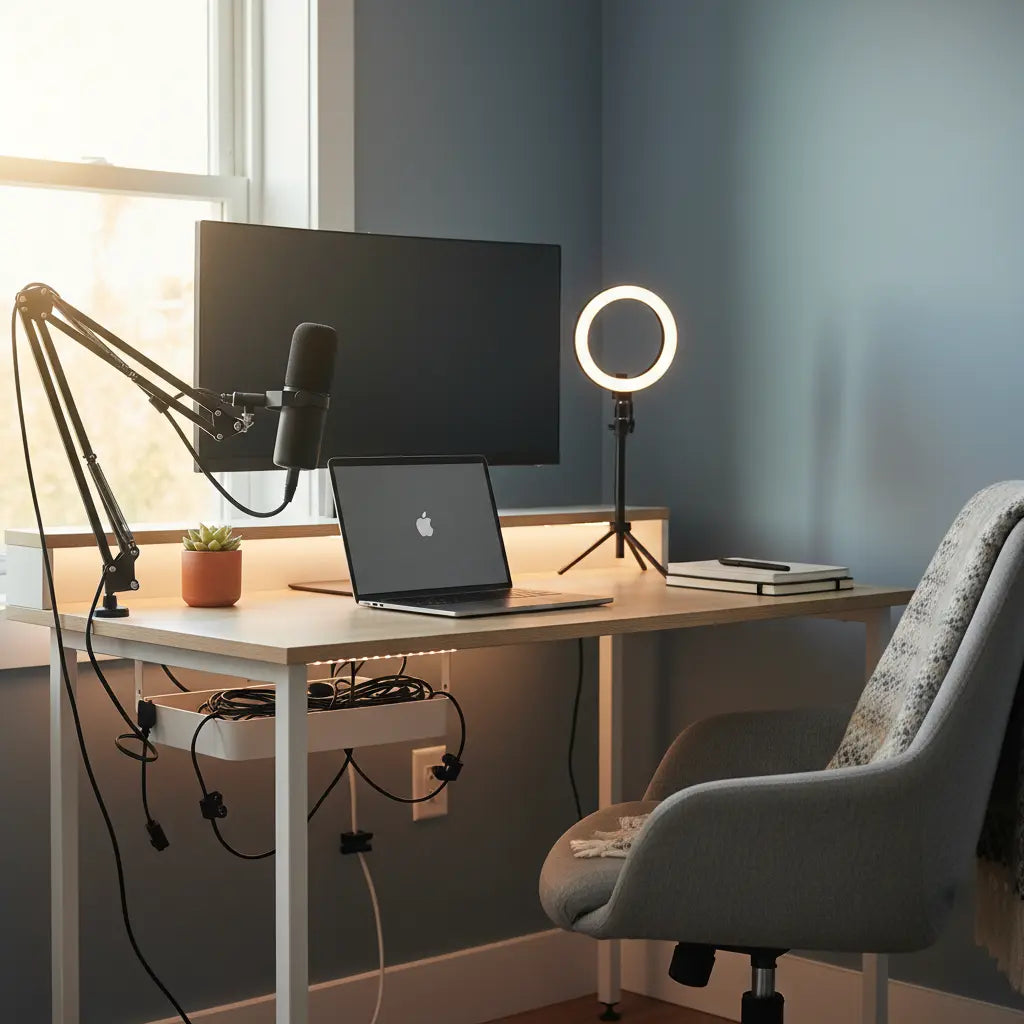
Summary
Building a professional TikTok studio on a budget requires a strategic focus on integrated furniture, high-CRI lighting, and adaptive ergonomics rather than expensive equipment. By utilizing LED-integrated desks and modular organization, creators can transform small bedroom spaces into high-production value environments that meet 2026's competitive content standards.
Key takeaways
- Prioritize Light Quality: Focus on lights with a Color Rendering Index (CRI) of 90+ or a high Television Lighting Consistency Index (TLCI) to ensure professional skin tones and color accuracy.
- Integrated Power is Essential: Choose desks with built-in outlets to manage the high power demands of ring lights, cameras, and chargers without creating visual clutter.
- Adaptive Three-Point Lighting: In small rooms, use corner-mounted key lights and floor-based fill solutions to achieve professional depth without sacrificing floor space.
- Non-Destructive Sound Treatment: Use movable acoustic panels and strategic furniture placement to reduce echo in rentals without permanent wall modifications.
- Dynamic Ergonomics: Optimize your setup for frequent posture changes between active filming and long-form editing sessions to prevent creator-specific strain.
The creator economy has undergone a massive transformation, reaching an estimated market value of over $200 billion as of 2024, with projections suggesting a climb toward $1.5 trillion by 2034. In this hyper-competitive landscape, the "aesthetic gap" between amateur and professional content has narrowed. For aspiring creators, the challenge is no longer just about having a good camera—it is about creating a "Studio-in-a-Box" environment that looks professional on-screen while remaining functional for daily life. This guide explores how to build that pro-level setup using budget-friendly, space-efficient strategies tailored for the modern creator.
How to Choose the Right Foundation: Budget Creator Desks
The desk is the anchor of your studio. Unlike a traditional office desk, a creator's workstation must serve as a filming stage, an editing suite, and a charging hub. When looking for the how to choose the right desk for your home office, you must prioritize features that support video production. This includes a stable surface to prevent camera shake and integrated storage to keep props and gear within reach.
For those working in tight quarters, an affordable gaming desk with built-in power outlets is a game-changer. These integrated power strips allow you to plug in ring lights, key lights, and phone chargers directly into the desk surface, eliminating the "cable waterfall" that often ruins the background of a video. Furthermore, understanding essential desk features for streamers and creators helps in selecting a model that offers the right balance of depth for your monitor and width for your filming equipment.
Logic Summary: We recommend desks with integrated power because creators frequently swap between mobile and desktop setups. Built-in outlets reduce the risk of tripping over cables and improve the visual "cleanliness" of the background, which is critical for high-retention video content.
Materials and Safety: The Invisible Quality Factor
When purchasing budget-friendly furniture, it is easy to overlook the materials used in construction. However, for creators spending 8-12 hours a day in a small bedroom studio, indoor air quality is paramount. It is vital to verify that your desk meets engineered wood safety standards, specifically CARB Phase 2 and EPA TSCA Title VI compliance.
These standards regulate the emission of formaldehyde from engineered wood products like MDF and particle board. As detailed in our comprehensive guide on the topic, factors such as high humidity and temperature can increase off-gassing rates. Choosing certified furniture ensures that your creative space remains a healthy environment, especially in smaller rooms with limited ventilation.
Lighting for Small Spaces: Beyond the Ring Light
Most budget guides suggest a simple ring light, but professional TikTok aesthetics require more depth. In a small bedroom (often under 100 square feet), traditional three-point lighting—consisting of a key, fill, and back light—can be difficult to implement. The key is adaptation.
For your primary source (the key light), aim for a CRI of 90 or higher. Research indicates that for smartphone video, CRI improvements provide more noticeable quality gains than sheer brightness once you reach about 500 lux. If you cannot fit a softbox, use a corner-mounted light angled at 45 degrees to your face. For the fill light, instead of a second stand, consider a floor-based LED panel or even a white foam board to bounce light back onto the shadowed side of your face.

Creating the 'Vibe': Backgrounds and LED Integration
The "vibe" of a TikTok or Reel is often what keeps a viewer from scrolling. This is where accent lighting plays a crucial role. An LED gaming desk collection for aesthetic lighting provides built-in RGB strips that can be color-synced to match your brand or the mood of your video.
To create a professional background in a bedroom:
- Depth is Key: Position your desk at least 2-3 feet away from the back wall to create a natural blur (bokeh) effect, even on mobile cameras.
- Layer Your Lights: Use the desk's built-in LEDs as a "wash" on the wall behind you, then add a small "kicker" light (a small LED cube) to separate your hair and shoulders from the background.
- Modular Props: Keep your background minimalist. Use 2-3 high-quality props that represent your niche, and swap them out to keep the aesthetic fresh.
Integrated Cable Management for Video Aesthetics
One of the biggest "SERP gaps" in creator advice is the distinction between cable management for aesthetics versus workflow. A creator needs to be able to quickly unplug a camera to go handheld or swap a microphone for a voiceover session.

Instead of just hiding cables behind a leg, use a modular routing system. Mount a power strip underneath the desk and use "J-channels" or cable sleeves to group wires by function (e.g., all lighting cables in one sleeve, all data cables in another). This allows you to maintain a clean look for the camera while keeping the ports accessible for quick changes.
Sound Treatment for Renters: Echo Reduction on a Budget
Great video with poor audio will not perform well. In small, rectangular rooms, sound waves bounce off hard surfaces, creating a "hollow" or echoey effect. Since most creators are renters, permanent acoustic foam is rarely an option.
Instead, focus on non-destructive sound diffusion. Large area rugs, heavy curtains, and even an open bookshelf filled with books can act as natural sound absorbers. For targeted treatment, use movable acoustic panels or "sound blankets" that can be hung on temporary hooks during filming and tucked away afterward. This approach addresses the common issue of neighbor noise and internal echo without risking your security deposit.
Ergonomics for the Dynamic Creator Posture
Content creation involves a unique physical demand: the "creator posture." You might spend four hours hunched over a screen editing, followed by two hours of active, standing movement for filming. Traditional office ergonomics often fail to account for this transition.
To maintain health and energy:
- Filming Height: Ensure your camera or phone is at eye level during recording to prevent "tech neck."
- Editing Support: When switching to editing, use a chair with adjustable lumbar support.
- Dynamic Movement: If using an L-shaped desk, designate one side for editing and the other for filming. This physical shift encourages you to change your posture and prevents repetitive strain.
Budget Creator Studio Checklist
| Category | Essential Item | Budget Tip |
|---|---|---|
| Furniture | LED-Integrated Desk | Look for models with built-in USB/Power. |
| Lighting | High-CRI Key Light | Aim for CRI 90+; use a white sheet as a diffuser. |
| Audio | Cardioid Microphone | Use a desk arm to keep it close to your mouth. |
| Aesthetics | RGB Accent Strips | Use the desk's built-in LEDs for wall washes. |
| Organization | Cable Sleeves | Group cables by "Filming" vs "Editing" use. |
Logic Summary: This checklist assumes a starting budget of under $500. We prioritize the desk and lighting because these have the highest impact on visual quality, which is the primary driver of engagement on short-form video platforms.
FAQ
What is the best desk for a TikTok studio setup in a small bedroom? The best desk for a small space is one that maximizes vertical storage and includes integrated power. An L-shaped desk is often ideal for corners, providing separate zones for filming and editing. Look for models with built-in LED lighting to save on the cost and space of additional accent lamps.
How do I get professional lighting for Reels on a budget? Focus on quality over quantity by choosing lights with a high CRI (90+). Instead of buying a massive studio kit, start with one high-quality key light and use "found" reflectors like white walls or foam boards to fill in shadows. Positioning yourself near a window during the day provides the best free "key light" available.
Do I really need a dedicated creator desk? While any flat surface works, a dedicated creator desk offers features like monitor stands, headphone hooks, and built-in power outlets that significantly improve your workflow. These features help you transition from "setup mode" to "creative mode" faster, which is essential for consistent posting schedules.
How can I make my small studio look bigger on camera? To create the illusion of space, use "leading lines" in your background—such as the edge of a desk or a shelf—that point toward the camera. Additionally, using cool-toned LED accent lights on the back wall can create a sense of depth and distance that makes a cramped corner feel like a professional studio.
Is cable management really that important for TikTok? Yes, because viewers are highly sensitive to "visual noise." Cluttered cables in the background can distract from your message and make your content feel amateur. Effective cable management also protects your gear from being accidentally pulled off the desk during high-energy filming sessions.
How do I stop my room from echoing in videos? Echo is caused by sound reflecting off hard surfaces. You can dampen this by adding soft materials to your room, such as rugs, curtains, or even hanging clothes. For a more professional solution, portable acoustic shields that wrap around your microphone can significantly improve audio clarity in untreated rooms.
Related
- Budget-friendly setup ideas
- How to choose the right desk for your home office
- LED gaming desk collection for aesthetic lighting
References
Government / Standards / Regulators
- EPA TSCA Title VI: Formaldehyde Standards for Composite Wood Products
- OSHA: Computer Workstations eTool - Ergonomics
Industry Associations / Research Institutes
- CIE (International Commission on Illumination): Standards for Color Rendering
- Goldman Sachs: The Creator Economy is a $250 Billion Market
Platform Official Docs
- TikTok Creator Academy: Lighting and Sound Basics
Community (Intent Only)
- r/ContentCreation: Budget Studio Megathread (Intent only; not authoritative)
