





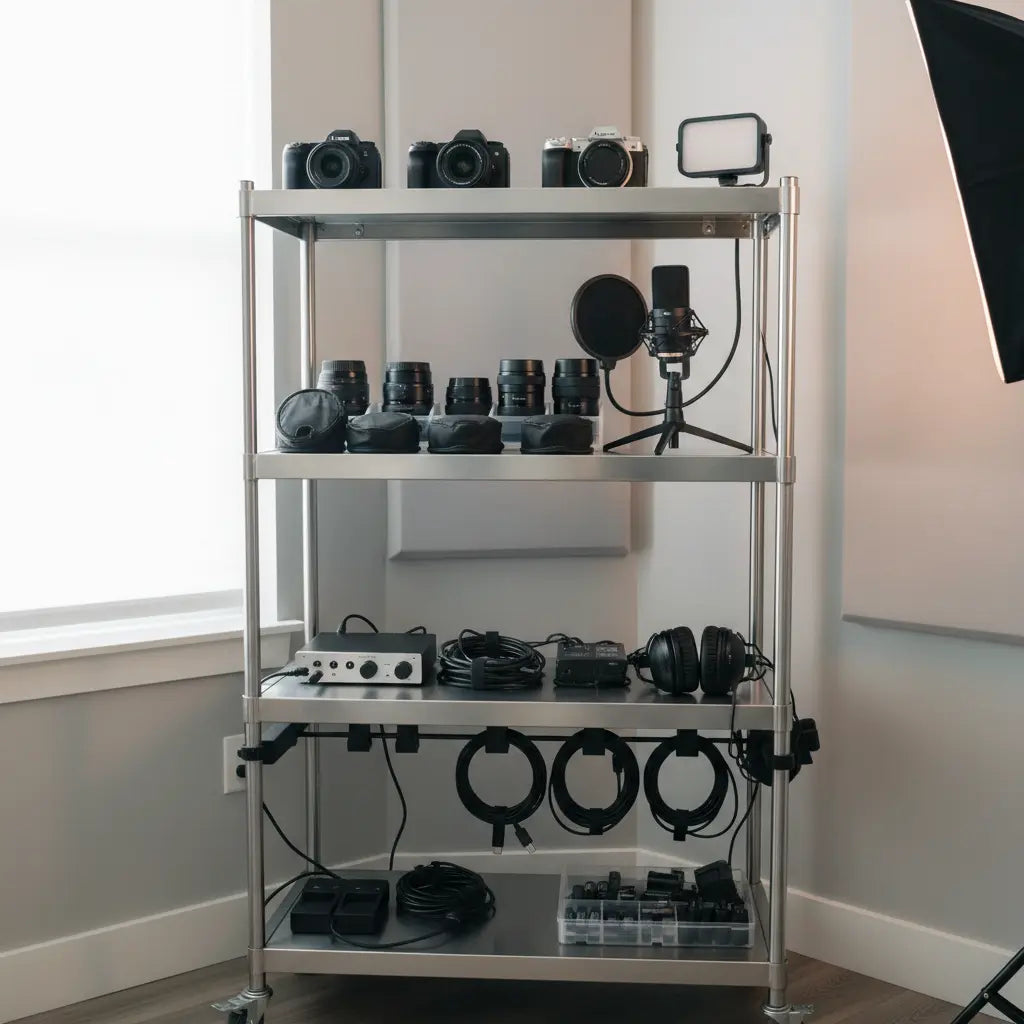
Vertical Creator Studio: Using Bakers Racks for Professional Gear
Many creators face the challenge of building a professional studio in tight living spaces like apartments, dorms, or shared rooms. A bakers rack can become an effective vertical studio solution when you follow practical safety rules, smart gear placement, and intentional cable management. This approach turns an affordable kitchen-style rack into a functional "Studio-in-a-Box" that keeps cameras, lights, microphones, and audio interfaces organized and accessible while minimizing clutter and setup time.
The key is treating the rack as part of your workflow rather than simple storage. By anchoring the unit, placing heavier items low, and planning power and cable routes early, you can create a compact setup that supports fast content production without compromising safety or on-camera appearance.
Quick Start: The Creator’s Rack Checklist
Before you begin assembly, use this "answer-first" checklist to ensure your setup is professional and secure:
- Anchor First: Never load gear until the rack is secured to a wall stud or solid masonry.
- Weight Gradient: Heaviest items (UPS, tripods) on the bottom; lightest (cables, SD cards) on top.
- Power Priority: Install a surge-protected power strip before placing gear to avoid reaching behind heavy equipment.
- Eye-Level Alignment: Position your primary camera and monitor at chest-to-eye height on the middle shelves.
- Cable Slack: Leave 2–3 inches of "service loop" (extra slack) for every cable to prevent port damage during adjustments.
- Stability Test: Gently shake the rack after every two items added to check for center-of-gravity shifts.
Why Bakers Racks Work for Vertical Creator Studios
Bakers racks offer multiple open shelves in a narrow footprint, making them ideal for small-space YouTube studio furniture. Their sturdy metal construction often handles moderate loads, and many models include hooks, power outlets, or adjustable feet that support creative adaptations.
Retail listings frequently describe these racks as compact, multi-purpose storage for small spaces, which aligns well with the needs of digital nomads and budget-conscious streamers. When paired with wall anchoring and thoughtful organization, a bakers rack can reduce desk clutter and speed up gear changes between recording sessions.
However, success depends on respecting stability limits. Tall storage furniture used in a creator studio should be secured against tip-over risk, especially when loaded with expensive gear or placed in a busy room. For safety, anchor tall storage furniture to the wall and treat tip-over prevention as part of the setup, not an optional add-on.

Safety First: Anchoring, Weight, and Power Integrity
Stability is the most important consideration when repurposing a bakers rack for professional gear. Furniture tip-over prevention guidance consistently recommends anti-tip brackets, braces, or wall straps for upright storage units.
1. Wall Anchoring & Hardware Selection
To ensure your gear stays safe, you must match your anchoring hardware to your wall type:
- Drywall/Plaster: Use a stud finder to locate wooden studs and use 2.5-inch wood screws. If no stud is available, use heavy-duty toggle bolts (avoid plastic plug anchors for tall racks).
- Brick/Concrete: Use masonry anchors or Tapcon screws.
- Verification: Once anchored, the rack should not pull away from the wall when a moderate forward force is applied to the top shelf.
2. Load Distribution
Heavier items belong on lower shelves in any vertical storage build to reduce instability. Put the heaviest gear on the lowest shelves and keep lighter accessories higher up. Always verify the manufacturer's weight rating for each shelf. As a rule of thumb, try to keep the bottom 30% of the rack's height holding 60% of the total weight.

3. Power and Airflow Safety
- Surge Protection: Only use power strips with a built-in surge protector (UL-certified) to protect sensitive PC and camera components.
- Heat Dissipation: Ensure audio interfaces and laptops have at least 2 inches of clearance above their vents. Do not stack gear directly on top of heat-producing power bricks.
- Cable Routing: Use Velcro ties rather than plastic zip ties. This prevents "over-tightening" which can damage shielded signal cables (like XLR or HDMI).
This official tip-over prevention guide from the CPSC provides practical anchoring methods that work without special tools.
Recommended Shelf Layout for Creator Gear
Organize your rack using a simple three-zone system that balances safety, reach, and accessibility. This layout follows ergonomic principles while protecting expensive equipment.
- Bottom Zone (Stability): Reserve for the heaviest items. Audio interfaces, larger power supplies, spare batteries, and heavier tripods belong here.
- Middle Zone (Action): Ideal for daily-use gear like cameras, primary microphones, and audio mixers. This zone sits at comfortable waist-to-chest height for most users.
- Top Zone (Lightweight): Limit to lightweight accessories such as cables, memory cards, small lenses, or filters.
Vertical Streaming & On-Camera Layout Ideas
To make your rack "camera-ready," consider these three common arrangements:
- The "Side-Car" Setup: Place the rack at a 45-degree angle to your desk, just out of the camera's frame. This allows you to reach for gear mid-stream without standing up.
- The "Professional Backdrop": If the rack is in the shot, use the top shelves for "set dressing" (plants, awards, or warm LED lights) and keep the "utility" gear (cables/batteries) on the bottom shelves hidden by decorative bins.
- The "Overhead Rig": Use the middle shelf of the rack to mount a top-down camera arm for "unboxing" or "tutorial" style videos. Ensure the rack is anchored to prevent camera shake.
Rack Layout Safety and Efficiency by Shelf Zone
Illustrative heuristic only: lower shelves are safer for heavier gear, middle shelves balance access and stability, and top shelves should stay light and anchored.
View chart data
| Category | Safe weight load | Priority for heavy gear | Reach convenience | Risk if overloaded |
|---|---|---|---|---|
| Bottom | 5.0 | 5.0 | 1.0 | 1.0 |
| Middle | 3.0 | 3.0 | 3.0 | 2.0 |
| Top | 1.0 | 1.0 | 5.0 | 5.0 |
Note: While 24–36 inches of clearance around the rack is a common heuristic for comfortable movement, adjust this based on your specific room dimensions and reach.
Workflow Tips for Streamers, Podcasters, and YouTubers
Setup needs vary by content type. Streamers should prioritize monitor height and camera eye line, keeping top shelves light to avoid a top-heavy feel. Podcasters benefit from microphone arm clearance and clean cable paths that prevent bumping during recording.
Use cable ties, sleeves, or raceways to route wires behind the rack. Mount a power strip with USB ports on a middle shelf or the back of the rack for easy device charging. Label shelves or bins to make locating small items like SD cards or batteries effortless.
Many creators regret discovering that open shelving makes cables highly visible on camera. Plan cable management from day one. Position the rack off-camera when possible, or style visible shelves with neutral backdrops and minimal items to maintain a professional look.
Choosing the Right Bakers Rack for Your Studio
Look for models with these features:
- At least 4–5 tiers for sufficient vertical storage.
- Adjustable or reinforced shelves to accommodate different gear heights.
- Built-in power outlets for convenient device charging.
- Leveling feet to stabilize on uneven floors (essential for preventing camera wobble).
- Compatible wall-anchoring points or a flat back frame.
Bestier's bakers racks with power outlets provide practical organization for studio gear while maintaining a clean aesthetic. Consider their Bestier Bakers Rack with Power Outlet or the taller 60 inch Bakers Rack with Power Outlet for more capacity.
For wall-mounted options that save even more floor space, explore the Industrial 2-Tier Wall-Mounted Bookshelf or similar solutions in the Bestier Baker's Racks collection.
Common Mistakes to Avoid
- The "Top-Heavy" Trap: Placing a heavy PC tower or large monitor on the top shelf. This significantly increases the risk of a catastrophic tip-over.
- Cable Tension: Forgetting to check if cables are long enough when the rack is moved or adjusted. Always test the full range of motion for camera arms.
- Ignoring Floor Type: Placing a tall rack on thick carpet without using a solid base or extra-secure wall anchoring. Carpet can cause "lean" over time.
- Skipping the Leveling: If your rack has leveling feet, use a spirit level. Even a 1-degree tilt can make a camera shot look unprofessional.
How to Build Your Studio-in-a-Box Setup
Follow this step-by-step guide to create a reliable vertical streaming setup:
- Measure & Mark: Mark the rack's footprint plus required clearance. Ensure you are near a grounded wall outlet.
- Secure the Frame: Anchor the rack securely to the wall using the appropriate hardware for your wall type (studs vs. masonry).
- Power Foundation: Install your surge-protected power strip and route the main power cable down the back leg of the rack.
- Bottom-Up Loading: Place your heaviest items (UPS, storage bins) first.
- Ergonomic Placement: Position your "active" gear (camera, mixer) at a height where you don't have to hunch or overextend to reach them.
- Cable Management: Route all signal cables (HDMI, XLR) away from power cables to minimize electronic interference.
- Visual Check: View the rack through your camera lens. Adjust lighting or add "fill" items to any unsightly gaps.
- Stress Test: Ensure all cables have enough slack for daily use and that the rack remains perfectly still when you interact with the gear.
For broader studio planning ideas, review our guide to Professional Home Studio Design or Creator Setup Blueprints for modular approaches.
Important Safety and Comfort Note: This article discusses setup advice and organization strategies for creator equipment. It does not constitute professional advice regarding structural safety, load-bearing capacity, or medical concerns. Anchoring and weight distribution suggestions are general heuristics based on common guidance. Verify all specifications with your specific rack model and consult qualified professionals for installation if you have any doubts about stability or structural integrity. If you experience persistent discomfort from workstation use or have existing health conditions, consult appropriate specialists.
