





Summary
Building a professional-grade music production environment in a small space requires a strategic focus on ergonomic furniture, tiered gear placement, and technical safety standards to ensure both creative flow and audio precision.
Transparency Disclosure: This guide is provided by Bestier. Some links in this article lead to our product pages or specialized guides. Our recommendations are based on industry standards and internal testing to help you build a functional studio on a budget.
Key Takeaways
- Tiered Surfaces: Utilize desks with integrated monitor shelves to keep studio monitors at ear level while freeing up primary desk space for MIDI controllers and interfaces.
- EMI/RFI Mitigation: Proactive cable management and strategic power routing (maintaining a 6-inch gap) are essential in budget setups to prevent electromagnetic interference.
- Material Safety: In small, enclosed home studios, prioritizing furniture that meets CARB Phase 2 and TSCA Title VI standards is critical for maintaining indoor air quality.
- Ergonomic Alignment: Maintaining a neutral spine and proper eye-level monitor placement prevents long-term strain during intensive mixing sessions.
- Hybrid Versatility: Modern budget desks can transition between a professional workstation and a creative studio using modular accessories and integrated power stations.
How to Choose the Right Desk for a Small Music Studio
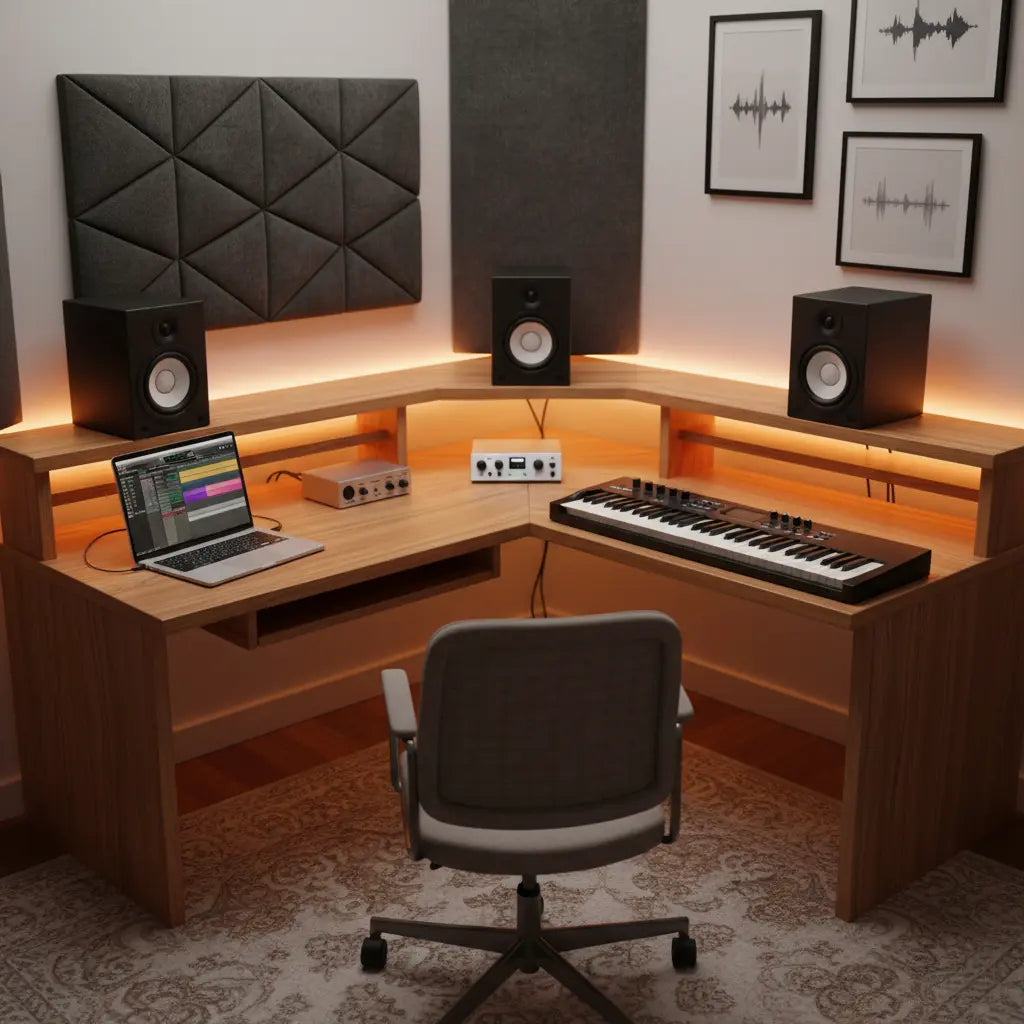
Selecting the foundation of your studio—the desk—is the most critical decision for a small space. In 2026, the trend has shifted toward multi-functional furniture that balances a compact footprint with high-utility features. For most bedroom producers, an LED gaming desk offers a surprisingly effective budget-friendly alternative to expensive custom studio furniture. These desks often include built-in power strips and tiered shelving that are perfect for housing a laptop, an audio interface, and a pair of 5-inch studio monitors.
When evaluating a desk, stability is paramount. Music production involves physical interaction with gear—pressing pads on a MIDI controller or adjusting faders. A wobbly desk can introduce unwanted mechanical noise into your recordings. Look for steel-framed designs with reinforced crossbars. Additionally, consider the depth; you need enough room to place a keyboard and mouse in front of your MIDI controller without feeling cramped.
Expert Tip: This recommendation assumes a standard "in-the-box" production workflow. If you use significant outboard hardware, you may need to prioritize desks with integrated 19-inch rack rails, though these often command a higher price point.
Maximizing Small Space with L-Shaped Studio Layouts
If your studio is confined to a corner, an L-shaped configuration is often the most efficient use of square footage. An L-shaped gaming desk with monitor stand creates a "cockpit" environment where you can rotate between different tasks—such as composing on one side and mixing on the other—without moving your chair.
Case Study: The 1.5m x 2m Bedroom Corner In a typical small bedroom setup, placing a straight desk against a wall often leaves "dead space" in the corner. By using an L-shaped desk, a producer can place their MIDI keyboard on the long wing and their computer/monitors at the junction. This layout allows for better acoustic positioning; by placing your primary monitors at the apex of the "L," you can achieve a more symmetrical listening position relative to the side walls, which is crucial for accurate stereo imaging.

Technical Integrity: Managing EMI and RFI in Budget Setups
One of the most frequent oversights in budget home studio guides is the impact of electromagnetic interference (EMI). In small spaces, where power cables and signal cables are packed tightly, the risk of "hum" in your audio path is high.
To maintain signal integrity, you must separate your power cables from your balanced audio cables. Using pro cable management tricks like under-desk trays can help you route power along one leg of the desk and audio along the other.
Audio Signal Protection Checklist
| Feature | Importance | Recommended Action |
|---|---|---|
| Balanced Cables | High | Use XLR or TRS cables for all monitor and interface connections. |
| Power Conditioning | Medium | Use a high-quality surge protector with EMI/RFI filtering. |
| Cable Routing | High | Maintain at least 6 inches (15cm) of separation between power and audio lines to minimize induction. |
| Shielding | Medium | Ensure your audio interface is not placed directly on top of a power brick. |
Note: The 6-inch separation rule is a standard industry heuristic for unshielded or poorly shielded budget cables to prevent 60Hz hum.
Ergonomics: Protecting Your Body During Long Sessions
Music production is a sedentary activity. Without a proper ergonomic desk height, you risk developing repetitive strain injuries (RSI).
Measurement Standards:
- Desk Height: According to HFES 100-2007 standards, the ideal height for most adults ranges between 28 and 30 inches. Your elbows should rest at a 90-degree angle.
- Monitor Placement: Monitors should form an equilateral triangle with your head (e.g., if speakers are 3 feet apart, they should each be 3 feet from your ears). Tweeters must be at ear level to ensure you are hearing the correct high-frequency response.
If your desk doesn't have a built-in shelf, use isolation stands. This not only improves ergonomics but also decouples the speakers from the desk surface, preventing bass "smearing" caused by desk vibrations.
Indoor Air Quality and Material Safety in Small Rooms
Small home studios are often poorly ventilated, making the chemical composition of your furniture a health factor. Many budget desks use engineered woods that can emit formaldehyde, a volatile organic compound (VOC).
When shopping for a professional home studio design, verify that materials meet CARB Phase 2 and EPA TSCA Title VI standards. These regulations limit formaldehyde emissions to 0.05 ppm (parts per million) for hardwood plywood and 0.11 ppm for particleboard.
How to Monitor and Mitigate VOCs:
- The "New Smell" Test: If a strong chemical odor persists beyond 72 hours, increase ventilation immediately.
- Detection: For enclosed spaces, consider a DIY formaldehyde test kit or a digital VOC sensor (available for $30-$60) to ensure levels remain below 0.1 ppm.
- Action: If you experience persistent headaches or respiratory irritation, move the furniture to a ventilated area or consult a professional environmental testing agency.
For a deeper dive, refer to our guide on engineered wood safety standards.
Logic Summary: This safety guidance is critical for "bedroom producers" who sleep in the same room where they work. High VOC levels in a sleeping area can lead to poor sleep quality and respiratory fatigue.
The Hybrid Creator: Balancing Work and Music
In 2026, many creators use the same desk for their day job and music production. A clean, organized surface is the key. Using a keyboard tray for your MIDI controller allows you to slide it out of sight during professional calls, while a monitor arm can help you reposition your screen for better ergonomics during spreadsheets vs. DAW editing.

Essential Gear Placement for Small Spaces
To maximize a compact setup, follow these placement heuristics:
- Primary Zone (0-15"): Computer keyboard, mouse, and primary MIDI controller.
- Secondary Zone (15-24"): Audio interfaces, headphone amps, and secondary controllers.
- Reference Zone: Studio monitors on the highest tier, angled precisely toward the listening position.
FAQ
What is the best desk height for music production? The ideal height typically ranges between 28 and 30 inches. This follows BIFMA/HFES guidelines to ensure your forearms remain parallel to the floor, preventing wrist strain.
Do I really need a special desk for music production? Not necessarily, but you need a desk that handles the weight and layout. A standard office desk may lack the depth for a MIDI controller or the stability to prevent monitor vibration.
How can I stop my desk from vibrating when I play music? Use high-density foam isolation pads or specialized "puck" isolators under your monitors. This prevents the desk from acting as a resonator, which can make your mixes sound "muddy."
Is an L-shaped desk better than a straight desk for a small room? Yes, in most small rooms, an L-shaped desk utilizes corner space that is otherwise wasted and allows you to separate "admin work" from "creative work."
Are budget desks safe for small, unventilated rooms? They are safe if they meet CARB Phase 2 or TSCA Title VI standards. If setting up in a small room, we recommend using an air purifier with a HEPA and carbon filter to manage indoor air quality.
References
Government / Standards / Regulators
- EPA: Formaldehyde Emission Standards for Composite Wood Products
- OSHA: Computer Workstations eTool - Ergonomics
- California Air Resources Board: CARB Phase 2 Formaldehyde Regulation
Industry Associations / Research Institutes
- Audio Engineering Society (AES): Technical Council on Studio Design
- Human Factors and Ergonomics Society (HFES): Ergonomic Standards for Office Workspaces
Academic / Whitepapers
- Acoustical Society of America: Room Acoustics for Small Home Studios
Platform Official Docs
- Ableton: Setting up a Home Studio Guide
- Sound on Sound: Studio SOS: Small Room Solutions
YMYL Disclaimer: The information provided in this article, particularly regarding indoor air quality and ergonomics, is for educational purposes only and does not constitute medical or legal advice. If you suspect hazardous levels of formaldehyde or VOCs in your home, or if you are experiencing persistent health issues, please contact a certified environmental testing agency or a healthcare professional. Always follow local building codes and safety regulations when setting up electrical equipment.
