





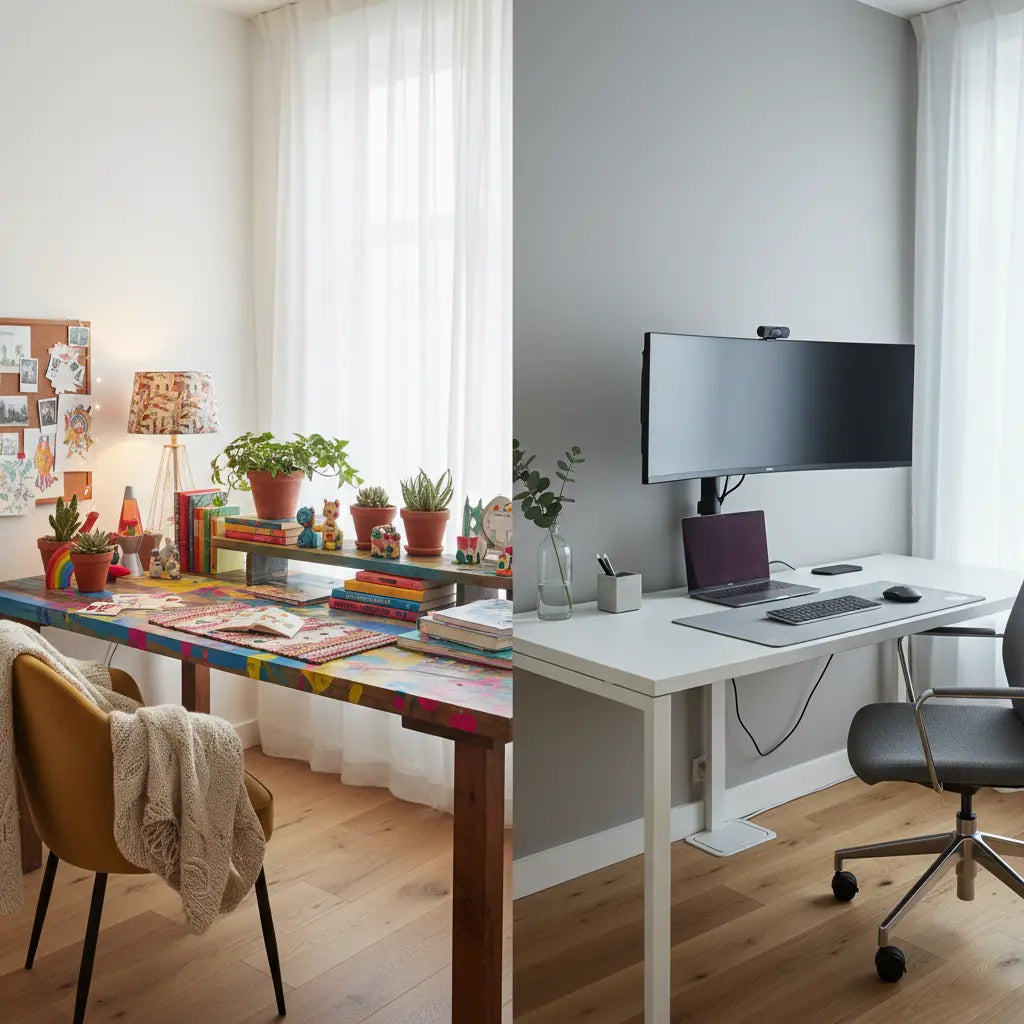
Your workspace aesthetic can either energize you to sit down and get started or help you stay focused once you begin. The choice between vibrant dopamine decor and clean minimalist tech depends less on which trend is popular in 2026 and more on how you actually work, the size of your room, and whether your priority is mood support or visual calm. This guide breaks down the practical differences, shows when each style tends to fit better, and gives budget-conscious steps to build a setup that looks intentional without sacrificing comfort or function.

What Dopamine Decor and Minimalist Tech Actually Mean for a Desk
Dopamine decor refers to intentionally colorful, personalized workspaces filled with items that spark joy and creativity. Think layered textures, plants, art prints, warm lighting accents, and small decorative objects that make the desk feel alive and motivating. The goal is to create an environment that lifts your mood and makes starting work feel rewarding rather than like a chore.
Minimalist tech, on the other hand, emphasizes intentional simplicity and streamlined technology. It favors neutral colors, clean lines, hidden cables, and only the essential tools you need. The aesthetic avoids visual noise so your attention stays on the screen and the task rather than competing decorations. It is not about rejecting technology but about making sure the tech serves you without distraction.
Both approaches can look high-end when executed well. The difference lies in what they prioritize: dopamine decor invests in emotional engagement while minimalist tech invests in frictionless focus.
Which Style Fits Your Workflow Better
The biggest information gain for most readers is realizing that neither style is universally superior. The right choice depends on your daily tasks, sensitivity to visual input, and room constraints.

Dopamine decor often suits people who need an inviting visual cue to begin work, especially in new home offices or when motivation fluctuates. Students mixing study with creative projects, content creators building camera-friendly backgrounds, or anyone who finds a sterile space draining may benefit from thoughtful color and personality. However, the style requires strong organization habits to prevent it from crossing into clutter.
Minimalist tech tends to work better for long deep-work sessions, remote professionals handling back-to-back calls, or users in smaller rooms where every added item competes for space. It reduces visual fatigue and makes maintenance easier, which matters when your desk must stay functional for hours at a time.
A common regret is choosing dopamine decor before solving basic functional problems. If your desk surface is already crowded, cables are everywhere, or monitor placement causes glare, adding more visual elements can increase stress rather than reduce it. In those cases, minimalist tech provides a safer starting point.
Heuristic Fit Guide
After fixing ergonomics, lighting, and cable clutter first, dopamine decor is the stronger starting point for motivation, mood lift, short work bursts, ADHD cues, and fresh setups. Minimalist tech is the safer starting point for long deep-work sessions, visual calm, tight rooms, video calls, and lower distraction. This is an illustrative rule-of-thumb, not a quantified finding.
Heuristic Fit Guide
Use after fixing ergonomics, lighting, and cable clutter first.
View chart data
| Category | Dopamine decor | Minimalist tech |
|---|---|---|
| Motivation / mood lift | 3.0 | 1.0 |
| Short work bursts | 3.0 | 1.0 |
| ADHD cues / fresh setup | 3.0 | 1.0 |
| Long deep work | 1.0 | 3.0 |
| Visual calm | 1.0 | 3.0 |
| Tight space / video calls | 1.0 | 3.0 |
| Reduce fatigue / distraction | 1.0 | 3.0 |
| Ergonomics, lighting, cables first | 0.0 | 0.0 |
Illustrative heuristic based on practical fit rules and scenario-matrix guidance. Relative 3-level scoring only; no measured statistics implied.
How to Build a Dopamine Decor Desk on a Budget
Start with the functional foundation before adding personality. Choose an L-shaped or spacious desk that provides distinct zones for work, storage, and display. This Bestier 42" Reversible L-Shaped Gaming Desk with Power Outlets, LED Lights, Monitor Stand, Storage Shelves and Hooks offers built-in power, lighting options, and shelving that serve as a strong base for either style.
Layer in color and texture gradually. Use warm LED or RGB lighting to highlight specific areas rather than flooding the entire desk. Our guide on How to Build a Dopamine Desk Setup for Better Focus explains how to use lighting science and cable management to keep the energetic look from becoming overwhelming.
Add a few meaningful objects: small plants, a colorful notebook, or one art print. Limit surface items to what fits comfortably within arm's reach without crowding your keyboard and mouse. For ADHD-friendly execution, follow the ADHD-Friendly Desk Setup: Organization Tips for Better Focus to create visual zones that support executive function rather than distract from it.
Creating a Minimalist Tech Desk That Still Feels Premium
The key to minimalist tech is intentional subtraction. Select furniture with clean lines and built-in cable channels or power integration. The same Bestier L-shaped desk works here too when configured with neutral accessories and hidden wiring.
Prioritize quality over quantity. Invest in a comfortable chair, properly positioned monitor, and even lighting that reduces glare. Learn Pro Cable Management Tricks for a Clean Gaming Setup to keep cords completely out of sight, which instantly elevates the polished look.
For lighting, compare options in our article RGB vs. LED Lights: Which Is Better for Gaming Setup?. Stable neutral LEDs often provide better focus lighting than dynamic RGB for minimalist setups. If you want smart control without visual clutter, explore Smart Home Furniture: Syncing Bestier with Razer Chroma & Alexa for subtle integration.
Common Pitfalls and How to Avoid Them
Poor lighting and screen glare remain two of the most frequent causes of discomfort regardless of aesthetic. As guidance from the Canadian Centre for Occupational Health and Safety explains, poor lighting and glare can make computer work less comfortable and contribute to eye discomfort. Position lights to the side rather than behind or directly above your monitor.
Clutter is another risk, particularly with dopamine decor. Research summarized by Nuvance Health notes that clutter is commonly associated with more stress and more difficulty focusing. Set a rule that every new decorative item must replace something else or fit into designated storage.
Never let aesthetics override ergonomics. According to the University of Pennsylvania's ergonomics resources, the setup must match the person so the workstation supports comfort and work efficiency. Check that your chair, desk height, and screen position feel right before investing in decor.
Workspace design includes more than decoration. U.S. General Services Administration policy reminds us that workspace design goes beyond décor and includes furnishings, acoustics, privacy, and how space is allocated. In a home setting this means ensuring you have enough surface area for your tasks and storage for supplies.
How to Choose the Right Desk Aesthetic for Your Room
Follow this practical checklist before buying:
- Measure your available space and note natural light sources.
- List your three most common daily tasks and how long each typically lasts.
- Assess your sensitivity to visual stimulation. Do busy patterns energize or distract you?
- Check current cable and storage situation. Can you maintain order easily?
- Set a realistic budget split: at least 60-70% should go toward the desk, chair, lighting, and cable solutions before decorative items.
- Test the setup for one week using temporary items before committing to permanent decor.
If your room already feels dark or uninspiring and your work includes creative or varied tasks, introduce dopamine elements gradually after the functional base is complete. If you spend most of the day in focused screen work or attend many video calls, lean minimalist and add only one or two personal touches.
Making Either Style Look Expensive on a Budget
Both aesthetics benefit from the same high-impact upgrades: excellent cable management, layered lighting (task plus ambient), and quality materials in the furniture base. Smart power outlets and integrated LED strips can make even modest desks appear custom-built.
Choose versatile pieces that transition between styles. An L-shaped desk with multiple storage options gives you flexibility to experiment. Neutral base colors allow easy swaps between vibrant accents and clean minimal accessories as your needs change.
Remember that visual comfort matters in how people experience a workspace, especially with constant screen use. The most expensive-looking setups are those where every element serves a purpose and nothing competes for attention unnecessarily.
This Article Is About Comfort and Setup Advice
This article discusses aesthetic preferences, organization strategies, and practical workspace setup. It does not constitute medical advice, diagnosis, or treatment. If you experience persistent discomfort, eye strain, or other symptoms, consult qualified healthcare or ergonomics professionals.
The best desk aesthetic is the one you will actually maintain and enjoy using every day. Whether you choose the energetic personality of dopamine decor or the calm precision of minimalist tech, start with ergonomics, lighting, and organization. Once those foundations are solid, the decorative choices become tools that support your workflow rather than distractions from it.
Experiment thoughtfully, observe how different configurations affect your energy and focus, and adjust over time. In 2026, the most successful home offices combine personal expression with practical function, creating spaces that both look good and work well for the unique way you work.
