





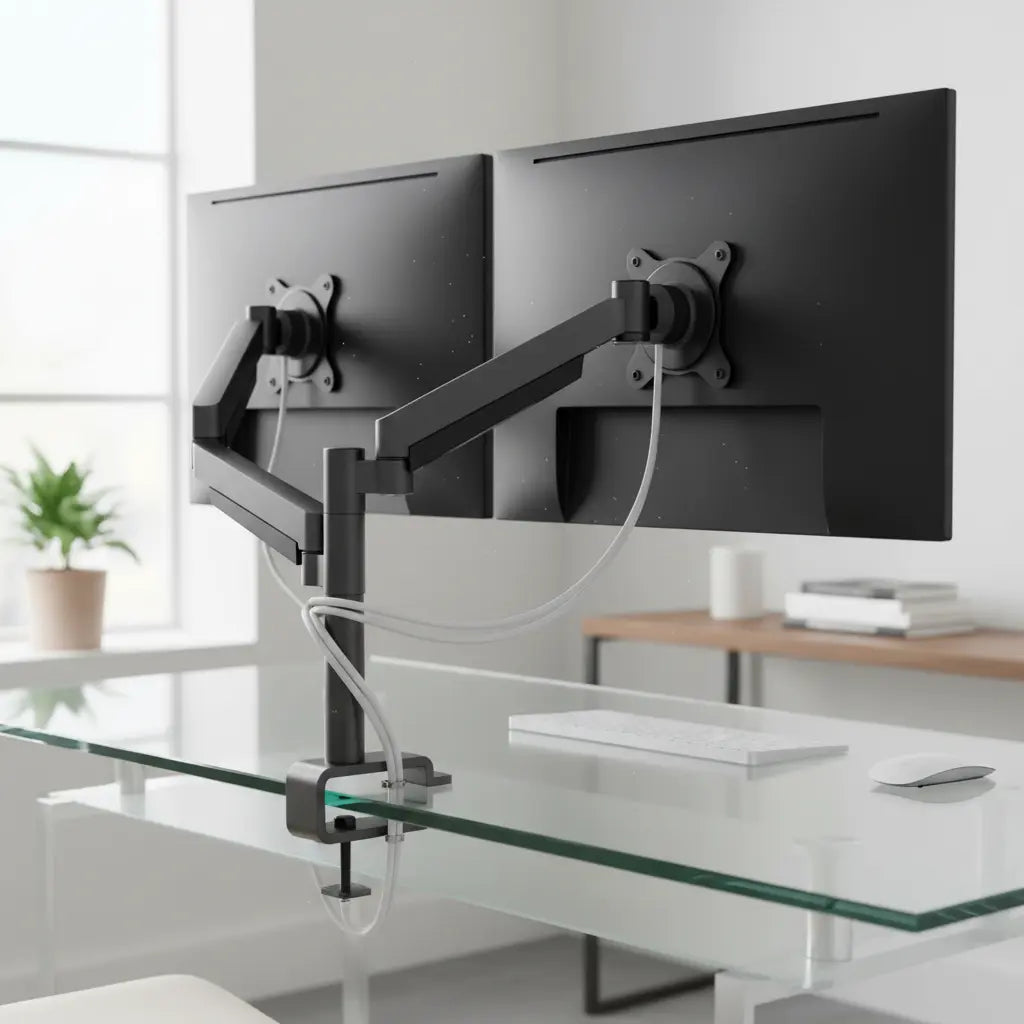
Summary
Mounting a monitor arm on a glass desk is safe only when using tempered glass of at least 10mm thickness and employing a dedicated reinforcement plate to distribute pressure. This guide provides the engineering-backed steps to prevent glass shattering by managing point loads and torque through proper hardware selection and installation techniques.
Key takeaways
- Verify Glass Type: Only use monitor arms on tempered glass; never attempt mounting on annealed or laminated glass surfaces.
- Use Reinforcement Plates: A metal or high-density acrylic plate (minimum 6x6 inches) is mandatory to distribute the clamp's pressure across a larger surface area.
- Observe Minimum Thickness: Ensure your glass is at least 10mm thick for a single monitor and 12mm or more for dual-monitor configurations.
- Manage Torque and Weight: Reduce the monitor arm's rated weight capacity by 40-60% for glass applications and avoid overtightening the clamp.
- Edge Clearance: Maintain a distance of at least four times the glass thickness between the clamp and any desk edge or corner.
Understanding the Risks: Can You Put a Monitor Arm on a Glass Desk?
The short answer is yes, but the technical execution determines whether your setup remains stable or results in a catastrophic failure. The primary risk with glass desks is not the weight of the monitor itself, but the "point load" and "leverage torque" created by the monitor arm's clamp. Glass is exceptionally strong under compression but vulnerable to tension and localized stress.
Standard monitor arm clamps are designed for wood or metal, focusing high pressure on a small area (usually 2-4 square inches). On glass, this concentrated force can exceed the material's internal tension limits, leading to immediate or delayed shattering. Furthermore, the "lever effect" created when you extend a monitor arm away from the base multiplies the force exerted on the glass edge. To mitigate these risks, you must shift from a point-load mindset to a distributed-load strategy.
While glass safety is a distinct engineering challenge, it shares a common goal with other furniture standards: ensuring a healthy and secure environment. For instance, when choosing wood-based furniture, consumers often look for compliance with Engineered Wood Safety: A Comprehensive Guide to CARB & TSCA Standards, which details how formaldehyde emissions are regulated to protect indoor air quality. Similarly, glass desk safety relies on adhering to tempered glass standards (like ASTM C1048) to ensure the material can handle the mechanical stresses of modern office hardware.
Logic Summary: This guidance assumes the use of high-quality tempered glass. It does not apply to non-tempered (annealed) glass, which breaks into large, sharp shards and lacks the structural integrity for clamping.
Essential Safety Specifications for Glass Desk Monitor Mounts
Before purchasing hardware, you must audit your current desk's specifications. Not all glass tops are created equal, and the margin for error is significantly smaller than with a complete home office desk setup guide involving solid wood.
Minimum Glass Thickness and Weight Derating
For a single monitor setup, a glass thickness of 10mm (approximately 0.4 inches) is the industry-standard minimum. If you are planning a dual-monitor setup, the increased torque and asymmetric loading require a minimum of 12mm.
Crucially, you should "derate" the monitor arm's weight capacity. If a manufacturer claims an arm can hold 20 lbs, treat its limit as 10-12 lbs when mounting on glass. This safety buffer accounts for the dynamic forces generated when you adjust the arm's height or tilt.
The 4x Edge Rule
The edges of a tempered glass sheet are its most vulnerable points. Placing a clamp too close to the edge increases the risk of "edge chipping," which can trigger the entire pane to fail. A reliable heuristic is the 4x Rule: the center of your clamp should be at least four times the thickness of the glass away from any edge. For a 10mm desk, this means a minimum 40mm (1.6 inches) clearance.
| Feature | Single Monitor Requirement | Dual Monitor Requirement |
|---|---|---|
| Min. Glass Thickness | 10mm (0.4") | 12mm (0.5") |
| Glass Type | Tempered (Heat-Strengthened) | Tempered (Heat-Strengthened) |
| Reinforcement Plate | Recommended (4x4" min) | Mandatory (6x6" min) |
| Weight Buffer | 40% reduction of rated max | 60% reduction of rated max |
| Edge Clearance | 4x Glass Thickness | 5x Glass Thickness |
How to Choose the Best Monitor Arm for Glass Top Desk Safety
When searching for the best monitor arm for glass top desk safety, prioritize models with wide, flat clamp bases. Avoid "C-clamps" with small, circular pressure points. Instead, look for "Grommet mounts" if your desk has a pre-drilled hole, as these distribute pressure more evenly across both the top and bottom surfaces.
The Role of Reinforcement Plates
A reinforcement plate is a non-negotiable accessory for glass setups. These plates, usually made of steel or high-density aluminum, sit between the clamp and the glass. They effectively expand the footprint of the clamp from a few square inches to 36 square inches or more.
When selecting a plate, ensure it includes a soft interface material, such as neoprene or high-density felt. This prevents direct metal-to-glass contact, which can cause microscopic scratches that weaken the tempered surface over time. If your chosen arm doesn't include a plate, you can purchase universal kits or even use a L-shaped gaming desk with integrated monitor stand that bypasses the need for edge-clamping altogether.

Step-by-Step Guide: How to Mount Dual Monitors on Glass Desk Safely
Proper installation is as much about the process as it is about the hardware. Follow these steps to ensure a secure fit without overstressing the material.
- Clean the Surface: Use isopropyl alcohol to remove all oils and dust from both sides of the glass where the clamp will sit. Debris can create "pressure hotspots" or cause the clamp to slip.
- Position the Reinforcement Plates: Place the upper plate on the desk surface, ensuring it meets the 4x edge clearance rule. If you are using an adjustable height standing desk, ensure the plates won't interfere with the lifting mechanism.
- Align the Clamp: Open the monitor arm clamp fully and slide it over the reinforcement plates. Ensure the clamp is perfectly centered on the plates.
- Tighten Gradually: Tighten the clamp until it is "finger-tight." Then, give it another half-turn with a tool. Do not exceed 8-10 inch-pounds of torque. Overtightening is the leading cause of glass desk failure.
- Check for Stability: Gently wiggle the base of the arm. If it moves, tighten in very small increments (1/8 turn) until stable. If you notice the desk flexing, stop immediately; you may need to learn how to stabilize a wobbly desk before proceeding.
- Mount the Monitors: Attach the monitors only after the base is secure. For dual setups, mount both monitors before making significant adjustments to ensure the weight remains balanced.

Maintenance and Long-Term Fatigue: Ensuring Your Setup Stays Secure
Glass is subject to "static fatigue," where a constant load can slowly weaken the material over years. This is compounded by thermal stress—changes in room temperature cause the glass and the metal clamp to expand and contract at different rates.
To maintain safety, perform a Weekly Visual Inspection:
- Check the glass around the clamp for "spider-web" micro-fractures.
- Ensure the protective padding hasn't compressed or slipped.
- Verify that the clamp hasn't loosened due to vibration or thermal cycles.
Additionally, consider cable management solutions for monitor arms to prevent cables from pulling on the arm, which adds unnecessary dynamic tension to the glass. Following ergonomic monitor positioning guidelines will also help you find a "set and forget" position, reducing the frequency of adjustments that stress the mounting point.
Logic Summary: These maintenance steps are designed to catch early signs of material fatigue. If any micro-cracks are detected, the monitor arm must be removed immediately, and the glass top should be replaced, as tempered glass cannot be repaired once its structural integrity is compromised.
FAQ
Can you put a monitor arm on a glass desk without a reinforcement plate? It is highly discouraged to mount a monitor arm on a glass desk without a reinforcement plate. Without a plate, the clamp exerts concentrated pressure on a very small area, which significantly increases the risk of the tempered glass shattering. A reinforcement plate distributes this force across a larger surface, typically 6x6 inches or more, bringing the pressure within safe limits for the material.
How do I know if my glass desk is tempered? Most tempered glass furniture features a small, permanent laser-etched "bug" or logo in a corner, often accompanied by the word "Tempered" or a standard code like "ASTM C1048." If no mark is visible, look at the edges; tempered glass usually has smooth, rounded edges, whereas annealed glass may have sharper, more uneven edges. If you are still unsure, contact the manufacturer before attempting to mount any heavy hardware.
Is a dual monitor mount safe for a glass desk? A dual monitor mount is safe only if the glass is at least 12mm thick and a high-quality reinforcement plate is used. Dual mounts create significant "torsional stress" (twisting force) when the monitors are moved or positioned asymmetrically. To ensure safety, always keep the monitors balanced and avoid extending the arms to their maximum reach, which creates a powerful lever effect on the glass edge.
What is the maximum weight a glass desk can hold with a monitor arm? The maximum weight depends on the glass thickness and the quality of the reinforcement, but a general rule of thumb is to never exceed 50% of the desk's rated static load capacity when using a clamp. For a standard 10mm tempered glass desk, a total weight (arm + monitors) of 25-30 lbs is typically the upper safe limit, provided the weight is properly distributed via plates.
Will a monitor arm scratch my glass desk? A monitor arm can scratch glass if the metal clamp makes direct contact with the surface or if dust and grit get trapped between them. To prevent this, always use a reinforcement plate with a soft interface material like rubber, neoprene, or felt. Cleaning the glass with isopropyl alcohol before installation is also a critical step to remove abrasive particles that could cause microscopic damage.
Can temperature changes cause a glass desk with a monitor arm to break? Yes, extreme or rapid temperature changes can cause "thermal shock." Metal clamps and glass expand and contract at different rates; if a clamp is already very tight, a drop in temperature can cause the metal to contract and increase the pressure on the glass beyond its breaking point. Keep your workspace at a relatively stable temperature and avoid placing the desk directly in front of high-output heaters or air conditioning vents.
References
Government / Standards / Regulators
- ASTM C1048 - Standard Specification for Heat-Strengthened and Fully Tempered Flat Glass
- U.S. Consumer Product Safety Commission (CPSC) - Glass Furniture Safety
Industry Associations / Research Institutes
- National Glass Association (NGA) - Engineering Standards for Architectural Glass
- BIFMA X5.5 - Desk and Table Products - Safety and Performance Standards
Academic / Whitepapers / Labs
- Glass Association of North America (GANA) - Proper Handling and Installation of Tempered Glass
- Research on Static Fatigue in Tempered Glass Surfaces (Intent only; not authoritative)
Platform Official Docs & Policies
- Engineered Wood Safety: A Comprehensive Guide to CARB & TSCA Standards (Authoritative Reference for Material Safety)
