





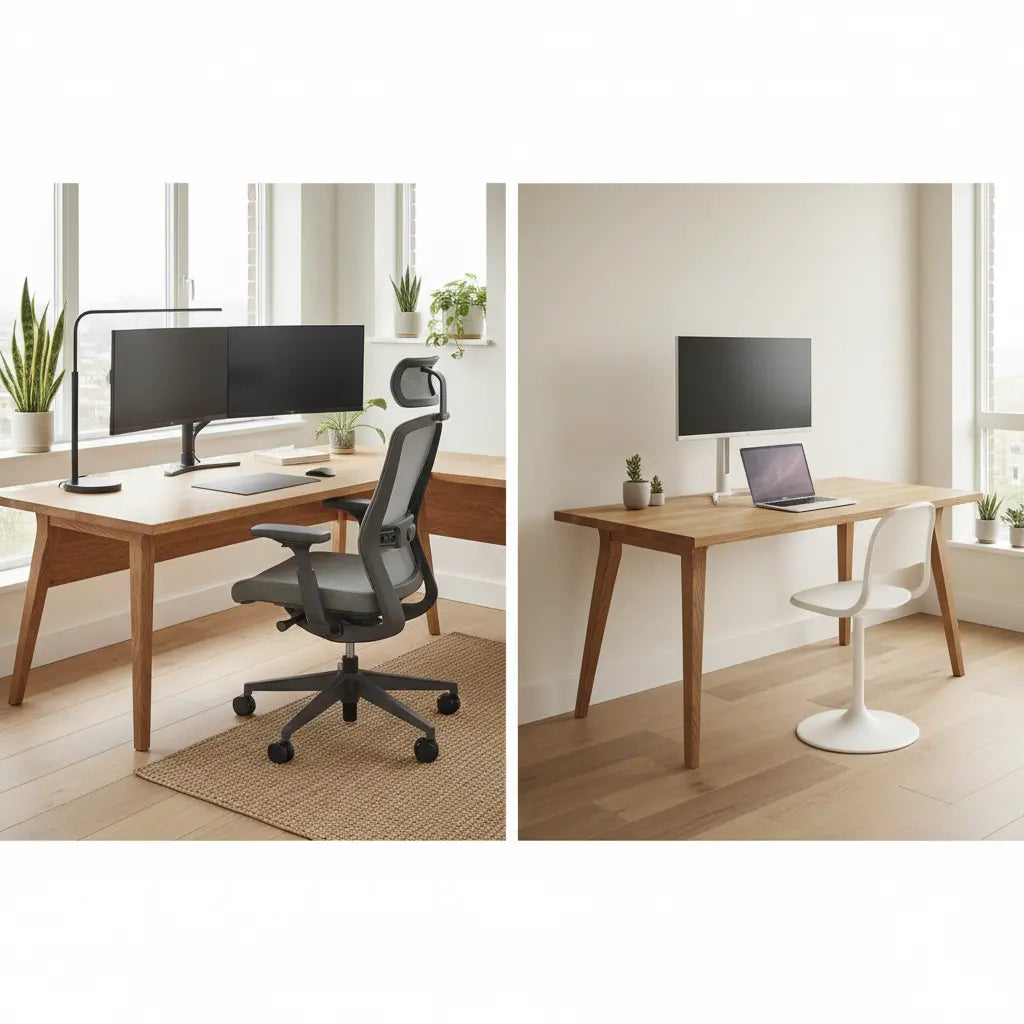
Summary
Choosing between an L-shaped desk and a straight desk depends primarily on your available floor plan and the complexity of your daily workflow. While straight desks offer minimalist versatility and easier placement in narrow rooms, L-shaped desks maximize corner efficiency and provide distinct zones for multi-tasking, making them the superior choice for high-productivity home offices and multi-monitor gaming setups.

Key takeaways
- Spatial Efficiency: L-shaped desks utilize often-neglected corner space, making them ideal for small rooms where wall space is limited but floor area allows for a deeper footprint.
- Ergonomic Advantage: The "reach zone" of an L-shaped desk is significantly larger, allowing users to access more equipment without straining or excessive chair movement.
- Workflow Separation: L-shaped layouts enable a "Command Center" feel, physically separating digital work (monitors) from analog tasks (paperwork or secondary devices).
- Placement Flexibility: Straight desks are easier to move and fit into more diverse room configurations, whereas L-shaped desks are often locked into corner placements.
- Assembly & Mobility: Straight desks generally involve simpler assembly and are more portable for those who frequently rearrange their workspace.
How to Map Your Room: Spatial Efficiency and Floor Plan Mapping
When deciding on a desk layout, the first step is a rigorous assessment of your room’s "traffic flow." A common mistake in home office design is choosing a desk based on surface area alone without considering the clearance needed for movement. For a functional setup in 2026, interior design standards suggest maintaining a minimum of 36 inches for primary walkways and at least 48 inches of clearance behind the desk for chair movement and reclining.
Straight desks are the "Swiss Army Knife" of furniture; they can sit flush against a wall, float in the center of a room, or be tucked into a closet nook. This makes them the guide to choosing the right desk size for users in studio apartments or multi-purpose rooms. However, if your room has an empty corner, a straight desk often leaves "dead space" that collects dust rather than utility.
In contrast, an L-shaped desk is designed to reclaim that corner. By extending two work surfaces at a 90-degree angle, you effectively double your reachable surface area without doubling the desk's footprint in the room. This is particularly effective for small rooms where you need to fit a large workstation without blocking windows or doorways. When planning, ensure you account for the "return" side of the L-desk, as this can sometimes interfere with drawers or heaters if not measured correctly.
Logic Summary: This spatial guidance assumes a standard residential room size. The 36/48-inch clearance rules are industry heuristics to prevent "cramping" and ensure long-term comfort. These may be adjusted for ultra-compact "cloffice" (closet office) setups.
Ergonomic Reach Zones: Optimizing Your Workflow for 2026
Ergonomics in 2026 has moved beyond just chair height; it is now about "Reach Zone Optimization." Human factors engineering categorizes your desk into three zones: the Primary Zone (items reached with elbows at sides), the Secondary Zone (items reached with arms extended), and the Tertiary Zone (items requiring a lean or stand).
Straight desks excel in the Primary Zone for single-task workflows. If you only use a laptop and a mouse, a straight desk like this 60-inch straight desk with power outlets provides a clean, focused environment. However, once you add a second monitor, a printer, or a tablet, a straight desk forces you into the Tertiary Zone, leading to repetitive reaching and potential shoulder strain.

L-shaped desks solve this by wrapping the Primary and Secondary zones around the user. By pivoting your chair just 45 to 90 degrees, you can access a completely different work surface. This "cockpit" effect reduces the physical distance between your most-used tools. However, a critical SERP gap often ignored is the "dead corner" of an L-desk. If the corner is too deep, it becomes a graveyard for cables and unused peripherals. To maximize this, look for desks with a slight curve or integrated cable management in the corner to keep the area productive.
Professional vs. Gaming: Comparing L-Shaped and Straight Layouts
The choice of desk often mirrors your primary activity. For professional use, the L-shaped desk is favored for its ability to separate "Deep Work" from "Administrative Tasks." You might have your computer on the main wing and your notebook, scanner, or secondary laptop on the return. This physical separation helps with cognitive flow, signaling to your brain which task you are currently focusing on.
For gamers, the debate is equally fierce. When comparing L-shaped and straight desks for gaming setups, the L-shape is the clear winner for streamers and multi-PC users. It provides ample room for a primary gaming monitor, a vertical chat monitor, and dedicated space for a mixer or stream deck. Straight desks remain popular for competitive FPS (First-Person Shooter) players who prefer a wide, unobstructed surface for large mouse movements and a minimalist aesthetic.
If you are looking for a specific recommendation that bridges both worlds, this 63-inch L-shaped desk with charging station offers the farmhouse aesthetic suitable for a professional office with the tech-ready features (like built-in power) that gamers demand.
Material Safety and the "Invisible" Quality Factor
Beyond the shape, the materials used in your desk significantly impact your home's air quality. Most modern desks are constructed from engineered wood, which can sometimes emit formaldehyde. In 2026, health-conscious consumers should prioritize furniture that meets CARB Phase 2 and EPA TSCA Title VI standards.
For a deeper dive into why these regulations matter, we recommend reading our Engineered Wood Safety: A Comprehensive Guide to CARB & TSCA Standards. This authoritative guide explains how these standards limit off-gassing in materials like MDF and particle board, ensuring your home office remains a healthy environment. Choosing a desk that adheres to these standards is just as important as choosing the right shape for your back.
Decision Framework: L-Shaped vs. Straight Desk Comparison
To help you visualize the trade-offs, use the following table to compare the two layouts across key performance indicators.
| Feature | Straight Desk | L-Shaped Desk |
|---|---|---|
| Space Efficiency | High (in narrow rooms) | Ultra-High (in corners) |
| Surface Area | Moderate | High to Very High |
| Ergonomics | Linear (limited reach) | Radial (optimal reach) |
| Assembly Time | 30–60 Minutes | 60–120 Minutes |
| Mobility | Easy to move/reposition | Difficult to move |
| Multi-Tasking | Moderate | Excellent (distinct zones) |
| Cable Management | Visible (requires kits) | Often integrated/hidden |
Logic Summary: This table assumes standard retail sizes (48"-60" for straight, 55"-70" for L-shaped). Assembly times are estimates based on average consumer feedback and may vary by brand and complexity.
The Psychological Impact: Cognitive Flow and Task Switching
An underrated factor in desk selection is how the layout affects your mental state. A straight desk promotes a "linear" thought process. It is excellent for "single-threaded" work where you need to focus on one screen or one document at a time. The lack of visual distractions in your peripheral vision can help maintain focus during intense coding or writing sessions.
The L-shaped desk, however, supports "multi-threaded" work. The ability to physically turn away from your screen to a clean surface for brainstorming or reading can reduce "digital fatigue." This physical movement acts as a mental reset, making it easier to switch between different types of tasks without losing momentum. If your job involves frequent context-switching—such as a project manager who moves between emails, spreadsheets, and physical blueprints—the L-shaped layout is psychologically superior.
To see the variety of ways these layouts can be implemented, you can browse all L-shaped desk options or explore all computer desk collections to find the specific dimensions that fit your cognitive style.
FAQ
Is an L-shaped desk better for small rooms? Yes, L-shaped desks are often better for small rooms because they utilize corner space that is usually wasted. By placing the desk in a corner, you free up the center of the room for better traffic flow and other furniture. However, you must ensure the "return" side doesn't block access to drawers or walkways, so careful measurement of the room's footprint is essential before purchasing.
Are L-shaped desks harder to assemble than straight desks? Generally, yes, L-shaped desks are more complex to assemble due to the 90-degree joint and the increased number of support legs and surface panels. While a straight desk might take 30 to 45 minutes, an L-shaped desk often requires 1 to 2 hours of assembly time. Many users find that having a second person to help hold the larger panels during the joining process is highly beneficial.
Can I use an L-shaped desk in the middle of a room? While L-shaped desks are designed for corners, they can be used as "floating" desks in larger offices to create a semi-private cubicle feel. This setup is common in executive offices where the desk acts as a barrier between the user and guests. If you choose this layout, ensure the back of the desk is finished and that you have a plan for cable management, as wires will be more visible than when the desk is against a wall.
Which desk is better for a dual-monitor setup? The L-shaped desk is typically superior for dual or triple-monitor setups. The angled design allows you to place monitors in a way that maintains a consistent focal distance from your eyes, reducing neck strain. On a straight desk, the outer edges of secondary monitors are often further away, forcing you to turn your head more frequently, which can lead to discomfort during long work sessions.
Do L-shaped desks provide more storage than straight desks? Typically, yes. Because of their larger footprint, L-shaped desks often include integrated shelving, hutches, or file cabinets that straight desks lack. For example, many L-shaped models feature under-desk storage on the return side, allowing you to keep your main workspace clutter-free. If storage is your primary concern, an L-shaped desk offers more "real estate" for both on-desk and under-desk organization.
Are there ergonomic downsides to L-shaped desks? The main ergonomic risk with an L-shaped desk is the "inner corner" reach. If you place your primary keyboard and mouse directly in the 90-degree corner without a curved transition, you may find your wrists resting at an awkward angle. It is often better to use one of the straight wings as your primary workspace and the other as a secondary zone, rather than trying to work directly in the sharp corner.
References
Government / Standards / Regulators
- EPA TSCA Title VI: Formaldehyde Standards for Composite Wood Products. EPA Official Site.
- California Air Resources Board (CARB): Airborne Toxic Control Measure (ATCM) to Reduce Formaldehyde Emissions. CARB Official Site.
Platform official docs & policies
- Bestier Safety Standards: Internal policy on CARB Phase 2 and TSCA Title VI compliance for all engineered wood furniture. bestier.net/safety.
Industry associations / research institutes / market reports
- BIFMA (Business and Institutional Furniture Manufacturers Association): Ergonomic guidelines for office furniture (G1-2013). BIFMA Standards.
- HFES (Human Factors and Ergonomics Society): ANSI/HFES 100-2007 Human Factors Engineering of Computer Workstations.
Academic / whitepapers / labs
- Cornell University Ergonomics Web: Guidelines for choosing an ergonomic desk layout and reach zones. Cornell CUErgo.
- Journal of Environmental Health: Research on indoor air quality and furniture off-gassing (Methodology reference).
Community (Intent only; not authoritative)
- r/HomeOffice & r/Battlestations: User discussions on L-shaped vs. straight desk preferences and cable management challenges. (Used for identifying user intent and common pain points).
