





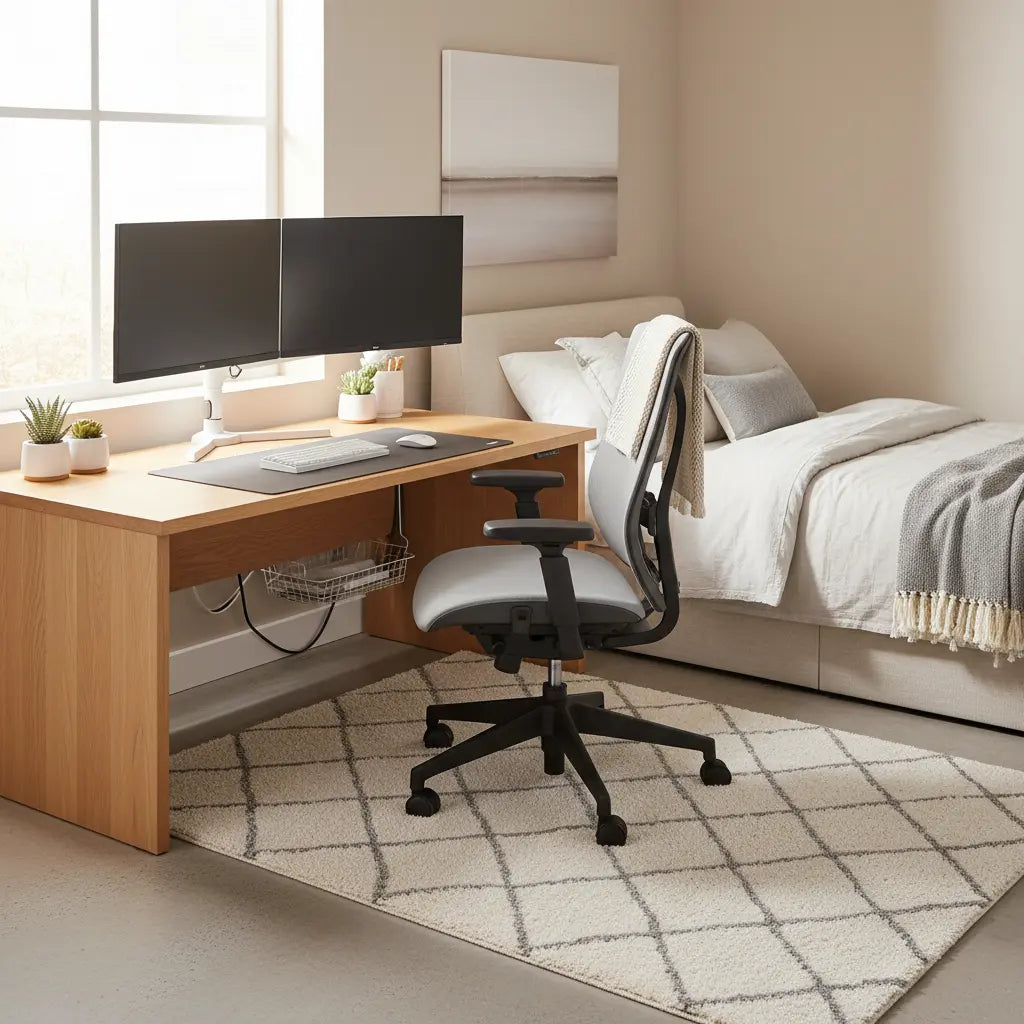
Finding the Right Balance: Dual Monitors in Small Bedrooms
Setting up dual monitors in a small bedroom requires a strategic approach to furniture and layout. The challenge isn't just fitting the screens; it’s maintaining a functional "flow" so the room still feels like a place to sleep. By focusing on specific desk dimensions, choosing between straight or L-shaped configurations, and utilizing tools like monitor arms, you can create a professional-grade dual-monitor desk setup in a limited space.
Quick Recommendation for Small Spaces: For a dual 27-inch monitor setup, we recommend a desk width of 55–60 inches and a depth of 28+ inches. If your room has an unused corner, an L-shaped desk is the most space-efficient choice; for narrow walls or "corridor" layouts, a straight desk paired with a monitor arm is the best way to reclaim depth and floor space.
Many remote workers and students find that a standard desk often feels either too small for two screens or too large for a bedroom corner. Success lies in matching the desk's geometry to your room's specific constraints—such as closet clearance and walking paths—rather than forcing a one-size-fits-all solution.
Essential Desk Dimensions: Benchmarks for Dual Screens
When planning a dual monitor desk setup for a small space, dimensions are your most critical data points. While individual needs vary, these benchmarks are based on standard equipment sizes (typically 24-27 inch monitors) and common ergonomic requirements.
Width and Depth Benchmarks
-
Straight Desks: For two 27-inch monitors placed side-by-side, a width of 60 inches is the standard benchmark to prevent screen overhang.
- Applicable Condition: If you use "bezel-less" monitors or angle them in a sharp "V" shape, you can downsize to a 55-inch desk.
-
Depth Requirements: Aim for a depth of 28 to 30 inches.
- Applicable Condition: If your desk is only 24 inches deep, you must use a monitor arm. Standard monitor stands often consume 6-10 inches of depth, pushing the screens too close to your eyes and increasing eye strain.
- L-Shaped Desks: These typically offer "wings" or returns between 48 and 60 inches. The advantage here is the ability to place one monitor on the main desk and the second on the return, which can be a more efficient use of a 90-degree corner.
The "Arm’s Length" Self-Test
To determine if a desk depth works for your specific monitors:
- Sit in your intended working position.
- Extend your arm fully toward the wall.
- The Calculation: If your fingertips touch the wall, a 24-inch desk is only viable if the monitor is mounted on an arm at the very back. If you cannot reach the wall, or if you use large monitor bases, you require a 30-inch depth to maintain the recommended 20-30 inch viewing distance.
Clearance and Circulation
A common mistake is measuring the desk but forgetting the chair. To maintain a livable bedroom, plan for:
- Chair Pull-back: At least 30 inches of clear floor space behind the desk.
- Walking Paths: Ideally 36 inches of clearance for primary walkways to ensure you aren't bumping into the desk while moving toward the bed or closet.

Straight vs. L-Shaped Desks: Choosing Your Layout
The choice between a straight and an L-shaped desk usually depends on your bedroom's "dead space."
The L-Shaped Advantage
L-shaped desks are often the superior choice for corners. They provide more surface area for peripherals (like a laptop dock or printer) without extending as far along a single wall. This layout is particularly effective if you need to separate your "primary" screen from a "reference" screen.
The Straight Desk Advantage
Straight desks are better for "corridor" layouts—where the desk must sit against a long wall shared with a bed or wardrobe. They are visually less intrusive and easier to fit into narrow rooms.
Decision Heuristics for Small Bedrooms:
- Best Fit: L-Shaped Desk: Use if you have an empty corner and need extra surface for non-computer tasks (e.g., writing or a secondary laptop).
- Best Fit: Straight Desk: Use if your workspace is positioned in a high-traffic area, between two pieces of furniture, or if you prefer a minimalist visual profile.
Note: The following chart provides a qualitative comparison of layout suitability based on common bedroom constraints.
Heuristic Fit for Dual-Monitor Desk Options in a Small Bedroom
Heuristic only. Higher scores mean a better likely fit for the bedroom layout; scores are illustrative, not measured.
View chart data
| Category | Straight desk fit | L-shaped desk fit |
|---|---|---|
| 130 cm width, no corner, no arms | 4 | 2 |
| 140 cm width, corner available, no arms | 5 | 8 |
| 120 cm width, corner available, with arms | 6 | 9 |
| 150 cm width, corner available, with arms | 7 | 9 |
| 130 cm width, no corner, with arms | 5 | 4 |
For a deeper dive into these configurations, see our L-Shaped Desk vs. Straight Desk: Choosing the Right Layout.
Maximizing Space with Monitor Arms
In a small bedroom, "floating" your monitors is one of the most effective ways to reclaim desk real estate. Monitor arms replace bulky plastic stands with a single mounting point, freeing up the space directly underneath your screens for your keyboard, notebooks, or a docking station.
Technical Checklist for Arms:
- Weight Capacity: Ensure the arm is rated for your specific monitor weight (check the manufacturer's spec sheet).
- VESA Compatibility: Most monitors use a 75x75mm or 100x100mm hole pattern; verify your screens match the arm.
- Desk Attachment: Check if your desk can support a C-clamp or if it requires a grommet hole. Note that some "honeycomb" or thin particle-board desks may require a reinforcement plate to prevent the clamp from damaging the surface.
-
Cable Length Calculation: Monitor arms increase the distance a cable must travel because they route through the arm's chassis.
- Rule of Thumb: Add 2 feet to your standard cable length. Ensure your HDMI/DisplayPort and power cables are at least 8-10 feet long to allow for full arm articulation without tension.

Ergonomics and Micro-Adjustments for Comfort
A dual-monitor setup in a tight space can easily lead to "tucked-in" shoulders or neck strain if not adjusted correctly. Following OSHA’s monitor placement ergonomics guidance, you should aim for the following:
- Height: The top of the screens should be at or slightly below eye level.
- Distance: Screens should be roughly an arm's length away (20-30 inches).
- Angle: If using two monitors of equal importance, angle them in a "V" shape. If one is primary, place it directly in front of you and the secondary to the side at a slight angle to minimize neck rotation.
- Visual Clutter: In a bedroom, cable management isn't just about safety; it’s about mental rest. Use cable sleeves or trays to hide the "nest" of wires, which helps the room feel less like an office when you're trying to sleep.
Note: Individual ergonomic needs vary based on height, vision (e.g., use of bifocals), and chair type. Always adjust within these ranges until you find a position that eliminates neck tension.
Practical Checklist: Setting Up Your Workspace
Before buying a new desk, follow these steps to ensure a proper fit:
- Measure the "Swing": Open all closet and room doors to ensure the desk won't block their path.
- Map the Outlets: Identify where your power sources are. Small bedrooms often have limited outlets, necessitating a high-quality surge protector.
- Test the Depth: Use a folding table or existing surface to see if 24 or 30 inches feels more comfortable for your eyesight.
- Check the "Return": If buying an L-shaped desk, ensure it is "reversible" so you can switch the long side to fit your specific corner.
For those looking for a compact yet featured option, the Bestier 42" Reversible L-Shaped Gaming Desk is designed specifically for bedroom corners, offering integrated power and storage.
Avoiding Common Pitfalls
The most frequent error in small bedroom setups is overestimating the "livable" space. A desk that fits the wall but prevents you from opening your dresser drawers will quickly become a source of frustration.
Summary of Recommendations:
- Width: 55"-60" for dual 27" monitors (adjust based on bezel width).
- Depth: 28"+ unless using monitor arms to reclaim space.
- Layout: L-shaped for corners; Straight for walls and high-traffic areas.
- Organization: Use vertical storage and cable management to reduce visual "noise" in your sleeping area.
For more detailed sizing advice, refer to our How to Choose the Perfect Desk Size: Complete Guide (2026) or explore Small Space Living: The Ultimate Guide to Multi-Functional Furniture.
Important Note on Comfort and Health: This article provides general setup advice for ergonomic comfort and space optimization. It does not constitute medical advice. Proper monitor placement depends on individual body type, vision requirements, and equipment. If you experience persistent neck pain or eye strain, consult a qualified healthcare professional or an ergonomics specialist.
By measuring thoughtfully and prioritizing circulation, you can build a dual-monitor workspace that enhances your productivity without compromising the comfort of your bedroom.
