





Summary
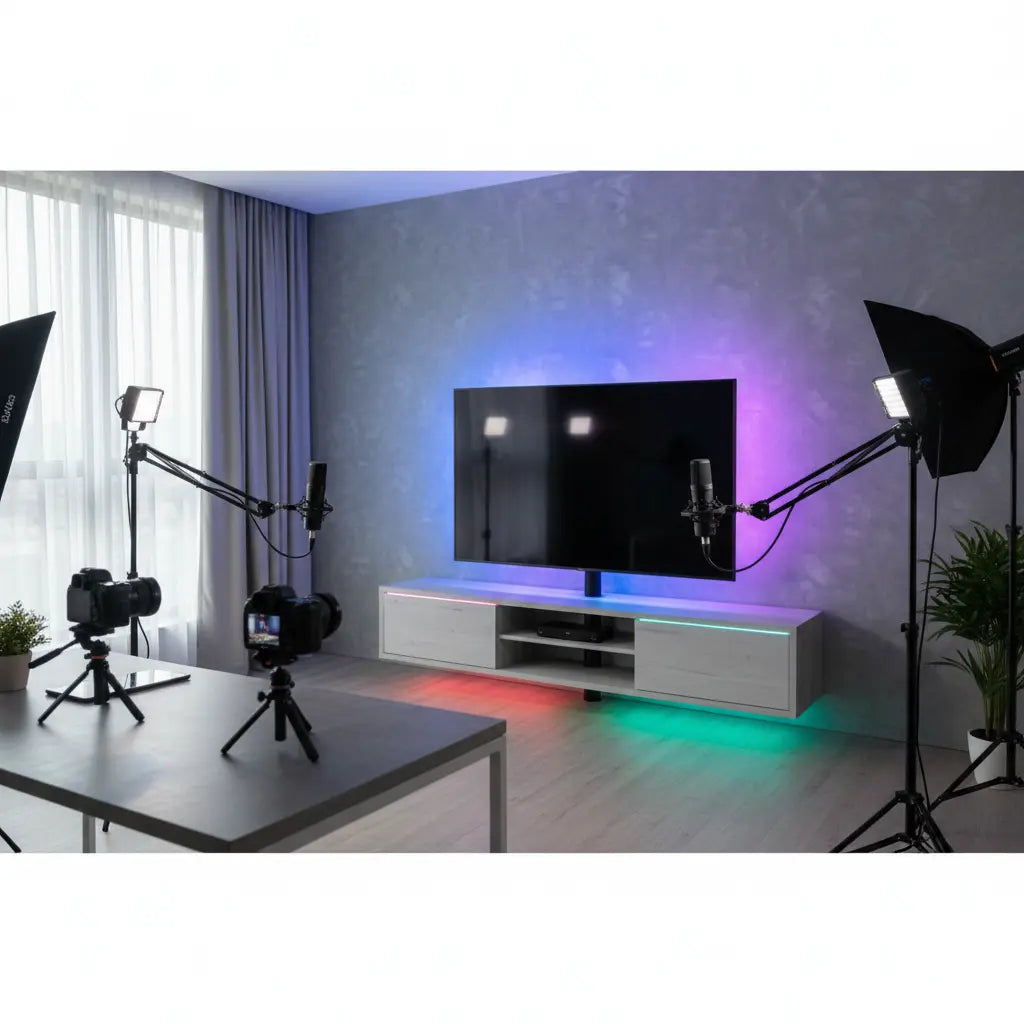
In 2026, professional YouTube backgrounds have evolved from simple static walls to dynamic, multi-layered sets where LED-integrated furniture serves as essential practical lighting. By utilizing RGB-enabled TV stands and shelving units, creators can achieve broadcast-quality depth, brand-aligned color palettes, and sophisticated bokeh effects that were previously reserved for high-budget studios.
Key takeaways
- Practical Lighting Integration: Treat LED furniture as a functional light source rather than just decor to enhance three-dimensional depth (bokeh) in your video frames.
- Color Accuracy Matters: Prioritize LED components with high CRI (90+) and TLCI (85+) ratings to ensure consistent skin tones and professional-grade color grading.
- Reflection Management: Use matte finishes or specific furniture angles to eliminate distracting glare from glossy surfaces during high-intensity studio shoots.
- Brand Consistency: Leverage programmable RGB furniture to synchronize your physical set with your digital branding for a cohesive viewer experience across platforms.
- Safety First: Ensure all studio furniture meets modern engineered wood safety standards for professional furniture to maintain air quality in enclosed recording spaces.
The Evolution of the YouTube Set: Furniture as Gear
The creator economy in 2026 has shifted the paradigm of home-based production. No longer is a desk just a place to sit; it is a "Setup-as-a-Product" that functions as a critical component of your visual storytelling. Professional creators now view their studio background decor as an extension of their lighting kit. This transition from utility to set design means that choosing the LED TV stands for professional video backgrounds is as important as selecting the right lens.
When you frame your shot, the furniture behind you provides the "practical" lights—light sources that are visible within the frame. These elements do more than just look good; they provide ambient fill, separate the subject from the background, and establish a professional atmosphere that builds viewer trust.
Choosing LED Furniture for Maximum Visual Impact
Not all LED furniture is created equal for video production. To build an aesthetic shelving for video creators, you must consider how the light interacts with the camera's sensor. Modern entertainment centers with LED lighting offer integrated strips that can be controlled via smartphone or studio-wide DMX systems, allowing for precise color matching.
Logic Summary: When selecting furniture for a video set, we assume the creator is working in a controlled lighting environment. The recommendation to use integrated LED furniture is based on the need for "layered" lighting which creates a professional 3D look. This may not apply if you rely solely on high-intensity natural light, which can wash out LED effects.
TV Stands and Consoles
A low-profile LED TV stand is ideal for "talking head" videos where you want a clean, horizontal line behind you. It provides a base for secondary set pieces like plants or tech collectibles while casting a soft glow upward that prevents the background from looking "flat."
Shelving and Storage
Vertical shelving units with integrated RGB strips allow you to create "pockets of light." This technique is essential for creating depth. By lighting individual cubbies at different intensities or colors, you guide the viewer's eye and add texture to the background.

Technical Standards: CRI, TLCI, and Color Temperature
One of the most common mistakes in YouTube background ideas is ignoring the quality of the LEDs. In 2026, professional video standards require a high Color Rendering Index (CRI). If your furniture LEDs have a low CRI, they will emit a "greenish" or "magenta" tint that is difficult to correct in post-production.
For the best results, look for furniture that specifies a CRI of 90 or higher. This ensures that the colors of your background decor—and more importantly, the reflected light on your skin—look natural. Additionally, the Television Lighting Consistency Index (TLCI) is a more accurate metric for camera sensors. Aim for a TLCI of 85+ to ensure your LED gaming desks for YouTube streaming setups don't cause flickering or color banding on camera.
Creating Depth and Bokeh with RGB Furniture
Depth of field is the secret sauce of professional video. By placing your LED-integrated furniture 5 to 8 feet behind your seated position, you can use a wide aperture (f/1.8 to f/2.8) to create a beautiful bokeh effect. The small LED points on the furniture will turn into soft, glowing orbs, providing a high-end cinematic feel.
Understanding how LED furniture enhances visual appeal for videos involves more than just turning the lights on. You should use the "Complementary Color" rule: if your key light is a warm 3200K, set your background LEDs to a cool blue or teal. This color contrast creates a "pop" that makes the creator stand out from the set.

Managing Reflections and Glare on Set
Glossy surfaces are the enemy of a clean video set. When using video studio lighting with RGB furniture, you may encounter "hot spots"—bright, distracting reflections of your studio lights on the furniture's surface.
To mitigate this, consider these professional strategies:
- Angle the Furniture: A slight 5-10 degree tilt can move the reflection out of the camera's line of sight.
- Diffusion: Apply a matte-finish vinyl wrap or use frosted diffusion tape over the LED strips to soften the light output.
- Polarization: Use a circular polarizer on your camera lens to cut through reflections on non-metallic surfaces.
Professional Setup Checklist for Creator Studios
Before you hit record, use this checklist to ensure your LED furniture is optimized for the camera.
| Feature | Requirement | Why it Matters |
|---|---|---|
| CRI Rating | 90+ | Ensures accurate color reproduction on camera. |
| Flicker-Free | PWM > 2000Hz | Prevents "rolling bars" or flickering at high frame rates. |
| Material Safety | CARB Phase 2 / TSCA Title VI | Essential for health in small, unventilated studios. |
| Cable Path | Hidden / Integrated | Maintains a professional, "floating" look for the set. |
| Control | App or DMX | Allows for remote adjustments without leaving the frame. |
Cable Management for a Clean Video Set
Nothing ruins a professional backdrop faster than a "spaghetti mess" of power cables. When building a tiktok video background setup with led lights, you must prioritize cable concealment. Most modern Bestier units include built-in cable management ports, but for a truly pro look, you should use cable management solutions for clean video sets.
Use split-sleeving or J-channels to route all power cables down a single furniture leg. If your furniture is in the middle of the room, use a low-profile floor cord cover that matches your flooring to prevent trip hazards and visual clutter.
Material Quality and Long-Term Value
As a creator, your studio is your workplace. You likely spend 8-12 hours a day in this environment. It is crucial to consider the safety of the materials used in your set. The "Engineered Wood Safety: A Comprehensive Guide to CARB & TSCA Standards" whitepaper highlights that professional-grade furniture must adhere to strict formaldehyde emission limits. This is particularly important for creators working in small bedrooms or converted closets where air circulation may be limited. Choosing furniture that is both functional for video and safe for long-term use is a hallmark of a professional creator.
FAQ
What is the best LED color for a YouTube background? The "best" color depends on your brand identity, but teal and orange (complementary colors) are industry standards for creating depth. Teal background lighting contrasts beautifully with warm skin tones, making the subject "pop" off the screen. For a more minimalist look, a soft white (around 4000K) provides a clean, professional aesthetic without the "gamer" vibe.
How do I prevent my LED furniture from flickering on camera? Flickering occurs when the LED's pulse-width modulation (PWM) frequency doesn't align with your camera's shutter speed. To fix this, try adjusting your camera's shutter speed to a multiple of your local power frequency (e.g., 1/50 or 1/100 in PAL regions, 1/60 or 1/120 in NTSC). Alternatively, use high-quality LED controllers that operate at frequencies above 2000Hz.
Can I use LED furniture as my only light source? While LED furniture provides excellent ambient and practical lighting, it should not be your only source. You still need a "Key Light" (the primary light on your face) and a "Fill Light" to manage shadows. The furniture serves as the "Background Light" in a traditional three-point lighting setup, providing separation and mood.
How far should my LED furniture be from the camera? For the best visual results, place your background furniture at least 5 to 10 feet away from your seated position. This distance allows for "light fall-off," ensuring the background doesn't overexpose your face, and it enables the camera to create a soft-focus (bokeh) effect on the LEDs.
Are LED-integrated TV stands worth the extra cost for creators? Yes, because they serve a dual purpose as both storage and a professional lighting fixture. Buying a standard stand and adding cheap LED strips often results in messy cables, poor color accuracy, and adhesive failure. Integrated units provide a cleaner look, better thermal management for the LEDs, and more reliable control systems.
How do I clean LED furniture without damaging the lights? Always unplug the unit before cleaning. Use a dry or slightly damp microfiber cloth to wipe down the surfaces. Avoid spraying liquid cleaners directly onto the LED strips or controllers. For glossy finishes, a specialized anti-static cleaner can help reduce dust buildup, which is highly visible under studio lights.
References
Government / Standards / Regulators
- EPA TSCA Title VI: Formaldehyde Standards for Composite Wood Products
- California Air Resources Board (CARB): Airborne Toxic Control Measure (ATCM)
Industry Associations / Research Institutes
- SMPTE (Society of Motion Picture and Television Engineers): Standards for Color and Lighting in Video Production
- CIE (International Commission on Illumination): Technical Report on Color Rendering of LED Light Sources
Platform Official Docs & Policies
- YouTube Creators: Lighting and Background Best Practices
- TikTok for Business: Creative Center - Video Production Tips
Academic / Whitepapers / Labs
- Bestier Whitepaper: Engineered Wood Safety: A Comprehensive Guide to CARB & TSCA Standards
- Lighting Research Center (LRC): Evaluations of LED Lighting for Video Applications
