





Summary
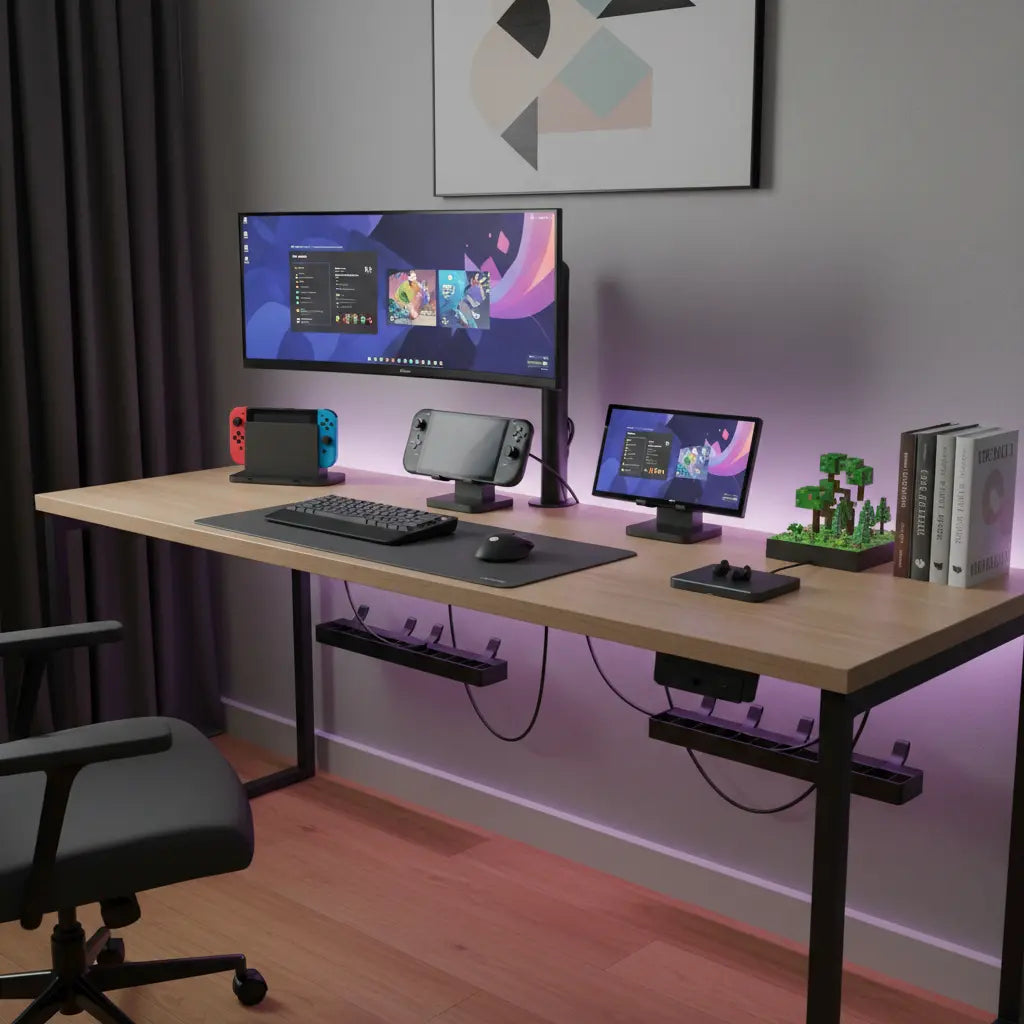
Creating a streamlined handheld gaming desk setup in 2026 requires a shift from traditional PC-centric layouts to a modular, dock-first approach. By prioritizing integrated power outlets, high-bandwidth USB-C docking stations, and strategic cable routing, gamers can eliminate "docking clutter" while maintaining a high-performance, aesthetic "Dopamine Desk" environment for devices like the Steam Deck, ROG Ally, and Nintendo Switch.
Key takeaways
- Integrated Power is Essential: Use desks with built-in AC outlets and USB-C Power Delivery (PD) to support the high wattage requirements (65W+) of modern handhelds.
- Modular Docking Stations: Select docks that support HDMI 2.1 and DisplayPort 1.4 to ensure 4K/120Hz output when transitioning from handheld to desktop mode.
- Strategic Cable Routing: Implement a "hidden-run" system using under-desk trays and adhesive clips to manage the multiple power bricks required for a multi-device setup.
- Aesthetic Synchronization: Leverage addressable RGB (ARGB) lighting that can sync with your handheld's software for a cohesive visual experience.
Designing the Ultimate Handheld Gaming Hub
The rise of powerful handheld PCs has transformed the "gaming desk" from a static workstation into a dynamic docking hub. Unlike a traditional tower PC that sits under the desk, handhelds like the Steam Deck and ROG Ally require frequent docking and undocking. This constant movement often results in a "cable octopus"—a mess of tangled USB-C, HDMI, and power cables sprawling across your workspace. To solve this, your setup must be designed around the dock as the central anchor.
Start by selecting a desk that minimizes external cable runs. A gaming desk with power outlets allows you to plug your docking stations directly into the desktop surface, reducing the length of visible cables. This is particularly important for handhelds, as their power bricks are often bulky and can create significant "wall wart" clutter if plugged into a standard floor strip.
Logic Summary: This approach assumes the user frequently switches between handheld and docked modes. The recommendation for integrated power is based on reducing cable tension and improving the ease of docking/undocking.
Managing Multi-Device Docking Clutter
If you own multiple handhelds—perhaps a Nintendo Switch for exclusives and a Steam Deck for your Steam library—the clutter doubles. Each device has its own proprietary or preferred dock, and managing two or three sets of cables can quickly overwhelm a small desk. The solution lies in vertical organization and cable "zoning."
Use a 52-inch L-shaped gaming desk with USB ports to create a dedicated "charging zone" away from your primary monitor and keyboard area. By grouping your docks in one corner, you can use a single cable management tray to hide the excess length of all power and HDMI cables. For a truly clean look, consider using adhesive cable clips to route the USB-C "tails" (the part that plugs into the handheld) so they stay perfectly positioned even when the device is in your hands.

Technical Requirements for 2026 Handheld Docking
When choosing a docking station, don't just look at the price. Modern handhelds have specific power and data requirements that, if not met, can lead to "slow charging" warnings or flickering displays.
| Feature | Minimum Requirement (2026) | Recommended for High Performance |
|---|---|---|
| Power Delivery (PD) | 65W (Steam Deck / ROG Ally) | 100W (Future-proofing for Switch 2/Ally 2) |
| Video Output | HDMI 2.0 (4K/60Hz) | HDMI 2.1 or DisplayPort 1.4 (4K/120Hz) |
| USB Ports | 2x USB 3.2 Gen 1 | 3x USB 3.2 Gen 2 (for fast external SSDs) |
| Ethernet | Gigabit (1000 Mbps) | 2.5 Gigabit (for ultra-fast game downloads) |
For users looking to maximize their aesthetic, integrating these docks into a Dopamine Desk setup is the next step. This involves using color-coordinated cables and ensuring your desk's LED lighting complements the RGB effects of your handheld.
Aesthetic Integration and RGB Synchronization
A "Dopamine Desk" isn't just about organization; it's about creating a space that triggers joy through color and light. Most Bestier desks come with integrated LED strips that can be customized to match your gaming mood. To take this further, you can sync your desk RGB lighting with your handheld's software (like Armoury Crate for the ROG Ally) using third-party controllers or smart home bridges.
When setting up your lighting, avoid placing LED strips where they will reflect off your handheld's screen. Instead, use them as bias lighting behind your monitor or under the desk edge to create a soft glow. This enhances the "neon" aesthetic without causing eye strain during long gaming sessions.

Safety and Material Standards
When building a high-tech setup, it's easy to overlook the furniture itself. However, because gaming setups generate heat, the quality of your desk material matters for long-term durability and indoor air quality. Bestier uses materials that meet strict environmental standards. For a deeper look at why this matters, read our guide to CARB & TSCA standards, which explains how these regulations limit formaldehyde emissions in engineered wood products like MDF and particle board.
Advanced Cable Management Hacks
To truly master the handheld setup, you need to go beyond basic zip ties. Here are three pro-level hacks for 2026:
- The "Tail" Anchor: Use a weighted cable holder on your desk surface to keep your handheld's charging cable from sliding off the back when you're playing in handheld mode.
- Power Brick "Under-Mounting": Use heavy-duty hook-and-loop fasteners to mount bulky power bricks to the underside of your desk. This clears up floor space and keeps the heat away from your legs.
- Color-Coded Sleeving: Use braided cable sleeves in different colors (e.g., blue for Steam Deck, red for Switch) to instantly identify which cable belongs to which dock.
For more detailed strategies, check out these 5 cable management hacks for LED gaming desks.
FAQ
Can I use one docking station for both my Steam Deck and ROG Ally? Yes, most universal USB-C docks will work for both, but you must ensure the power supply is at least 65W. The ROG Ally, in particular, requires a 65W input to enable its "Turbo Mode" (30W TDP), so using a lower-wattage Steam Deck charger may limit your performance. Always check the manufacturer's specifications for Power Delivery (PD) compatibility.
How do I prevent my handheld from overheating while docked? Ensure the dock does not block the intake or exhaust vents of your device. Many high-quality docks are designed with an open-back structure to facilitate airflow. Additionally, placing your dock on a LED gaming desk with a metal or high-quality engineered wood surface can help dissipate heat better than a plastic or glass surface.
Is it safe to leave my handheld docked and charging 24/7? Most modern handhelds use lithium-ion batteries with smart charging circuits that prevent overcharging. However, constant heat is the enemy of battery longevity. If you plan to leave your device docked for weeks at a time, check if your handheld has a "Battery Care" or "Desktop Mode" that limits the maximum charge to 60% or 80% to preserve battery health.
What is the best desk layout for a dual-handheld setup? An L-shaped layout is generally superior for multi-device setups. You can place your primary monitor and "pro" handheld (like the Steam Deck) on the main wing, while keeping your secondary console (like the Switch) on the side wing. This prevents the cables from crossing and allows you to switch between devices without rearranging your workspace.
How can I hide the thick HDMI cables coming from my dock? Use a 48-inch LED L-shaped gaming desk that features built-in cable management grommets. These holes allow you to route thick cables directly through the desktop into a tray underneath. For cables that must remain on top, use a decorative cable spine or a "tech-pouch" to bundle them together aesthetically.
References
Government / Standards / Regulators
- USB Implementers Forum (USB-IF): USB Power Delivery Specifications
- Environmental Protection Agency (EPA): TSCA Title VI Formaldehyde Standards
- California Air Resources Board (CARB): Airborne Toxic Control Measure (ATCM)
Platform official docs & policies
- Valve / Steam Deck: Docking Station Technical Specifications
- ASUS / ROG Ally: Power and Charging Guide
- Nintendo: Switch Docking and Power Safety
Industry associations / research institutes / market reports
- VESA: DisplayPort and HDMI 2.1 Standards for Gaming
- HDMI Licensing Administrator: HDMI 2.1 Specification Features
Community
- Reddit r/SteamDeck & r/ROGAlly: User-reported docking station compatibility lists (Intent only; not authoritative)
