





Summary
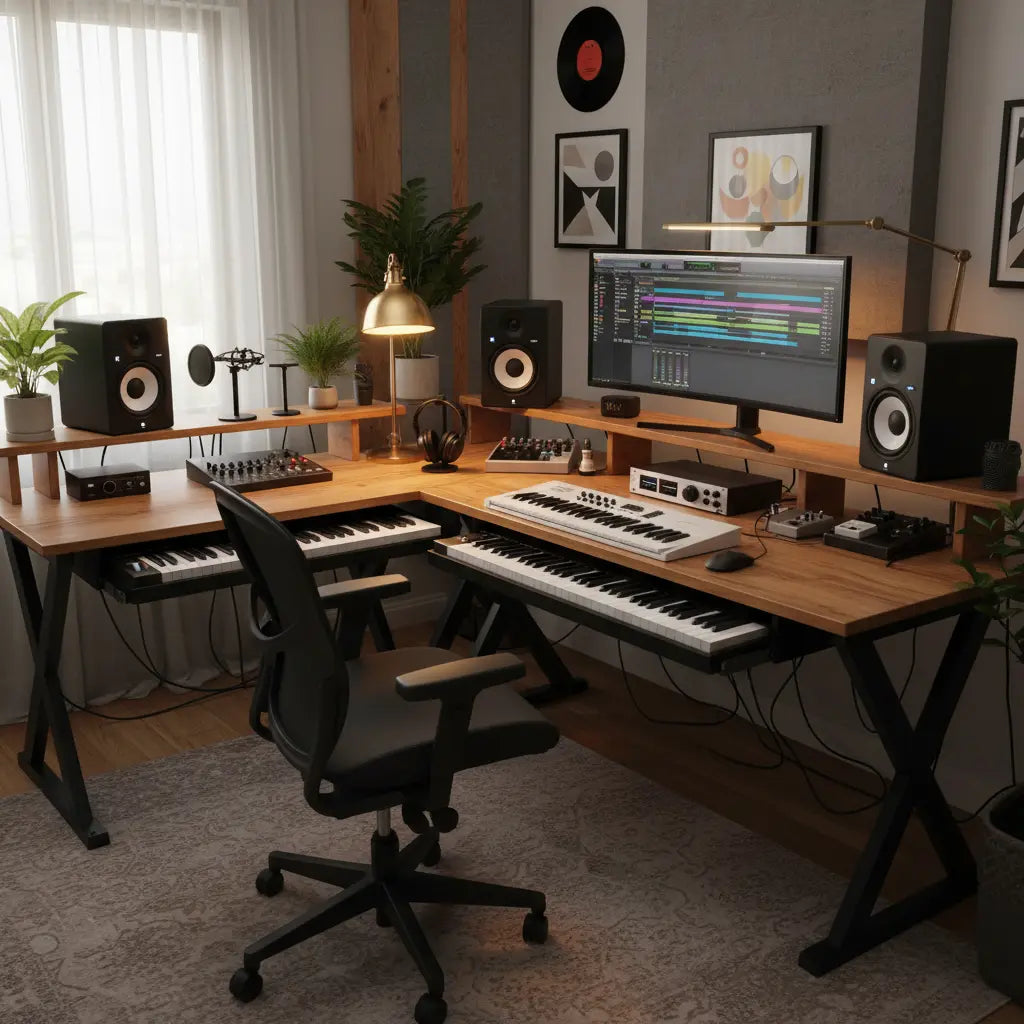
L-shaped desks are the superior choice for home music studios because they maximize usable surface area within a producer's natural reach zone, allowing for the simultaneous placement of MIDI keyboards, studio monitors, and rack gear without compromising ergonomics. By utilizing corner space, these layouts facilitate a dedicated "production wing" and a "mixing wing," which streamlines workflow and maintains the critical equilateral triangle required for accurate acoustic monitoring.
Key takeaways
- Workflow Segmentation: L-shaped layouts allow producers to separate creative tasks (MIDI sequencing) from technical tasks (mixing/mastering) into distinct physical zones.
- Ergonomic Reach: Essential gear like audio interfaces and controllers remain within the "primary reach zone," reducing repetitive strain from overextending.
- Space Optimization: These desks turn underutilized corners into high-functioning workstations, making them ideal for small bedroom studios or multi-use rooms.
- Acoustic Symmetry: When positioned correctly, an L-shaped desk can support a professional monitoring environment while providing ample room for secondary displays and hardware.
How L-Shaped Layouts Transform Music Production Workflows
In the evolving landscape of 2026, the "Creator Economy" has shifted from simple setups to highly specialized environments. For music producers, the desk is more than a piece of furniture; it is the central nervous system of the studio. Traditional straight desks often force a compromise between keyboard access and monitor placement. However, an L-shaped configuration offers a wrap-around experience that aligns with the natural arc of human arm movement. This layout is particularly effective for those following a budget-friendly pro creator desk setup, where every square inch must be justified by utility.
By dedicating one side of the "L" to a 61-key or 88-key MIDI controller and the other to the computer and mixing interface, producers can switch between "composition mode" and "engineering mode" with a simple swivel of their chair. This physical separation helps maintain mental focus and reduces the clutter that often plagues creative spaces. For those just starting, consulting an ultimate guide to professional home studio design can provide deeper insights into how these zones interact with room acoustics and lighting.

Optimizing Gear Placement: From MIDI Keyboards to Studio Monitors
The most significant challenge in a home studio is fitting large hardware without blocking the sound path from studio monitors. In a standard straight desk setup, a large MIDI keyboard often pushes the computer monitor and speakers too far back or too high, leading to neck strain and poor acoustic imaging. An L-shaped desk solves this by allowing the MIDI keyboard to sit on the side wing. This keeps the main mixing area clear for the "equilateral triangle" setup—where the distance between the two speakers and the producer's head are all equal—ensuring the most accurate sound reproduction.
When planning your layout, consider optimal L-shaped desk setups for multiple monitors. Music production software (DAWs) like Ableton Live or Logic Pro benefit immensely from dual-screen setups—one for the arrangement view and one for the mixer. The L-shape provides the depth needed to angle these monitors toward the listener, minimizing off-axis coloration and desk reflections that can muddy a mix.
Logic Summary: The recommendation for L-shaped desks assumes the producer uses at least one large peripheral (like a MIDI keyboard) and requires a dedicated sweet spot for mixing. If your studio is purely "in-the-box" with no external hardware, a straight desk may suffice, but the L-shape remains superior for future-proofing and multi-tasking.
Managing the "Cable Jungle" and Structural Integrity
A professional studio setup can easily involve 20 or more cables, from XLR and TRS audio lines to USB-C and power cords. Managing this "cable jungle" is critical not just for aesthetics, but for preventing electromagnetic interference (EMI) that can cause hum in your recordings. L-shaped desks often provide more discrete routing paths along the back edges. Utilizing a 58-inch L-shaped desk with built-in shelves can offer additional tiers to hide power strips and cable management trays away from the floor.
Furthermore, producers must consider the weight of their gear. A pair of 8-inch studio monitors, a weighted 88-key controller, and rack-mounted preamps can easily exceed 100 lbs. It is essential to choose furniture that meets high safety standards. For instance, understanding engineered wood safety and CARB/TSCA standards is vital for indoor air quality, as this guide details the regulations limiting formaldehyde off-gassing in materials like MDF and particle board—common components in studio furniture.
Studio Gear Organization Checklist
| Gear Category | Ideal Placement | Why? |
|---|---|---|
| Studio Monitors | Ear level, angled at 60° | Ensures accurate frequency response and stereo imaging. |
| MIDI Keyboard | Side wing of the "L" | Keeps the main desk area free for mouse/keyboard and mixing. |
| Audio Interface | Primary reach zone (corner) | Allows for quick gain adjustments during recording. |
| Secondary Display | Angled on the side wing | Provides extra DAW real estate without blocking the main speakers. |
| Rack Gear | Under-desk or on shelves | Keeps heavy equipment stable and accessible but out of the way. |

Acoustic Considerations: Minimizing Desk Reflections
One often-overlooked aspect of desk choice is "comb filtering." When sound waves from your speakers hit a large flat surface (like a desk) before reaching your ears, they reflect and interfere with the direct sound. This creates peaks and dips in the frequency response, making it impossible to hear your mix accurately.
L-shaped desks can actually help mitigate this if the "corner" is used wisely. By placing the monitors on the main section and using the side wing for non-acoustic gear (like controllers), you reduce the amount of reflective surface directly in front of the speakers. For more on essential desk features for creator studios, look for models with matte finishes or integrated acoustic pads that further dampen these reflections.
Finding the Right Fit for Your Space
Whether you are working in a dedicated room or a small corner of a bedroom, the variety of L-shaped options ensures a fit. You can explore a complete collection of L-shaped desks to find dimensions that match your floor plan. Remember to measure your largest piece of gear—usually the MIDI keyboard—before purchasing to ensure the wing depth is sufficient.
FAQ
Can I fit an 88-key weighted MIDI keyboard on a standard L-shaped desk? Most 88-key controllers are between 50 and 55 inches long. While they may be too long for the short side of a compact L-shaped desk, they fit perfectly on the long side or a dedicated "wing" of a larger model. Always check the specific length of your keyboard against the desk's "usable length" specifications, as some desks have corner supports that may limit the continuous flat surface.
How do I prevent my studio monitors from vibrating the desk? Vibrations (desk resonance) can distort the low-end of your mix. The best solution is to use isolation pads (made of high-density foam) or dedicated desktop speaker stands. Some L-shaped desks come with integrated monitor risers, which can help decouple the speakers from the main work surface, though separate isolation is still recommended for professional results.
Is an L-shaped desk better than a straight desk for a small room? Surprisingly, yes. While an L-shaped desk has a larger footprint, it utilizes the corner space that is often wasted with a straight desk. By "tucking" the workstation into a corner, you open up the center of the room, which can actually improve the room's acoustic response by allowing more space for bass traps and acoustic treatment.
Where should I place my audio interface for the best workflow? The audio interface should be placed in your "primary reach zone"—the area you can reach without leaning forward or stretching. In an L-shaped setup, this is typically the corner where the two wings meet. This allows you to adjust input gain or monitor volume while remaining in the "sweet spot" between your speakers.
Do L-shaped desks interfere with room acoustics? Any large object in a room affects acoustics. However, the primary concern with desks is early reflections. To minimize interference, avoid placing the desk directly against a wall; leave a small gap (4-6 inches) to allow for acoustic treatment on the wall behind the speakers. This helps manage the "speaker-boundary interference response" (SBIR).
What is the best way to manage cables on an L-shaped studio desk? Use the "under-and-over" method: run power cables along the underside of the desk using J-channels or trays, and keep audio cables (which are more sensitive to noise) separated. Many L-shaped desks feature grommet holes in the corners, which are perfect for dropping cables directly into a management tray, keeping the work surface clean and interference-free.
References
Government / Standards / Regulators
- EPA TSCA Title VI: Formaldehyde Emission Standards for Composite Wood Products
- California Air Resources Board (CARB) Phase 2 Standards
Industry Associations / Research Institutes
- Audio Engineering Society (AES) - Recommendations for Surround Sound and Stereo Monitoring
- Sound on Sound - Studio SOS: Guide to Desk Reflections and Acoustics
