





Summary

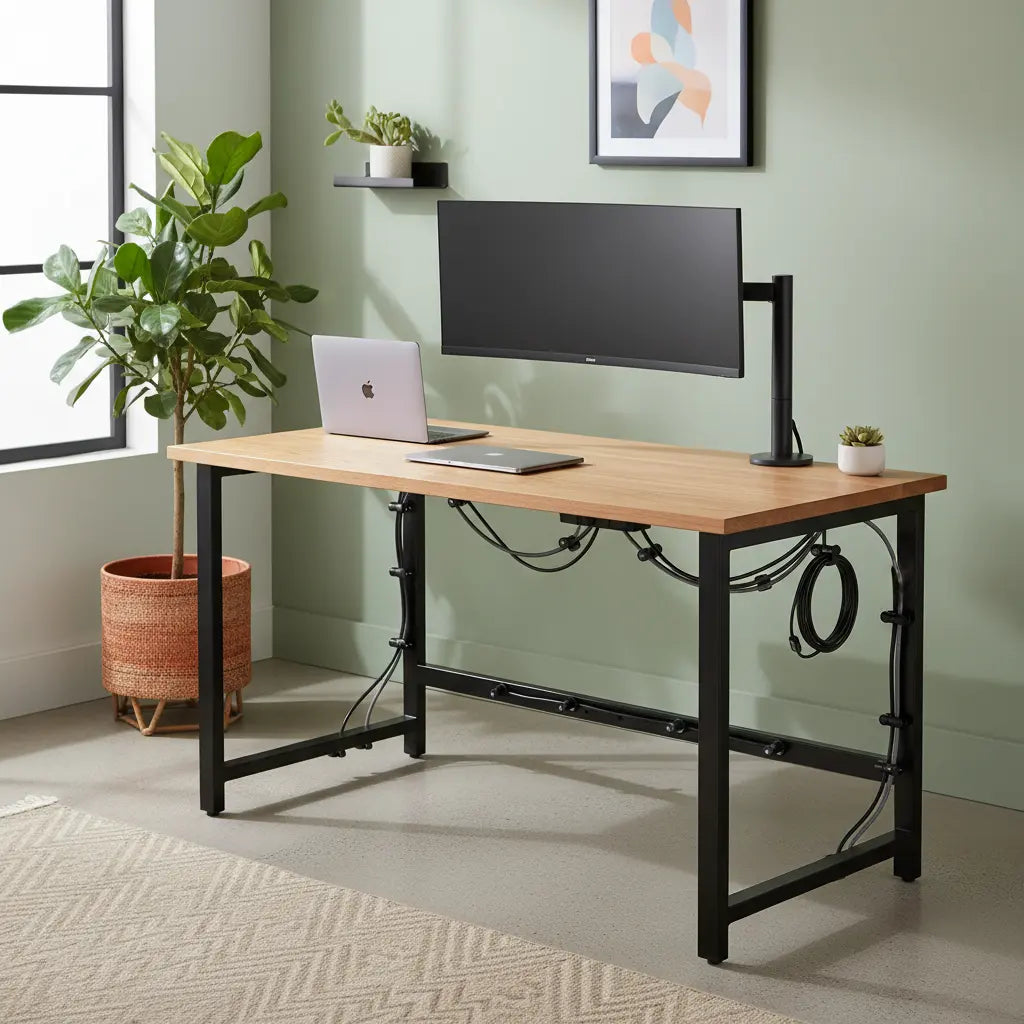
Magnetic cable management leverages the ferromagnetic properties of steel frame desks to create a modular, tool-free organization system that is far superior to traditional adhesive-based solutions. By utilizing specialized Neodymium and Ferrite magnets, users can secure everything from lightweight peripheral wires to heavy power bricks directly to the desk's structure, ensuring a clean aesthetic while maintaining the flexibility to reconfigure the setup as technology evolves in 2026.
Key takeaways
- Tool-Free Versatility: Magnetic clips and trays allow for instantaneous repositioning without leaving sticky residue or damaging the desk's finish, a significant advantage for dynamic gaming and professional setups.
- Magnet Selection Matters: Neodymium magnets are essential for heavy loads like power strips, while Ferrite magnets offer a cost-effective solution for routing individual USB or display cables.
- 2026 Safety Standards: Modern SSDs and OLED monitors are highly resistant to the low-intensity magnetic fields produced by cable organizers, provided a minimum clearance of 2-6 inches is maintained from sensitive internal components.
- Vertical Routing Efficiency: Steel desk legs serve as natural conduits for "invisible" cable routing, allowing wires to be tucked behind the frame and secured with magnetic zip-tie mounts.
- Standing Desk Compatibility: Magnetic systems are uniquely suited for height-adjustable desks, as they can easily accommodate the shifting "slack" required during transitions between sitting and standing positions.
The Steel Frame Advantage: Why Metal is the Ultimate Cable Management Canvas
In the world of home office design, the choice of desk material often dictates the limits of your organization. While solid wood or glass surfaces offer distinct aesthetics, they frequently require permanent adhesives or invasive drilling to manage the inevitable "cable nest." A steel frame computer desk transforms the entire structure into a functional canvas. Because steel is ferromagnetic, every square inch of the frame becomes a potential mounting point for magnetic accessories. This inherent property allows for a level of modularity that traditional desks simply cannot match.
When comparing a budget gaming desk comparison between Bestier and IKEA, the structural integrity of the steel frame is often a deciding factor for power users. Beyond stability, the metal frame facilitates a "hidden-in-plain-sight" routing strategy. Cables can be snapped along the underside of crossbeams or tucked into the inner channel of the legs. This is particularly useful for maintaining industrial home office design with metal elements, where a clean, streamlined look is paramount. Furthermore, for those concerned about the materials used in their workspace, it is worth noting that while the frame is steel, the desktop surfaces often utilize high-quality materials that meet strict safety standards, as detailed in our guide to engineered wood safety and CARB/TSCA standards.
Logic Summary: The recommendation for steel frames is based on the physical property of ferromagnetism, which eliminates the need for mechanical fasteners or chemical adhesives. This approach assumes the user prioritizes modularity and ease of reconfiguration.
Choosing Your Magnets: Neodymium vs. Ferrite for Desk Organization
Not all magnets are created equal, and choosing the wrong type can lead to sagging cables or dropped power bricks. For the ultimate setup, you must distinguish between the two primary types of magnets used in cable management: Neodymium (Rare Earth) and Ferrite (Ceramic).
Neodymium magnets are the "heavy lifters" of the organization world. They possess a significantly higher magnetic flux density, allowing a small clip to hold several pounds of weight. If you are mounting a power strip or a heavy multi-port hub to the underside of your desk, Neodymium is the only viable choice. Ferrite magnets, on the other hand, are larger, heavier, and less powerful, but they are significantly more affordable. They are perfectly adequate for individual cable clips where the only force is the weight of a single braided USB-C cable.
| Magnet Type | Best Use Case | Weight Capacity (Approx.) | 2026 Cost Factor |
|---|---|---|---|
| Neodymium (N52) | Power bricks, heavy hubs, multi-cable bundles | 2.0 - 5.0 lbs per mount | Premium |
| Ferrite (Ceramic) | Single USB cables, lightweight LED strips | 0.1 - 0.5 lbs per mount | Budget-friendly |
| Magnetic Rubber | Flexible routing along curved surfaces | 0.05 lbs per inch | Mid-range |
Logic Summary: These weight capacities are heuristics based on standard N52 grade Neodymium and Grade 8 Ferrite magnets. Actual performance may vary depending on the thickness of the steel frame's powder coating, which can act as an air gap and reduce magnetic pull.
Safety in 2026: Do Magnets Interfere with Modern Electronics?
One of the most common concerns when implementing magnetic cable management is the potential for interference with sensitive electronics. In the past, strong magnets were a legitimate threat to CRT monitors and mechanical hard drives (HDDs). However, as we move through 2026, the technology landscape has shifted significantly.
Modern Solid State Drives (SSDs), which have almost entirely replaced HDDs in gaming and professional rigs, are not affected by the static magnetic fields produced by consumer-grade cable organizers. Similarly, OLED and IPS panels do not use electron beams like old CRTs, making them immune to the "color bleeding" or distortion caused by magnets. The primary areas where caution is still required involve magnetic storage media (like credit cards or old floppy disks) and high-precision sensors in some wireless peripherals.
To maintain maximum safety, follow the "6-inch Rule": keep high-power Neodymium magnets at least six inches away from the internal components of your PC case and the active area of your monitor. For ADHD-friendly desk organization strategies, where focus is key, the peace of mind provided by a safe, organized environment is invaluable.

Pro Hacks for Routing Cables Along Steel Desk Legs
The legs of a steel frame desk are often underutilized real estate. By using magnetic zip-tie mounts or magnetic cable sleeves, you can turn a structural necessity into a hidden conduit.
- The "Leg Tuck": Instead of letting cables dangle from the center of the desk, route them horizontally along the underside of the frame until they reach a leg. Use a magnetic clip to secure them to the back-facing side of the leg as they travel down to the power outlet.
- Magnetic "Snake" Sleeves: These are flexible fabric sleeves with magnetic strips sewn into the seam. You can wrap your entire cable bundle in the sleeve and simply "click" it onto the desk leg. This is far more aesthetic than traditional plastic split-loom tubing.
- The Under-Desk Power Hub: Use high-strength Neodymium magnetic mounts to attach your power strip directly to the underside of the steel crossbeam. This keeps all "plugs" off the floor, which is a core principle in LED gaming desk cable management techniques.
Logic Summary: These hacks assume a standard powder-coated steel frame. If your desk has a particularly thick or textured finish, you may need to use "cup magnets" which focus the magnetic field to increase grip strength.
Managing Movement: Magnetic Solutions for Standing Desks
Height-adjustable desks present a unique challenge: the "slack" problem. When the desk is at its highest point, cables must be long enough to reach. When the desk is lowered, that extra length often bunches up on the floor or gets caught in the lifting mechanism.
Magnetic cable management is the ideal solution for this dynamic movement. Unlike fixed adhesive clips, magnetic clips can "slide" slightly or be easily repositioned to accommodate the changing tension of the cables. A popular hack involves using a "weighted" magnetic base on the floor or the desk's foot. As the desk lowers, the magnetic base holds the excess cable in a neat loop, preventing it from tangling. This flexibility is essential for maintaining an organized workspace that supports both productivity and physical health.
Industrial Aesthetics and DIY Magnetic Modifications
For those who want to go beyond off-the-shelf products, DIY magnetic modifications offer endless possibilities. You can turn almost any plastic cable tray or organizer into a magnetic one by attaching small Neodymium discs with high-bond epoxy.
This DIY approach allows you to customize your setup to match specific color schemes or hardware requirements. For instance, if you have a custom-built PC with a specific color palette, you can paint your magnetic clips to match. This level of customization is a hallmark of high-end setups and fits perfectly within the broader trend of modular, personalized workspaces. By integrating these small but impactful changes, you can achieve a professional-grade look that rivals expensive custom-built furniture.
FAQ
Are magnets safe to use near my gaming PC? Yes, magnets used for cable management are generally safe near modern PCs. Most contemporary components, such as SSDs and modern GPUs, are not susceptible to the relatively weak static magnetic fields of cable organizers. However, it is a best practice to keep strong Neodymium magnets a few inches away from the motherboard and power supply to avoid any theoretical interference with sensitive voltage regulators or sensors.
Will magnetic clips fall off if I bump my desk? The stability of magnetic clips depends on the "pull force" of the magnet and the thickness of the steel frame. High-quality Neodymium (N52) clips are very difficult to dislodge accidentally. If you find your clips are sliding, it may be due to a thick powder coating on the desk; in this case, switching to a larger magnet or one with a rubberized "anti-slip" coating will solve the problem.
Can I use magnetic cable management on a wooden desk? Not directly. Magnetic accessories require a ferromagnetic surface like steel or iron. However, you can "retrofit" a wooden desk by adhering small steel plates or magnetic receptive tape to the underside or the legs. This allows you to enjoy the benefits of magnetic modularity even on a non-metal surface.
Do magnets affect Wi-Fi or Bluetooth signals? Static magnets used in cable management do not interfere with radio frequency (RF) signals like Wi-Fi or Bluetooth. These wireless technologies operate on high-frequency electromagnetic waves, which are unaffected by the stationary magnetic fields of small permanent magnets. You can safely route your wireless router's power and Ethernet cables using magnetic clips.
How many magnets do I need for a standard dual-monitor setup? A typical dual-monitor setup usually requires 8 to 12 magnetic points. This includes 2-3 clips per monitor (for power and display cables), 2 for keyboard/mouse routing, and 2-4 larger mounts for power strips and hubs. Buying in "bulk packs" of 20 is usually the most cost-effective way to ensure you have enough for a comprehensive "clean" look.
What is the best way to hide a large power brick magnetically? To hide a large power brick, use a magnetic cable tray or a "heavy-duty" magnetic strap. Ensure the magnets used are rated for at least twice the weight of the brick to account for the leverage of the attached cables. Mounting the brick to the inside of a steel desk leg or the underside of the main support beam is the most effective way to keep it out of sight.
References
Government / Standards / Regulators
- U.S. Environmental Protection Agency (EPA): TSCA Title VI - Formaldehyde Standards for Composite Wood Products
- California Air Resources Board (CARB): Airborne Toxic Control Measure (ATCM) to Reduce Formaldehyde Emissions
Industry Associations / Research Institutes
- Business and Institutional Furniture Manufacturers Association (BIFMA): Safety and Performance Standards for Office Furniture
- Magnetic Materials Association (MMA): Guidelines for Permanent Magnet Selection and Safety
Academic / Whitepapers / Labs
- IEEE Xplore: Analysis of Static Magnetic Field Interference on Modern Electronic Components
- National Institute of Standards and Technology (NIST): Magnetic Field Measurement and Safety Standards
Platform Official Docs & Policies
- Bestier Support: Steel Frame Assembly and Maintenance Guide (internal://support/faq)
Community
- Reddit r/CableManagement: Community Hacks for Steel Frame Desks (Intent only; not authoritative)
- StackExchange - Electrical Engineering: Discussion on Magnetism and SSD Data Integrity (Intent only; not authoritative)
