





Summary
Creating a cohesive pink gaming setup in 2026 involves more than just selecting rose-colored peripherals; it requires a strategic blend of white furniture bases, high-CRI lighting, and ergonomic precision to ensure a space that is as healthy as it is aesthetic. By prioritizing material safety standards like CARB Phase 2 and integrating functional "kawaii" elements, gamers can build a professional-grade battlestation that maintains its vibrant look while supporting long-term wellness.

Key takeaways
- Base Foundation: Use white or light-oak furniture to provide a neutral canvas that allows pink RGB lighting to pop without overwhelming the visual field.
- Lighting Precision: Opt for LED strips with a Color Rendering Index (CRI) of 90+ and color temperatures between 2700K and 3500K to achieve true pink hues rather than washed-out purples.
- Safety First: Ensure all composite wood desks meet CARB Phase 2 and TSCA Title VI standards to minimize formaldehyde off-gassing in enclosed gaming environments.
- Ergonomic Balance: Maintain the top of your monitor at eye level and your keyboard at elbow height, regardless of how many decorative accessories are added to the desk.
- Maintenance Routine: Implement a weekly micro-cleaning schedule using non-abrasive microfiber cloths to prevent dust buildup on light-colored surfaces.
Designing Your Aesthetic Pink and White Gaming Room
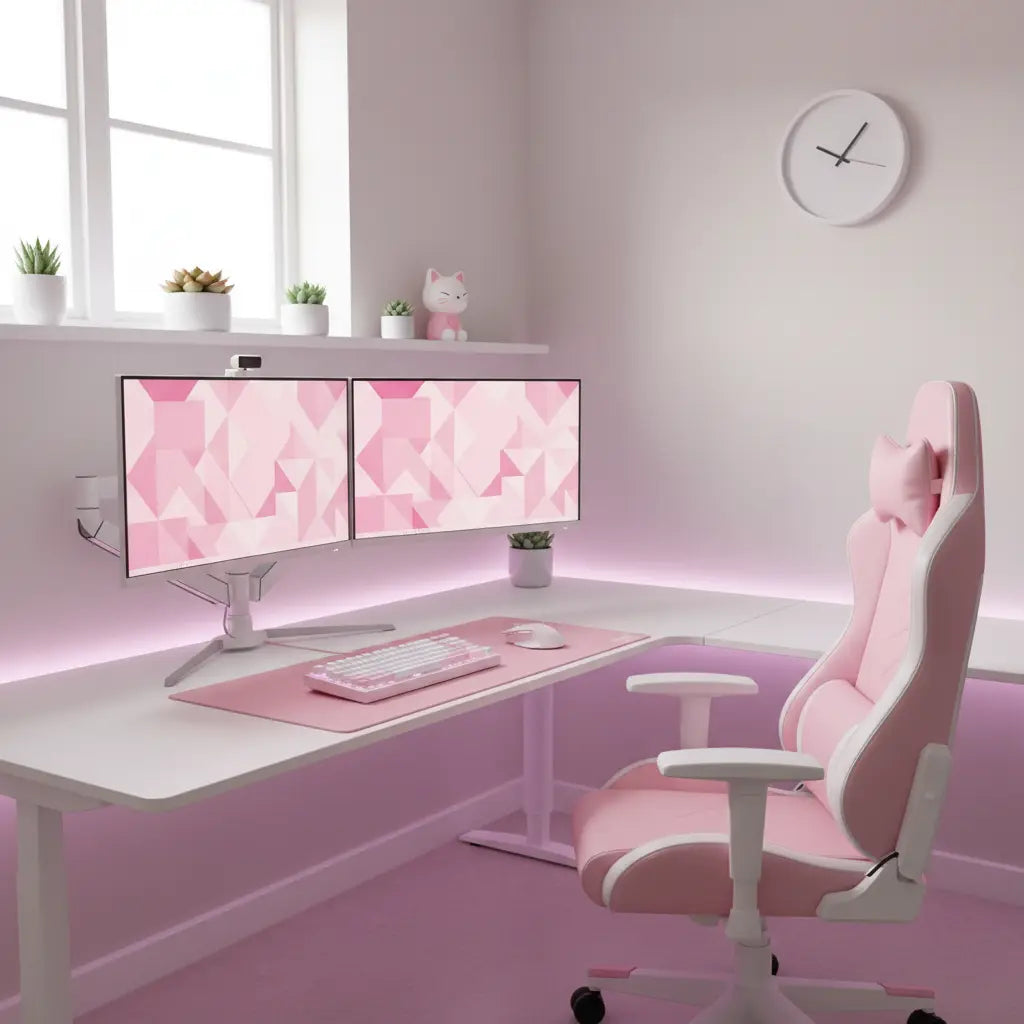
The "kawaii" aesthetic has evolved significantly by 2026, moving away from cluttered "maximalism" toward a more refined, functional "soft-tech" look. The foundation of any successful aesthetic pink desk setup is the contrast between a clean white base and vibrant rose or pastel accents. Starting with a high-quality white L-shaped gaming desk provides the necessary surface area for dual monitors and decorative figurines while keeping the room feeling airy and spacious.
When selecting furniture, it is crucial to look beyond the surface finish. Many aesthetic desks use engineered wood, which must adhere to strict environmental regulations. For instance, the safety standards for engineered wood furniture outlined in the CARB Phase 2 and EPA TSCA Title VI guidelines ensure that formaldehyde emissions are kept below 0.05 parts per million (ppm). This is particularly important for gamers who spend 6–10 hours a day in their setup, as poor indoor air quality can lead to fatigue and respiratory irritation over time.
Logic Summary: We recommend a white furniture base because it acts as a neutral reflector for RGB lighting. While pink furniture exists, it often limits your ability to change the room's color palette later. The focus on safety standards is non-negotiable for long-term health in small, enclosed gaming rooms.
Technical Lighting Strategies for the Perfect Pink Glow
One of the most common mistakes in building a pink gaming setup is relying on cheap, low-quality LED strips that produce a "neon purple" rather than a soft, aesthetic pink. To achieve the "strawberry milk" or "blush" tones seen on social media, you need to understand the relationship between color temperature and the Color Rendering Index (CRI).
For a warm, inviting pink, look for RGB LED lighting strips that allow for granular control over the R (red) and B (blue) channels. Setting your lights to a color temperature between 2700K and 3500K provides a warm white base that, when mixed with red tones, creates a sophisticated pink. Furthermore, choosing lights with a CRI of 90 or higher ensures that your pink peripherals—like your keyboard and mouse—look their true color under the artificial light.

When placing your lights, avoid direct "line-of-sight" exposure. Instead, mount strips behind the desk or monitor to create an ambient glow. This technique, known as bias lighting, reduces eye strain by decreasing the contrast between the bright screen and the dark wall behind it. For a deeper dive into the differences between lighting types, consult our guide on RGB vs. LED lighting.
Ergonomics Meets Kawaii: Comfort Without Compromise
It is a common misconception that an "aesthetic" setup cannot be ergonomic. In 2026, the industry has shifted toward "functional cuteness," where accessories like cat-ear headsets and paw-shaped wrist rests are designed with human factors in mind. However, the core principles of gaming ergonomics remain the same: your body must be supported to prevent repetitive strain injuries (RSI).
| Ergonomic Component | Ideal Positioning for Gaming | Aesthetic Integration Tip |
|---|---|---|
| Monitor Height | Top 1/3 of the screen at eye level | Use a white or pink monitor riser to match the desk. |
| Elbow Angle | 90 to 100 degrees, resting on armrests | Use plush, aesthetic armrest covers for added comfort. |
| Feet Placement | Flat on the floor or a footrest | A cloud-shaped plush footrest adds to the kawaii theme. |
| Wrist Position | Neutral (straight), not bent up or down | Match your wrist rest color to your desk mat. |
Maintaining these standards is essential for long-term health. Even the cutest setup will lose its charm if it causes back pain or wrist fatigue. Ensure your chair provides adequate lumbar support, and if you are using a smaller desk, consider a white gaming desk with integrated cable management to keep your legroom clear of clutter.
Logic Summary: These ergonomic standards are based on ANSI/HFES 100-2007 guidelines. We emphasize integration because users often remove ergonomic supports (like lumbar pillows) if they don't match the "aesthetic," which is a mistake.
Maintenance and Care for Light-Colored Setups
A pink and white gaming room looks stunning when new, but it is notoriously difficult to keep clean. Dust, skin oils, and coffee rings show up much more clearly on white surfaces than on traditional black "gamer" furniture. To preserve the "clean girl" or "minimalist kawaii" look, you must adopt a proactive maintenance schedule.
- Daily Dusting: Use a handheld microfiber duster to remove surface particles from your desk and keyboard.
- Weekly Deep Clean: Wipe down the desk surface with a 70% isopropyl alcohol solution or a mild, non-abrasive soap. Avoid bleach, as it can yellow certain laminates over time.
- Peripheral Care: Clean your desk mat with a lint roller daily. If it is a fabric mat, hand-wash it every month to remove accumulated oils.
- Cable Organization: Use cable management tricks like white cable sleeves and under-desk trays. Tangled black cables are the fastest way to ruin a clean pink aesthetic.
Essential Kawaii Desk Inspiration Checklist
Before you start buying accessories, use this checklist to ensure your setup remains cohesive and functional:
- [ ] Large Desk Mat: A blush pink or white desk mat (900x400mm) to protect the desk and unify the peripherals.
- [ ] Pegboard System: A white wall-mounted pegboard for displaying headsets, controllers, and plushies.
- [ ] Cable Sleeves: White or pink braided sleeves to hide unsightly power cords.
- [ ] Ambient Lighting: At least two light sources (e.g., a desk lamp and behind-monitor LEDs) to prevent harsh shadows.
- [ ] Greenery: Small artificial succulents or "moss poles" to add a natural element to the tech-heavy space.
FAQ
How do I choose the right shade of pink for my gaming setup? The most effective way to choose a shade is to pick one "hero" item—usually your chair or keyboard—and match other accessories to it. In 2026, "Strawberry Milk" (a muted pastel) and "Rose Quartz" are the most popular choices because they are easier on the eyes during long sessions than "Hot Pink" or "Magenta." Using a white desk as a base allows these softer tones to stand out without clashing.
Are pink gaming desks durable? Durability depends on the material rather than the color. Look for desks with a melamine or high-pressure laminate (HPL) finish, which is resistant to scratches and water damage. Ensure the desk meets CARB Phase 2 standards for material safety, as this indicates a higher quality of construction and lower chemical emissions.
How can I make my setup look "kawaii" without it being cluttered? The key is "functional decor." Instead of just having figurines on the desk, choose items that serve a purpose, such as a cat-shaped headphone stand or a bunny-themed cable organizer. Use a pegboard to move decorative items off the main desk surface, which keeps your workspace clear for actual gaming or streaming.
What is the best lighting for a pink aesthetic? The best lighting is a combination of high-CRI RGB LED strips and warm ambient lamps. Set your RGB lights to a "Warm Pink" setting (roughly 3000K color temperature) to avoid the harsh, cold look of standard LEDs. This creates a soft, glowing atmosphere that enhances the pink tones of your furniture and accessories.
How do I hide black cables in a white and pink setup? Black cables are very visible against a white desk. Use white cable raceways or braided cable sleeves to bundle them together. For cables that must remain visible (like your mouse or keyboard cord), consider upgrading to "coiled" cables in a matching pink or white color to turn a utility item into a decorative one.
Is an L-shaped desk better for an aesthetic setup? An L-shaped desk is often superior because it allows you to separate your "gaming zone" from your "decor zone." You can have your monitors and peripherals on one side and your PC tower, plants, and figurines on the other. This prevents the desk from looking overcrowded while still allowing you to display your favorite kawaii items.
References
Government / Standards / Regulators
- California Air Resources Board (CARB) - Formaldehyde Standards
- EPA - Formaldehyde Emission Standards for Composite Wood Products
- OSHA - Computer Workstations Ergonomics
