





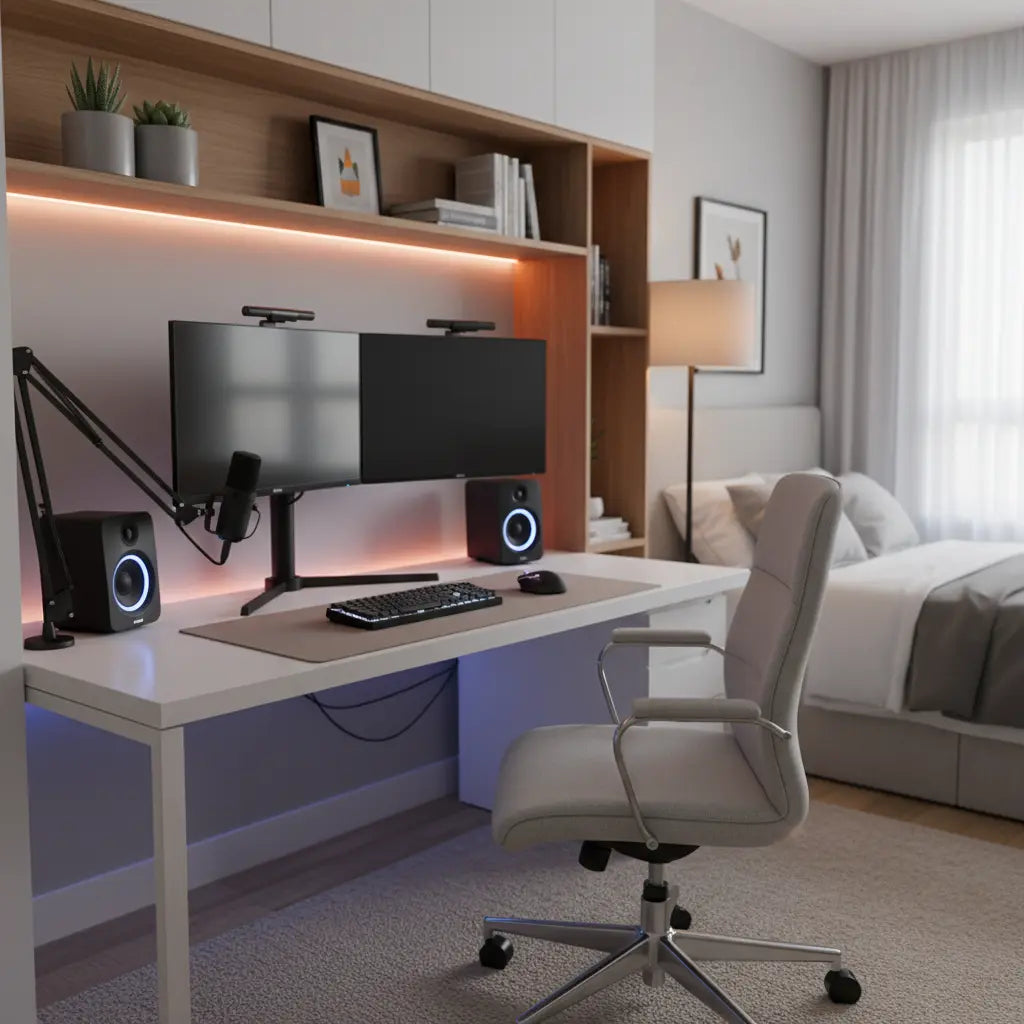
Building a professional home studio no longer requires a dedicated room or Hollywood-sized budget. A Studio-in-a-Box setup combines a compact, sturdy desk with smart storage, power outlets, and modular accessories to safely support dual monitors, heavy microphone arms, lighting, and streaming gear while keeping everything organized in small spaces like bedrooms or apartments.
Why a Studio-in-a-Box Matters for Today's Creators
The creator economy continues to grow rapidly in 2026, with more aspiring streamers, podcasters, and YouTubers working from limited living spaces. Many face the same challenges: insufficient surface area for multiple devices, desks that wobble under the weight of gear, messy cables that ruin the professional look, and setups that feel uncomfortable after long recording or editing sessions.
A well-designed creator desk solves these issues by offering built-in power solutions, integrated lighting, and flexible layouts that adapt to different workflows. Rather than buying separate pieces that may not fit together, an all-in-one approach reduces clutter and setup complexity while delivering a polished appearance on a reasonable budget.
This guide walks through practical steps to create your own Studio-in-a-Box using modular furniture that prioritizes stability, ergonomics, and scalability for content creation.

Choosing the Right Desk Type for Your Space
For small-space creator setups, desk shape and size directly impact both functionality and comfort. Straight desks work for simple single-monitor editing, but most content creators benefit from L-shaped or wider designs that provide dedicated zones for monitors, audio equipment, and controls.
Consider your primary activities. Podcasters often need clear space for a microphone arm and script stand, while live streamers frequently use dual-monitor workflows for chatting, monitoring, and content management simultaneously. Standing desks add flexibility for creators who alternate between sitting and standing to maintain energy during long sessions.
Key considerations include weight capacity, surface depth for monitor placement, and built-in features like power outlets or storage shelves. Many modern creator desks incorporate these elements to minimize additional purchases.
As this official monitor positioning guide explains, ergonomic workstation setups should place the monitor at or slightly below eye level and at a comfortable viewing distance to reduce neck strain.
Ergonomics and Gear Placement for Long Sessions
Comfort becomes critical when recording or streaming for hours. Office ergonomics guidance frames the workstation as something that should fit the worker and reduce awkward postures, according to CDC NIOSH resources.
For dual-monitor setups, position the primary display directly in front and center it with your body, then angle the secondary screen slightly toward your dominant side. This arrangement helps maintain neutral neck and shoulder positions during extended use.
Microphone arms should mount securely without causing desk vibration. Choose arms with sufficient reach and weight ratings that match your microphone model. Similarly, monitor arms can free up desk space and allow precise height and angle adjustments, but always verify VESA compatibility and published weight limits from the product manual.
Cable management features, such as grommets, trays, or hooks, help keep wires organized and prevent accidents. These practical elements reduce visual clutter and make the workspace feel more professional.
Small-space workstations generally work best when the desk layout stays compact, organized, and easy to reconfigure, as noted in university ergonomics resources.
Here is an illustrative comparison of common desk configurations for creator use:
Studio-in-a-Box Desk Size and Load Thresholds (Illustrative)
Helps compare desk-size and load-capacity tradeoffs for small-space creator setups.
View chart data
| Category | Min Recommended Size (index) | Max Load Estimate (lbs) | Dual Monitor + Mic Support (0/1) |
|---|---|---|---|
| Straight 48 in | 48.0 | 120.0 | 1.0 |
| L-shaped 42 in | 42.0 | 150.0 | 1.0 |
| Standing 58 in | 58.0 | 80.0 | 1.0 |
Illustrative based on common creator setups and product specs; values are heuristic thresholds for comparison only, not official measurements or engineering ratings.
These thresholds represent heuristic comparisons drawn from typical creator workflows and product specifications. Actual performance depends on construction quality, proper assembly, and even weight distribution.

Essential Features for a Professional Creator Desk
Look for desks with these practical elements when building your Studio-in-a-Box:
- Power integration: Built-in outlets, USB ports, and Type-C charging reduce the need for power strips and keep cables contained.
- Lighting options: Integrated RGB or LED strips with music sync create dynamic visuals for streaming while providing practical task lighting.
- Storage solutions: Shelves, hooks, and bags help organize headphones, cameras, controllers, and accessories without consuming main workspace.
- Sturdy construction: Engineered wood or steel frames rated for at least 100-150 lbs distributed load provide confidence when mounting heavy arms or multiple monitors.
- Modular design: Reversible layouts and adjustable components allow the desk to adapt as your setup evolves from beginner streaming to more advanced multi-PC configurations.
Our Creator Setup Blueprints: Modular Furniture for YouTube & Twitch explores T-slot integration and professional studio layouts in greater detail.
Budget-Friendly Studio Builds Under $500
Creating a capable creator workspace doesn't require spending thousands. A targeted budget allocation might include:
- Desk with power and lighting: $150–250
- Monitor arm or stand: $30–80
- Quality microphone arm: $40–90
- Basic cable management kit and accessories: $20–50
This leaves room for lighting upgrades or acoustic treatments. Focus first on a desk that offers strong load capacity and built-in organization rather than purely aesthetic features.
Check our guide on Building a Pro Creator Desk Setup for Under $500 for a complete blueprint with ergonomics checklist and budget breakdown.
For those starting with TikTok or short-form content, the TikTok Studio Setup: How to Build a Pro Creator Desk on a Budget offers specific tips on lighting, cable management, and aesthetic choices for small spaces.
Recommended Desk Options for Different Needs
L-shaped designs excel in corner placements common in apartments and bedrooms. They provide ample room for dual monitors while leaving space for audio interfaces and notepads.
The Bestier 42" Reversible L-Shaped Gaming Desk with Power Outlets LED Lights and Monitor Stand includes convenient charging ports, storage shelves, and hooks that make it suitable for both gaming and content creation.
Wider options like the Bestier 61 Inch Gaming Desk with Shelves & Storage Bag offer more surface area for complex streaming setups.
For creators who value posture variation, Bestier 58" Wide Electric Standing Desk Adjustable with LED Light Storage and Monitor Stand combines height adjustment with practical storage.
Browse the full Bestier L Shaped Desk collection to find layouts that match your room dimensions and workflow.
Podcasters specifically may appreciate how an L-shaped configuration creates natural zones, as discussed in Podcasting Setup: Why an L-Shaped Desk is a Game Changer.
Step-by-Step Setup Checklist
Follow this practical sequence when assembling your Studio-in-a-Box:
- Measure your available space and mark desk placement, ensuring at least 24-30 inches of depth for comfortable monitor viewing.
- Assemble the desk frame first, then add surface panels while checking for level and stability.
- Install monitor arms or stands, confirming weight ratings match your equipment.
- Mount the microphone arm on the strongest edge or dedicated mount point to minimize vibration transfer.
- Route cables through grommets or trays before connecting power and data lines.
- Position secondary devices, lights, and accessories in logical workflow zones.
- Test the full setup for wobble, heat buildup, and cable tension before finalizing positions.
Adjustments based on your specific gear and room acoustics will likely be needed during the first few weeks of use.
Common Mistakes to Avoid
Many beginners underestimate the importance of weight distribution. Placing heavy items too far from the desk's center of gravity can cause tipping or flexing over time.
Overlooking cable management early often leads to tangled messes that are difficult to correct later. Similarly, choosing purely aesthetic pieces without verifying load capacity frequently results in regret when gear doesn't fit securely.
Podcasting and streaming desks generally benefit from a clear surface and accessible mic placement, though direct official standards remain limited. Focus on practical performance rather than viral setups that may not translate to your space.
Health and Comfort Considerations
This article discusses comfort and setup advice for creator workspaces. It does not constitute medical advice, diagnosis, or treatment. Workstation adjustments may help reduce perceived strain for some users, but individual results vary based on personal factors and existing conditions. If you experience persistent discomfort, eye strain, or posture-related issues, consult a qualified healthcare professional or ergonomics specialist.
Proper monitor height, keyboard positioning, and regular movement breaks remain important regardless of desk choice.
Bringing It All Together
A Studio-in-a-Box transforms limited square footage into a capable, professional content creation environment. By selecting a modular desk with adequate load capacity, integrated power and lighting, and smart storage, you create a foundation that supports current needs while allowing future upgrades.
Whether you're starting your first streaming channel or refining an established podcast setup, focus on stability, ergonomics, and organization rather than chasing every trending accessory. The right creator desk serves as the reliable centerpiece that lets your content shine.
Explore the Bestier LED Gaming Desk collection or the broader All Desks range to find options that match your vision and budget. With thoughtful planning, your small-space studio can deliver results that rival much larger setups.
For additional inspiration on room aesthetics, review Budget-Friendly Streaming Room Decor: RGB and Beyond.
