





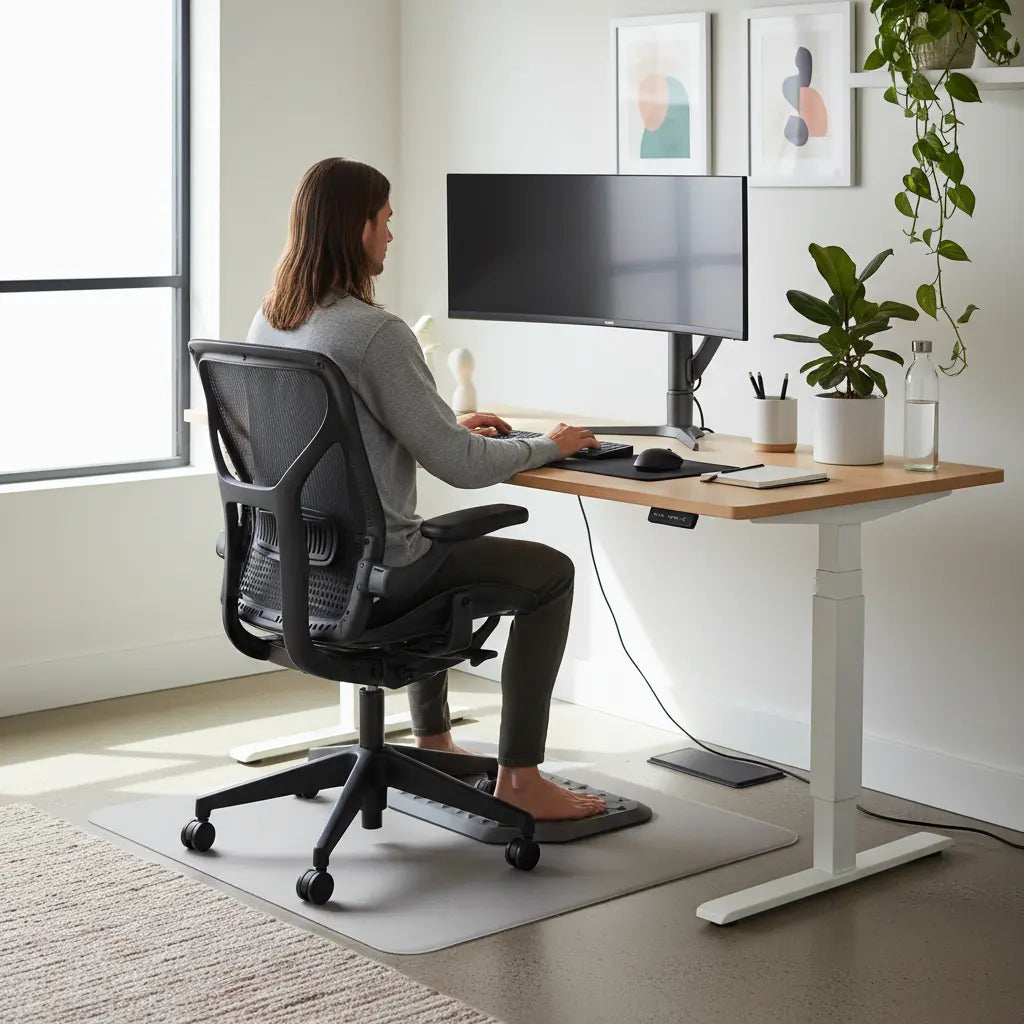
Summary
An optimized ergonomic desk setup is a holistic system that balances physical alignment, cognitive load, and environmental safety to enhance long-term health and mental focus. By integrating height-adjustable furniture, precise monitor positioning, and non-toxic materials, users can significantly reduce the risk of musculoskeletal disorders while creating a workspace that supports deep work and executive function.
Key takeaways
- The 90-90-90 Rule: Maintain 90-degree angles at your elbows, hips, and knees to minimize joint strain and promote neutral spinal alignment.
- Cognitive Ergonomics: Reduce visual clutter and utilize "zoning" techniques to support focus, particularly for neurodivergent individuals or those in high-pressure remote roles.
- Material Integrity: Prioritize furniture that meets CARB Phase 2 and TSCA Title VI standards to ensure indoor air quality and minimize formaldehyde exposure.
- Dynamic Movement: Transition between sitting and standing every 30 to 60 minutes to improve circulation and metabolic health.
- Visual Optimization: Position the top third of your monitor at eye level and maintain a distance of 20 to 30 inches to prevent neck strain and digital eye fatigue.
The Science of Workspace Ergonomics: Beyond Just Comfort
In 2026, the definition of ergonomics has evolved from simple "comfort" to a data-driven discipline focused on human performance and biological longevity. Whether you are a remote professional, a competitive gamer, or a creative studio lead, your desk is the foundation of your daily output. Proper ergonomics is not merely about avoiding back pain; it is about optimizing the interface between the human body and technology to prevent repetitive strain injuries (RSIs) and cognitive burnout.
Traditional ergonomics often focuses solely on the physical—the height of the chair or the curve of the lumbar support. However, modern research from organizations like the Human Factors and Ergonomics Society (HFES) emphasizes a three-pillar approach: physical, cognitive, and environmental. A truly optimized "blueprint" for your desk must address all three to be effective. This guide serves as a comprehensive resource to help you navigate these complexities and build a station that works for you, not against you.
Cluster map
To help you navigate specific aspects of workspace design, we have curated a selection of deep-dive guides. Use this map to explore specialized configurations based on your unique needs.
| Topic Area | Specialized Guide |
|---|---|
| Gaming Optimization | Ergonomic Gaming Desks with Monitor Risers: A Setup Guide |
| Focus & Neurodiversity | ADHD-Friendly Desk Setup: Organization Tips for Better Focus |
| Layout Strategy | L-Shaped Desk vs. Straight Desk: Choosing the Right Layout |
The 90-90-90 Rule: Achieving the Ideal Physical Posture
The cornerstone of physical ergonomics is the "neutral posture." This is the position where the body is aligned and balanced while sitting or standing, placing the least amount of stress on the musculoskeletal system. For seated work, the 90-90-90 rule is the gold standard recommended by OSHA and physical therapists worldwide.

To achieve this, your elbows should be at a 90-degree angle while typing, with your wrists in a neutral, straight position. Your hips should be at a 90-degree angle to your torso, supported by a chair that provides adequate lumbar tension. Finally, your knees should be at a 90-degree angle with your feet resting flat on the floor or a footrest. This alignment prevents the "slumping" that leads to chronic lower back pain and "tech neck."
Logic Summary: The 90-90-90 rule is a heuristic designed to distribute weight evenly across the spine and joints. It assumes a standard desk height of 28-30 inches; however, individuals shorter than 5'4" or taller than 6'2" may require adjustable standing desks for optimal posture to maintain these angles without compromising circulation.
Visual Ergonomics and Monitor Positioning
Eye strain and neck tension are often the first signs of a poorly configured desk. The "20-20-20 rule" (looking at something 20 feet away for 20 seconds every 20 minutes) is a great start, but the physical placement of your screens is even more critical. Your monitor should be positioned directly in front of you, about an arm's length away.
The top of the screen should be at or slightly below eye level. If the monitor is too low, you will naturally tilt your head forward, placing up to 60 pounds of extra pressure on your cervical spine. Utilizing an ergonomic monitor riser setup guide can help you find the exact height needed to keep your chin parallel to the floor, which is essential for both health and focus during long sessions.
Cognitive Ergonomics: Designing for Focus and Neurodiversity
While physical comfort is vital, cognitive ergonomics addresses how your workspace affects your brain's ability to process information. Visual noise—such as tangled wires, excessive decor, or disorganized supplies—can lead to "attentional blink," where the brain momentarily loses focus as it switches between tasks and distractions.
For many, especially those looking for ADHD-friendly desk organization for improved focus, a "minimalist-plus" approach is often most effective. This involves keeping the primary work surface clear while using vertical storage or side cabinets to keep essential tools within reach but out of the direct line of sight. Reducing the cognitive load required to find a pen or manage a cable allows more mental energy to be directed toward deep work.

Material Safety and Air Quality: The Hidden Side of Ergonomics
A frequently overlooked aspect of a healthy workspace is the chemical composition of the furniture itself. Many budget-friendly desks are constructed from engineered wood that may emit volatile organic compounds (VOCs), such as formaldehyde. In an enclosed home office, these emissions can accumulate, leading to headaches, respiratory irritation, and long-term health risks.
When selecting a desk, it is imperative to verify that the materials meet strict safety standards. Our authoritative resource on engineered wood desk safety standards (CARB/TSCA) details how the California Air Resources Board (CARB) Phase 2 and the EPA's TSCA Title VI regulations protect consumers. These standards ensure that formaldehyde emissions remain below 0.05 parts per million (ppm) for hardwood plywood and 0.09 ppm for particleboard, providing a safer environment for high-focus work.
Logic Summary: Material safety is a non-negotiable component of environmental ergonomics. We assume that users spend 8+ hours a day in their workspace; therefore, even low-level off-gassing can have a cumulative effect. Always look for "CARB P2 Compliant" or "TSCA Title VI Certified" labels on flat-pack furniture.
Choosing the Right Foundation: L-Shaped vs. Straight Desks
The layout of your desk dictates your workflow. A straight desk is often sufficient for single-task work, but for those managing multiple monitors, streaming setups, or hybrid "paper and digital" workflows, an L-shaped configuration offers significant ergonomic advantages.
An L-shaped desk provides a primary and secondary work zone, allowing you to pivot your chair rather than stretching your arms or twisting your spine to reach peripheral equipment. When conducting an L-shaped vs straight desk comparison for workspace layout, consider your "reach zones." The "Neutral Reach Zone" is the area you can reach with your elbows at your sides, while the "Maximum Reach Zone" is the area you can reach by extending your arms. An L-shaped desk maximizes the usable space within these zones, reducing repetitive reaching movements.
Workspace Organization and Clutter Reduction
A cluttered desk is a cluttered mind. Beyond the cognitive benefits, organization is a physical necessity. If you are constantly moving your mouse around a stack of papers or reaching over a tangled mess of power cords, you are introducing micro-strains into your daily routine.
Effective cable management is one of the easiest ways to improve the ergonomics of your station. Using cable management solutions for a clutter-free desk ensures that your legs have clear space under the desk (critical for the 90-90-90 rule) and that your peripherals are positioned exactly where they need to be without tension.
Ergonomic Self-Checklist for 2026
Use this checklist to audit your current setup. If you answer "No" to more than two items, it may be time to reconsider your furniture or positioning.
| Category | Checkpoint | Status (Y/N) |
|---|---|---|
| Seating | Are your feet flat on the floor with knees at a 90-degree angle? | |
| Lumbar | Does your chair backrest follow the natural curve of your lower spine? | |
| Monitor | Is the top of your screen at eye level and 20-30 inches away? | |
| Wrists | Are your wrists straight and level with the keyboard (not tilted up/down)? | |
| Materials | Is your desk certified CARB Phase 2 or TSCA Title VI compliant? | |
| Movement | Do you have a way to transition between sitting and standing? | |
| Lighting | Is your workspace free of glare on the screen from windows or lamps? |
Smart Integration: The Future of Health-Conscious Workspaces
As we move through 2026, the integration of smart technology into ergonomic furniture is becoming standard. Modern workstations now feature built-in reminders to change posture, haptic feedback for slouching, and adaptive lighting that adjusts its color temperature based on the time of day to support your circadian rhythm.
While these tools are helpful, they are most effective when built upon a solid foundation of physical and environmental ergonomics. A smart desk cannot fix a poor chair, and an expensive monitor cannot compensate for poor air quality. By following the "Ergonomic Blueprint," you ensure that every component of your workspace—from the wood in the desktop to the software on your screen—is working in harmony to support your health and focus.
FAQ
What is the best ergonomic desk for back pain? The most effective desk for back pain is one that allows for frequent posture changes, such as a height-adjustable standing desk. By alternating between sitting and standing, you reduce the static load on your intervertebral discs and engage different muscle groups, which prevents the stiffness and compression that often lead to chronic pain. Ensure the desk is paired with a chair that offers adjustable lumbar support to maintain the spine's natural S-curve.
How do I set up an ergonomic gaming station? Setting up a gaming station requires balancing high-performance hardware with physical safety. Focus on monitor height first, as gamers often tilt their heads forward during intense sessions; use a riser to keep the screen at eye level. Additionally, ensure your desk has enough depth (at least 24-30 inches) to allow for proper forearm support and a neutral wrist position while using a mouse or controller.
What are some posture tips for long gaming sessions? During extended sessions, it is crucial to follow the "90-90-90" rule and take "micro-breaks" every 30 minutes. Perform simple stretches for your neck, wrists, and hip flexors to counteract the effects of prolonged sitting. Using a desk with a contoured front edge can also help reduce pressure on your forearms and improve circulation to your hands.
How does desk ergonomics for remote workers differ from office setups? Remote workers often face challenges like limited space or multi-use rooms, making multi-functional furniture essential. Ergonomics for home offices should prioritize "zoning"—separating work and personal life visually and physically—to reduce cognitive fatigue. Furthermore, home workers must be more diligent about material safety (like CARB P2 compliance) since home ventilation systems are often less robust than commercial office HVAC systems.
Is an L-shaped desk better for ergonomics than a straight desk? An L-shaped desk is often superior for users with multiple monitors or diverse tasks because it places more equipment within the "Neutral Reach Zone." This reduces the need to lean or twist the torso, which are common causes of repetitive strain. However, a straight desk can be just as ergonomic if it is deep enough to accommodate all necessary tools without crowding the user's primary workspace.
What is cognitive ergonomics? Cognitive ergonomics is the study of how workspace design affects mental processes such as perception, memory, and reasoning. In a desk setup, this involves managing visual clutter, optimizing lighting to reduce mental fatigue, and organizing tools to minimize the "switching cost" of moving between different tasks. A well-organized, quiet, and aesthetically pleasing desk can significantly improve executive function and deep work capabilities.
References
Government / Standards / Regulators
- OSHA: Computer Workstations eTool - Good Working Positions
- EPA: Formaldehyde Emission Standards for Composite Wood Products (TSCA Title VI)
- NIOSH: Elements of Ergonomics Programs
Industry Associations / Research Institutes
- Human Factors and Ergonomics Society (HFES): Standards for Computer Workstations
- BIFMA: Ergonomics and Workplace Furniture Standards
Academic / Whitepapers / Labs
- Cornell University Ergonomics Web: CUErgo - Sitting and Standing at Work
- Mayo Clinic: Office ergonomics: Your guide to a healthy workstation
Platform Official Docs & Policies
- California Air Resources Board (CARB): Composite Wood Products ATCM
