





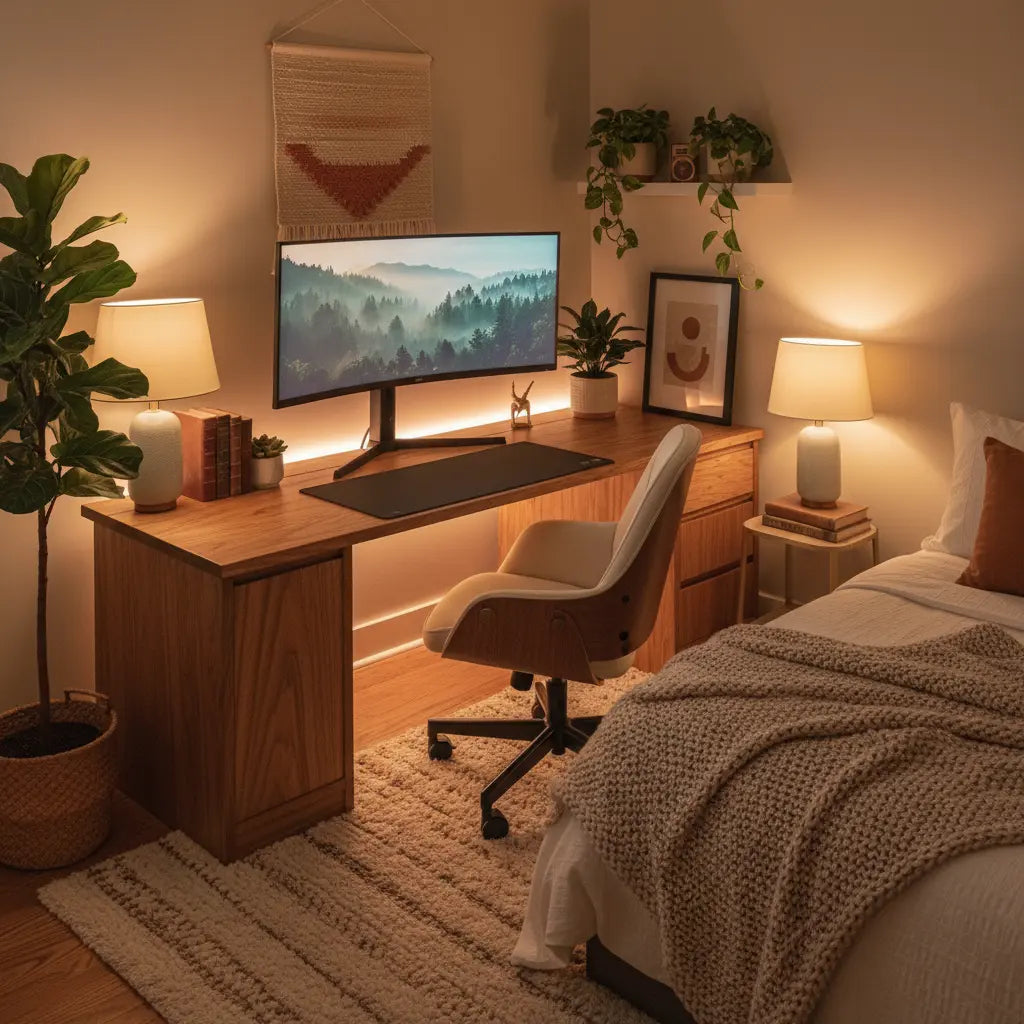
The shift from harsh neon-filled gaming rooms to warm, inviting setups with wood tones and soft lighting is more than a trend—it's a practical way to make your gaming space feel like a natural part of your home. For many in small apartments or multipurpose rooms, the key is choosing compact furniture, layered warm lighting that minimizes glare, and restrained decor so the desk supports both focused work and relaxed evening play without creating visual chaos or eye strain.

This approach works especially well when the setup prioritizes ergonomics and room flow first, then layers in cozy elements that complement existing furniture rather than compete with it. The result is a space that looks curated and comfortable in person and on camera, without the maintenance headaches common in overly decorative builds.
Why Cozy Gaming Setups Appeal in 2026
Cozy gaming blends high-performance gear with softer home aesthetics, moving away from the aggressive black-and-neon stereotype. Warm wood tones and adjustable lighting help the desk integrate into bedrooms or living areas, making the room feel more inviting for daily use. This matters for remote workers, students, and content creators who share the same surface for productivity and play.
The aesthetic draws on dopamine decor principles—thoughtful personal touches that spark joy—while avoiding clutter. According to design resources, ambient lighting forms the foundational layer that gives rooms a warm, inviting feel, which pairs naturally with wood finishes for a lived-in yet functional look.
However, success depends on realistic planning. In small rooms, every added lamp, shelf item, or light strip increases the risk of visual busyness. Prioritizing function helps ensure the setup remains practical long after the initial setup photos.
Understanding the Core Elements of a Cozy Gaming Desk
A successful cozy gaming setup rests on four pillars: desk choice, lighting strategy, material finishes, and controlled decor. Wood tones—ranging from light oak to medium walnut—bring natural warmth that softens the tech-heavy appearance of monitors and peripherals. These finishes integrate better with typical bedroom or living room furniture than stark black or carbon fiber surfaces.
Lighting shifts from bright RGB rainbow effects to softer, warmer options. Use 2700K–3500K bulbs or controllable LED strips for ambient layers, combined with targeted task lights. This creates depth without the harsh contrasts that cause discomfort during long sessions.
Storage and cable management become non-negotiable. Floating shelves, under-desk trays, and built-in hooks keep surfaces clear, preventing the cluttered look that undermines the cozy goal. For multipurpose desks, choose designs with monitor stands and adjustable elements that support neutral posture.
This official home office ergonomics guide emphasizes fitting the monitor, keyboard, chair, and accessories to the user to reduce strain, a principle that applies equally to gaming and work setups. Similarly, workplace lighting recommendations stress minimizing glare and shadows to support visual comfort and reduce eye fatigue.
Scenario-Based Choices: When the Best Setup Flips
The right cozy configuration changes based on your room and primary use. A one-size-fits-all mood board often fails in real apartments where the desk must support work by day and gaming by night.
In small bedrooms or studio spaces, compact straight desks with light-to-medium wood tones and primarily indirect warm lighting tend to perform best. They preserve floor space and minimize visual noise, allowing the room to reset quickly for sleep or other activities. L-shaped designs can overwhelm narrow layouts or shared pathways.
For dedicated gaming nooks with more square footage, richer wood tones and moderate layered lighting—including subtle warm RGB accents—add personality without dominating. Content creators often benefit from controllable, glare-free lighting and cleaner backdrops, favoring neutral woods and minimal surface decor that photographs well.
Scenario Fit Guide (modeled for comparison)
Scenario Fit Guide (modeled for comparison)
Scenario Fit Guide (modeled for comparison)
View chart data
| Series | Compact Desk / Small-Space Fit | Wood Tone Intensity | Layered Lighting | Warmth / Control | Decor Simplicity |
|---|---|---|---|---|---|
| Small Bedroom / Multipurpose | 5.0 | 3.0 | 4.0 | 4.0 | 2.0 |
| Dedicated Gaming Nook | 3.0 | 5.0 | 4.0 | 4.0 | 4.0 |
| Content Creator Setup | 4.0 | 4.0 | 5.0 | 5.0 | 1.0 |
Modeled comparison built from scenario_matrix + reverse_recommendation guidance and practical pattern evidence (small-space fit, glare control, layered warm lighting, neutral vs richer wood tones). Scores are heuristic and intended for planning, not measurement.
These modeled scores reflect practical patterns: higher numbers indicate better relative fit for that scenario. Treat them as a starting map rather than strict rules, as actual room dimensions and personal tolerance for visual elements will influence outcomes.

Choosing Warm Lighting That Supports Comfort
Warm lighting transforms a gaming desk from a cold workstation into a retreat, but placement and control determine whether it enhances or undermines the experience. Ambient layers from lamps and indirect strips create the inviting glow, while task lighting ensures the screen area stays usable.
Avoid placing any light source that reflects directly in your monitor or shines into your eyes. Canadian Centre for Occupational Health and Safety guidance highlights that good task lighting reduces glare and eye fatigue, making this a critical checkpoint before adding decorative elements.
Soft RGB or LED options in warm color temperatures (avoiding bright blues and purples) work well when synced subtly or used on timers. For small rooms, limit to one or two light sources total. Many users regret adding multiple RGB strips that become distracting during focused work or create maintenance hassles.
Consider these checkpoints when planning lighting:
- Can you adjust brightness and color temperature easily for day versus night use?
- Does any light cause reflections on the screen at your normal seating position?
- Is there enough ambient light to avoid harsh screen contrast?
- Can the setup be turned off or dimmed completely for sleep or non-gaming hours?
Our related guide on RGB vs. LED Lights for Gaming Setups explores performance differences, while How to Sync Your Desk RGB Lighting with Your Gaming PC covers practical integration for 2026 hardware.
Incorporating Wood Tones and Materials for Seamless Integration
Wood-grain finishes or wood-accented desks help gaming furniture blend into home environments. Light to medium tones generally pair better with cozy aesthetics than very dark stains, which can make small rooms feel smaller.
Look for engineered wood options that meet current safety standards for low emissions. When selecting, match the tone to your existing floor, shelving, or nearby furniture rather than choosing in isolation. Textured or matte finishes resist fingerprints better than glossy surfaces in daily use.
For small rooms, prioritize desks with built-in storage or reversible designs that adapt to corner or wall placement. Our collection of L-shaped desks includes several models with power outlets and lighting that support multipurpose needs, while warm modern desk setup ideas show Japandi-inspired combinations of wood and smart lighting.
Creating Dopamine Decor Without Clutter
Dopamine decor focuses on personal items that bring joy—plants, books, small artwork, or meaningful objects—but the line between curated and cluttered is thin in limited space. The goal is visual interest that supports the warm aesthetic rather than competing with your gear.
Use vertical storage like floating shelves with integrated lighting to keep the desk surface clear. Limit decor to 3–5 intentional pieces per visible area. In shared or bedroom setups, choose items that can be quickly rearranged or stored.
Common pitfalls include overfilling shelves until cleaning becomes difficult or adding decor that blocks ergonomic monitor height. Our article on Dopamine Decor vs. Minimalist Tech Desk Aesthetics helps weigh these tradeoffs, and How to Build a Dopamine Desk Setup for Better Focus offers additional practical tips.
For apartment dwellers, explore small gaming desk ideas for studio apartments and dorms that emphasize vertical storage and multi-functional designs.
What to Check Before Buying or Building Your Setup
Before purchasing furniture or adding lighting and decor, run through this practical filter:
- Does the desk size and shape leave clear pathways in your room?
- Can your monitor and chair be positioned for neutral posture and to avoid light glare?
- Will the chosen wood tone complement rather than clash with your current interior?
- Is lighting controllable enough for both daytime work and evening gaming?
- Can the entire setup be tidied in under two minutes for multipurpose rooms?
- Have you accounted for cable management and power access?
If several answers are uncertain, simplify the decor layer and focus on core ergonomics and lighting first. This PennEHRS resource on selecting office furniture reinforces that fitting the layout to the room is essential for comfort in smaller spaces.
Popular options include compact L-shaped or straight desks with integrated power and subtle lighting. For example, models with warm LED options and storage shelves help maintain a clean look while providing functionality. Browse the Bestier LED Gaming Desk collection or All Desks to see versatile designs that support the cozy aesthetic.
Common Mistakes and How to Avoid Regret
Many users initially focus on the visual mood but later regret setups that create glare, demand constant cable tidying, or feel too busy for daily work. Warm lighting only feels cozy when it supports rather than fights with screen use. RGB that looks dramatic in photos can become visually noisy during actual gaming or productivity sessions.
Wood tones that mismatch existing furniture often lead to a disjointed room instead of seamless integration. Overloading with decor quickly turns a dopamine-inspired space into one that feels cluttered and harder to maintain.
The reverse recommendation is clear: screen out options that introduce direct screen glare, reduce usable desk space, or require frequent readjustment. In small or shared rooms, prioritize clean surfaces and controllable lighting over maximal decorative layering. If your space already feels full or you switch frequently between work and play, start minimal and add warmth gradually.
Bringing It All Together for Your Space
A cozy gaming setup with warm lighting and wood tones succeeds when it respects your room's constraints, supports healthy posture and visual comfort, and uses decor as an accent rather than the main feature. Begin with ergonomics and layout, select lighting that reduces rather than adds strain, choose wood finishes that harmonize with your home, and apply dopamine elements sparingly.
This balanced approach creates a space that feels relaxing for gaming while remaining professional enough for work or streaming. Test your configuration during both day and evening use, adjusting as needed. The most sustainable setups evolve with your habits rather than chasing a static aesthetic ideal.
Important Note on Comfort and Setup: This article discusses aesthetic preferences, lighting choices, and ergonomic considerations for workspace comfort. It does not constitute medical advice, diagnosis, or treatment. Lighting and decor choices may feel more comfortable in some setups but results vary by individual, room conditions, and device quality. If you experience persistent eye discomfort, headaches, or other symptoms, consult a qualified healthcare professional.
For more inspiration, see our guides on warm modern desk setups and explore modern style furniture or computer desks that align with these principles.
