





Summary
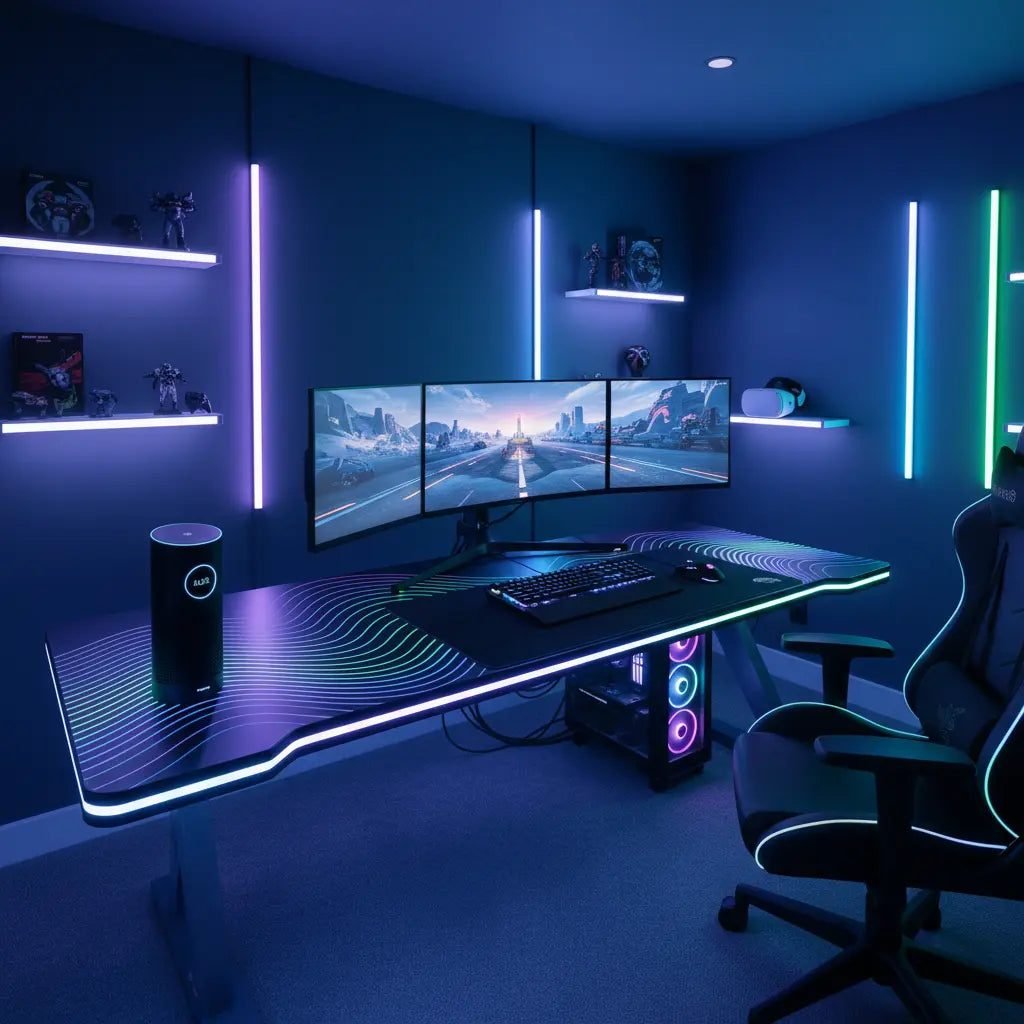
Building an automated battlestation in 2026 transcends basic LED strips, evolving into a sophisticated ecosystem where your gaming desk, PC peripherals, and smart home devices operate in a unified, voice-activated harmony. By integrating platforms like Razer Chroma, Alexa, and the Matter protocol, gamers can create "Dopamine Decor" environments that automatically trigger lighting scenes, optimize focus, and streamline technical workflows through deep hardware-software synchronization.
Cluster map
- Cozy Gaming Setup Ideas: Creating a Warm & Aesthetic Workspace
- Pink Gaming Setup Ideas: Aesthetic & Kawaii Desk Inspiration
Key takeaways
- Unified Ecosystems: Modern setups leverage the Matter protocol and cross-platform bridges to sync Bestier LED furniture with Razer Chroma, Govee, and Philips Hue.
- Automation Triggers: Advanced configurations use PC power states or game launches as triggers for complex smart home "scenes" that adjust lighting, temperature, and peripheral settings.
- Psychological Optimization: "Dopamine Decor" utilizes specific color frequencies and automated transitions to reduce eye strain and enhance cognitive focus during long sessions.
- Infrastructure First: High-performance battlestations require robust cable management and power distribution to handle the electrical load of extensive RGB arrays safely.
- Future-Proofing: Prioritizing Matter-compatible devices ensures your setup remains interoperable as smart home standards continue to evolve.
The Evolution of the Smart Gaming Environment
The concept of the "gaming room" has undergone a radical transformation. What once consisted of a simple desk and a few glowing fans has matured into the automated battlestation—a responsive environment that anticipates the user's needs. This shift is driven by the "Smart-Home Integration Pivot," where furniture is no longer a static object but a connected node in a digital ecosystem. When you sync desk RGB lighting with your gaming PC, you aren't just adding flair; you are establishing a visual feedback loop that can signal system health, in-game alerts, or even incoming notifications.
Strategic automation allows for "one-touch" or "voice-first" transitions. Imagine saying, "Alexa, start streaming," and watching as your 48-inch LED L-shaped gaming desk shifts to a cool 5000K white for face lighting, your room's ambient lights dim to a deep purple, and your PC launches OBS and your favorite title simultaneously. This level of integration is the hallmark of a benchmark setup in 2026.
Integrating Razer Chroma and Smart Home Ecosystems
The backbone of most high-end automated setups is the synchronization between gaming-specific software and general smart home platforms. Razer Chroma remains a dominant force, but its true power is unlocked when bridged with Alexa or Google Home. This allows your desk's lighting to react to in-game events—such as flashing red when health is low—while also participating in broader home automation routines.
To integrate your setup with Razer Chroma and Alexa, users typically employ a software bridge or a dedicated hardware controller. This connection enables the "Dopamine Decor" effect, where lighting is tuned to the user's circadian rhythm or specific task requirements. For instance, a "Focus Mode" might trigger a warm amber glow to reduce blue light exposure during late-night coding or strategy sessions.
Logic Summary: This recommendation assumes a PC-centric setup. For console-only users, integration relies more heavily on HDMI sync boxes (like Philips Hue Play) or camera-based systems (like Govee) that analyze screen pixels to command the desk's LEDs.
Multi-Platform Synchronization and the Matter Protocol
One of the biggest hurdles in 2026 remains the "walled garden" effect, where different brands refuse to talk to one another. However, the widespread adoption of the Matter protocol has begun to bridge these gaps. Matter provides a universal language for smart devices, allowing you to connect Bestier LED furniture to Govee and Philips Hue systems without needing five different mobile apps.
Comparison of Integration Methods
| Method | Complexity | Latency | Compatibility | Best For |
|---|---|---|---|---|
| Software Bridge (SignalRGB) | High | Low | Excellent | PC Enthusiasts |
| Matter Protocol | Medium | Very Low | Growing | Future-proofers |
| HDMI Sync Box | Low | Low | Limited to Video | Console Gamers |
| Cloud-to-Cloud (Alexa) | Low | High | High | Casual Users |

Advanced Cable Management for Complex Tech Stacks
As the number of connected devices grows, so does the complexity of the wiring. An automated battlestation can easily involve 20+ power and data cables. Without a strategy, this "cable spaghetti" creates electrical interference and a significant fire hazard. Advanced setups now utilize integrated power distribution units (PDUs) mounted under the desk surface, providing clean power and surge protection for sensitive electronics.
Effective management involves more than just zip ties. It requires a tiered approach:
- Power Tier: Heavy-gauge cables kept separate from data lines to prevent EMI (Electromagnetic Interference).
- Data Tier: High-speed USB and DisplayPort cables routed through dedicated trays.
- RGB Tier: Low-voltage LED extensions and controllers tucked into hidden channels.
For those building on a budget, exploring 5 cable management hacks for LED gaming desks can provide immediate relief from clutter. Beyond aesthetics, proper airflow around power bricks is essential for longevity.
Safety and Material Standards in the Smart Home
When filling a room with high-powered electronics and automated furniture, the safety of the materials themselves becomes a critical factor. Heat generated by extensive LED arrays and PC exhausts can accelerate the off-gassing of volatile organic compounds (VOCs) in low-quality furniture. It is vital to ensure your desk meets modern environmental standards.
For a deep dive into how these standards protect your indoor air quality, you should learn about engineered wood safety standards, specifically CARB Phase 2 and EPA TSCA Title VI compliance. This is especially important in the "sealed" environments of many gaming rooms where ventilation might be secondary to light control.

Troubleshooting Common Sync Issues
Even in 2026, "sync drift"—where different lights fall out of step—remains a common frustration. This is often caused by network congestion or software conflicts between competing RGB controllers (e.g., trying to run Razer Synapse and Corsair iCUE simultaneously).
Troubleshooting Checklist:
- Check Firmware: Ensure all smart controllers and bridges are on the latest Matter-certified firmware.
- Isolate 2.4GHz Traffic: Many smart devices use the 2.4GHz band; move your PC and consoles to 5GHz or 6GHz (Wi-Fi 6E/7) to reduce interference.
- Software Hierarchy: Use a "Master" controller like SignalRGB or OpenRGB to prevent multiple drivers from fighting over the same hardware.
- Power Injection: For LED strips longer than 5 meters, use a power injector to prevent color dimming or flickering at the end of the run.
Cluster map
To help you navigate the complexities of a connected gaming lifestyle, we have curated a selection of deep-dive guides:
| Topic | Focus Area | Reading Path |
|---|---|---|
| Platform Sync | Syncing Bestier with Razer Chroma & Alexa | Technical Setup |
| Cable Management | 5 Cable Management Hacks for LED Gaming Desks | Infrastructure |
| Psychology | How to Build a Dopamine Desk Setup for Better Focus | Aesthetic Design |
| Safety | Engineered Wood Safety: CARB & TSCA Guide | Health & Compliance |
| Theme Ideas | Cyberpunk Gaming Room Ideas: Neon & LED Guide | Creative Inspiration |
FAQ
How do I sync my Bestier LED desk with Alexa? To sync your desk with Alexa, you first need to ensure your desk uses a compatible Wi-Fi or Zigbee controller. Most Bestier smart models connect via the Tuya or Smart Life app, which can then be linked as a "Skill" within the Alexa app. Once linked, you can include your desk in "Routines," allowing it to change colors or turn on based on voice commands or time-of-day triggers.
Can I control my desk RGB through my PC software? Yes, this is possible through two main methods: using a physical USB-to-RGB adapter that connects the desk's LED strip to a motherboard header, or using software bridges like SignalRGB. These programs can detect smart lights on your network and sync them with your PC's internal components, creating a seamless glow across your entire setup.
What is the Matter protocol, and why does it matter for gaming? Matter is a universal smart home standard backed by Apple, Google, Amazon, and Samsung. For gamers, it means that a "Matter-certified" LED desk will work natively with almost any smart home hub without needing proprietary bridges. This reduces latency and ensures that your furniture remains compatible even if you switch from an Alexa-based home to a Google Home-based one.
Is it safe to leave RGB lights on all night? While modern LEDs are highly efficient and produce very little heat, it is generally recommended to use automation to turn them off when not in use. This extends the lifespan of the LED chips and prevents unnecessary electricity consumption. If you use them for ambient night lighting, ensure they are set to a low brightness (under 10%) and a warm color to avoid disrupting your sleep cycle.
How do I prevent my LED strips from peeling off the desk? The most common cause of peeling is poor surface preparation. Before applying the adhesive, clean the underside of the desk with 70% isopropyl alcohol to remove any oils or dust. For long-term durability in 2026, many enthusiasts now use small plastic mounting clips or aluminum channels which provide a more secure mechanical hold than adhesive alone.
Does a smart setup use a lot of electricity? A typical RGB setup with a desk strip, several smart bulbs, and peripherals uses roughly 30-60 watts when active—similar to a single old-fashioned incandescent light bulb. However, leaving these devices in "standby" mode (waiting for a voice command) does consume a small amount of "vampire" power. Using a smart power strip to completely cut power to non-essential components at night can help mitigate this.
References
Government / Standards / Regulators
- EPA: Technical Overview of the Formaldehyde Emission Standards for Composite Wood Products
- California Air Resources Board (CARB): Composite Wood Products ATCM
- UL Solutions: UL 153 Standard for Portable Electric Luminaires
Platform official docs & policies
- Connectivity Standards Alliance (CSA): Matter Protocol Specifications
- Razer: Chroma Workshop - Integration Documentation
- Amazon Alexa: Smart Home Skill API Documentation
Industry associations / research institutes
- International Commission on Illumination (CIE): Research on Blue Light and Circadian Rhythms
- IEEE: Standard for Ethernet (Power over Ethernet considerations)
Community
- r/Battlestations: Community Trends and Setup Troubleshooting (Intent only; not authoritative)
- SignalRGB: Supported Devices and Integration Forums (Intent only; not authoritative)
